
MCP server · Finance and crypto
kya labs MCP server
by payclaw
Lets your AI shop online by proving it is an authorized agent and paying with a one-time virtual Visa you approve.
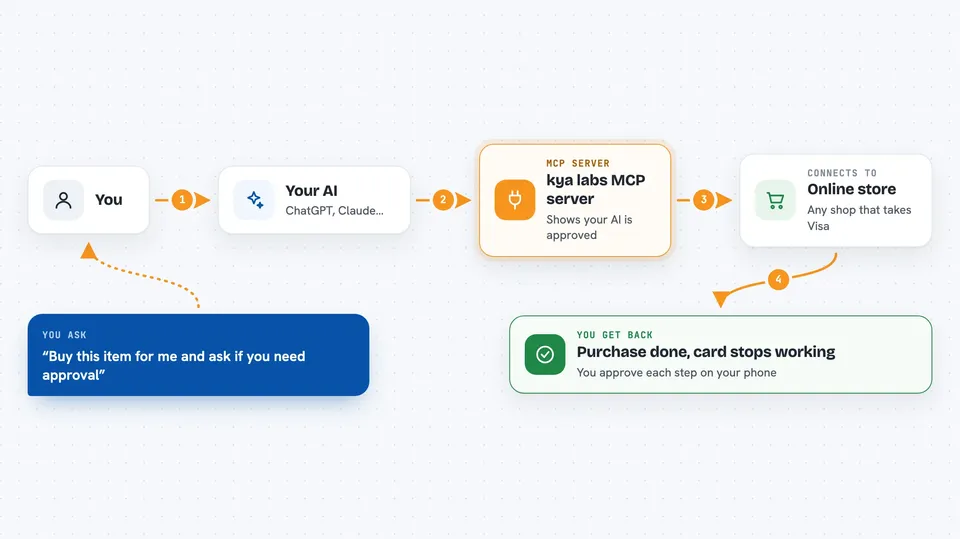
This is a helper for your AI assistant that deals with two annoying problems when it tries to shop online for you: websites treat it like a bot and block it, and it has no way to pay. kya labs gives your AI a kind of ID badge to show merchants, and when it is time to pay, it can get a one-time virtual Visa card that you approve first. It is handy for anyone who wants their AI to browse, add to cart, or check out at online stores without handing over a real card number.
What is an MCP server? The 30-second version
On its own, your AI can only chat with you. An MCP server is a small helper program that gives your AI a new skill or a connection to an app or service. This one connects your AI to kya labs, a service that gives AI agents an identity badge and a way to pay online. Once it is connected, your AI can show that badge to shops and, when you approve, get a single-use virtual card to pay with.
What this MCP server does
You ask your AI to buy something or check out at a store. Your AI uses this helper to announce itself to the merchant as an authorized agent, and the helper gives back a token plus a hint about what to do next. If the store needs stronger proof, you approve on your phone. When it is time to pay, your AI asks for a virtual card, you approve with a tap, and the helper issues a one-time Visa locked to that merchant. After checkout, the card stops working and the whole thing is logged.
 Click to zoom
What you can do with it
- Show a merchant that your AI is an authorized agent, not a bot
- Report back whether a merchant accepted or rejected the badge
- Request a single-use virtual Visa for a specific purchase
- Approve each purchase yourself with a tap before any card is issued
- Track which merchants are blocking or accepting your AI
- Close out the record after a purchase is done
Try asking your AI
- “Check out this cart at this store and let me know if you need my approval”
- “This site is blocking you. Try presenting your kya badge and tell me what happens”
- “I want to buy this item for 45 dollars. Get me a card and wait for my approval”
- “Report back whether that merchant accepted your badge or not”
What it gives back to you
You get short answers in the chat: whether the merchant accepted your AI's badge, a link or code to approve on your phone when needed, and a virtual card number when you approve a purchase. After checkout, your AI reports the outcome and you can see a record of what happened in your kya dashboard. It also tells your AI what the next step should be.
Before you start
What you need
- Node.js 20 or newer installed on your computer
- An MCP client like Claude Desktop or Cursor
- An API key from kyalabs.io for verified identity and virtual cards (a kind of password for apps; you get one when you sign up, and it does not expire)
Good to know
This can spend real money when you approve a purchase, so read the amount and merchant carefully before you tap approve.
Install it with your AI
Add kya labs MCP server to your AI, no technical skills needed
You don't install anything by hand. You copy one prompt, paste it into an AI that can work on your computer, and it checks, installs and connects the server for you, asking you when it needs something.
Sign in to get the install prompt
Members get a ready-made prompt that lets the Claude desktop app check kya labs MCP server, install it and connect it for them, step by step. You don't need any technical skills: you copy, paste and answer a few questions. Your connected AI can also find and install any of the 4,609 MCP servers here for you.
Who it's for
People who want their AI to shop or check out online for them, and who care about not handing over a real card number.



