MCP server · Finance and crypto
NostrPulse MCP server
by PHONGUIT22
Lets your AI check how trustworthy an online identity is and send small crypto payments on your behalf.
NostrPulse is a helper program that connects your AI assistant to a system built for paying and trusting other online accounts, including other AI agents. It is meant for people exploring crypto payments and reputation checks between machines, not for everyday office tasks. If you are curious about how AI agents could pay each other small amounts safely, this is a peek into that world.
What is an MCP server? The 30-second version
On its own, your AI can only chat with you. An MCP server is a small helper program you add once, and it gives your AI a new skill or a connection to another service. This one connects your AI to NostrPulse, a network for checking trust scores and sending tiny crypto payments. Once it is set up, you can just ask your AI to do those things and it will use this helper behind the scenes.
What this MCP server does
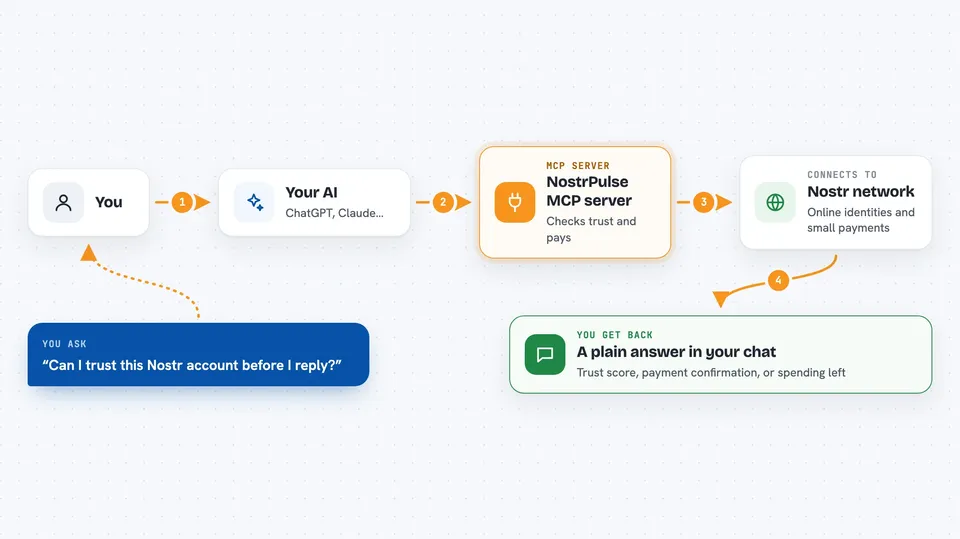
You ask your AI something like whether a certain online account can be trusted, or to send a small payment. Your AI passes that request to the NostrPulse helper running on your computer. The helper then talks to the Nostr network, checks reputation signals, or moves a small amount of digital cash. The result comes back to your AI, which explains it to you in the chat. There is also a spending limit built in so payments do not run away.
 Click to zoom
What you can do with it
- Check the trust score of an online identity before dealing with it
- Send a small digital cash payment to another account
- Pay a Lightning invoice through a connected wallet
- Send a computing task to a decentralized worker network
- Check whether a digital cash issuer is risky
- See how much your AI has spent in the last 24 hours
- Look up your AI agent's own public identity
Try asking your AI
- “Check the trust score for this Nostr account before I reply to them”
- “Send a small nutzap payment to that creator”
- “How much has my agent spent in the last day, and what is left?”
- “Audit this Cashu mint and tell me if it looks risky”
What it gives back to you
You get back plain answers in the chat: a trust score with a short explanation, a confirmation that a payment went through or failed, a spending summary, or a risk rating for a digital cash issuer. Some results include numbers like points, satoshis spent, or remaining allowance. Everything shows up as text you can read, not as files.
Before you start
What you need
- Node.js installed on your computer (the free program that runs npx commands)
- The Claude desktop app or the Cursor editor, set up to use MCP servers
- A Cashu wallet or a Lightning wallet connection if you want to send payments
Good to know
This server can move real money in crypto form, so set your spending limits carefully and only connect wallets you are willing to use for small payments.
Install it with your AI
Add NostrPulse MCP server to your AI, no technical skills needed
You don't install anything by hand. You copy one prompt, paste it into an AI that can work on your computer, and it checks, installs and connects the server for you, asking you when it needs something.
Sign in to get the install prompt
Members get a ready-made prompt that lets the Claude desktop app check NostrPulse MCP server, install it and connect it for them, step by step. You don't need any technical skills: you copy, paste and answer a few questions. Your connected AI can also find and install any of the 4,609 MCP servers here for you.
Who it's for
People curious about crypto, AI agents, and decentralized payments, especially developers and tinkerers exploring agent-to-agent commerce.