
MCP server · Developer tools
PhpCodeArcheology MCP server
Let your AI inspect your PHP project's code quality, hotspots, and test coverage for you.
PhpCodeArcheology is a tool that studies a PHP codebase and reports on its quality: how complex it is, where the messy spots are, and which parts have no tests. This MCP server is the bridge that lets your AI assistant read those findings and answer your questions about them. It is handy if you work on a PHP project and want plain answers about its health without digging through reports yourself.
What is an MCP server? The 30-second version
On its own, your AI can only chat. It cannot see your PHP project or run tools on it. An MCP server is a small helper program that gives your AI a new skill, here the ability to run PhpCodeArcheology's analysis and read its results. Once connected, you ask a question in plain words and the AI quietly uses this helper to look things up in your code.
What this MCP server does
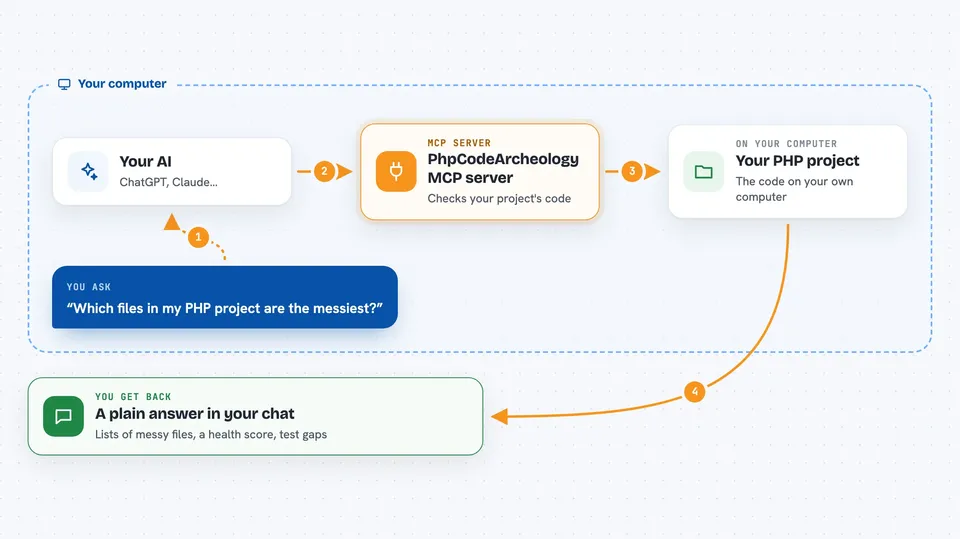
You ask your AI something like which files are the messiest or whether a class has tests. The AI passes that request to this MCP server. The server runs PhpCodeArcheology on your project, which measures things like complexity, coupling, and test coverage, and checks for problems such as God Classes or dead code. The results come back to the AI, which turns them into a normal answer for you.
 Click to zoom
What you can do with it
- Ask which files or classes are the most complex
- Find code hotspots that change often and are hard to maintain
- Check whether a class or method has tests
- List code problems like God Classes or dead code
- See the overall Health Score for your project
- Compare quality between two analysis runs
- Get a dependency or call graph for your code
Try asking your AI
- “Which files in my project have the highest complexity?”
- “Show me the untested classes that are also complex.”
- “What are the top refactoring priorities right now?”
- “Give me a quick health summary of my PHP project.”
What it gives back to you
You get answers in the chat, in normal sentences. Depending on what you ask, the AI can show lists of files or classes, problem counts, a Health Score number, coverage figures, or a short summary of the worst spots. It can also point you to the full HTML or JSON report if you want to look closer.
Before you start
What you need
- A PHP project on your computer
- PHP 8.2 or higher installed
- Composer installed
- The PhpCodeArcheology package added to your project
Good to know
It only reads and analyses your code, so it does not change or delete anything, but the analysis can take a while on large projects.
Install it with your AI
Add PhpCodeArcheology MCP server to your AI, no technical skills needed
You don't install anything by hand. You copy one prompt, paste it into an AI that can work on your computer, and it checks, installs and connects the server for you, asking you when it needs something.
Sign in to get the install prompt
Members get a ready-made prompt that lets the Claude desktop app check PhpCodeArcheology MCP server, install it and connect it for them, step by step. You don't need any technical skills: you copy, paste and answer a few questions. Your connected AI can also find and install any of the 4,609 MCP servers here for you.
Who it's for
PHP developers and tech leads who want quick, plain-language answers about their codebase's quality and test coverage.




