MCP server · Developer tools
EQVPS MCP server
by Poiuyhje
Let your AI rent and run a virtual server paid with crypto, from start to finish.

EQVPS is a hosting company that rents virtual servers, the kind of machine that runs a website or an app. This MCP server connects your AI assistant to EQVPS so it can look at plans, open an account, order a server and manage it for you. It is handy if you want a server without filling in long forms or using a credit card.
What is an MCP server? The 30-second version
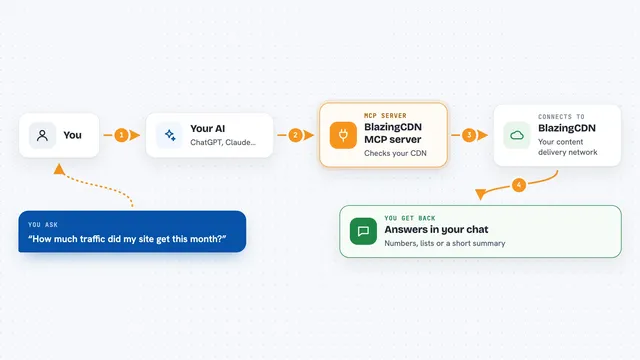
On its own, your AI can only chat. An MCP server is a small helper that gives your AI a new skill, in this case a connection to EQVPS. Once it is connected, your AI can ask EQVPS for plans, place orders and control your server when you ask it to. You do not install anything, because EQVPS runs this helper on its own website.
What this MCP server does
You tell your AI what you need, like a small server with Ubuntu. The AI talks to the EQVPS helper, which asks EQVPS for the list of plans and prices. You pick one, and the AI opens an account and creates a crypto payment link for you to pay. After the payment goes through, the AI orders the server and hands you the login details. Later you can ask the AI to restart it, change its name, or check how busy it is.
 Click to zoom
What you can do with it
- See available server plans, prices and operating systems
- Open an EQVPS account and get a login token
- Create a crypto payment link to add credit
- Order a new server and get its SSH access
- Start, stop or reboot your server
- Change the server name or root password
- Check CPU, memory, disk and network usage
- Cancel a server when you no longer need it
Try asking your AI
- “Show me the EQVPS plans and prices.”
- “Register an EQVPS account and create a 20 dollar top-up invoice.”
- “Order an Ubuntu 24.04 server and give me the SSH details.”
- “Restart my EQVPS server and show me its CPU usage for the last hour.”
What it gives back to you
You get answers in the chat: a list of plans with prices, a payment link, the status of your server, and its SSH login details. When you ask for metrics, you get numbers for CPU, memory, disk and network over time. When you ask for a change, like a reboot or a new password, the AI confirms what it did.
Before you start
What you need
- An MCP client that can connect to a remote server, like the Claude desktop app or Claude Code
- A crypto wallet with USDC, USDT, BTC or another supported coin to pay for the server
- A prepaid balance on EQVPS, which you add by paying a crypto invoice
Good to know
Some actions are destructive: reinstalling wipes the server, and cancelling immediately destroys it and its data, so check before you confirm. Ordering and topping up spend real crypto from your balance.
Install it with your AI
Add EQVPS MCP server to your AI, no technical skills needed
You don't install anything by hand. You copy one prompt, paste it into an AI that can work on your computer, and it checks, installs and connects the server for you, asking you when it needs something.
Sign in to get the install prompt
Members get a ready-made prompt that lets the Claude desktop app check EQVPS MCP server, install it and connect it for them, step by step. You don't need any technical skills: you copy, paste and answer a few questions. Your connected AI can also find and install any of the 4,066 MCP servers here for you.
Who it's for
People who want a server for a small project and prefer to pay with crypto, and who like doing it by chatting with an AI instead of clicking through a website.