MCP server · Chat
CustomGPT.ai MCP server
Let your AI chat with your CustomGPT agents, list them, and check their stats and pages.
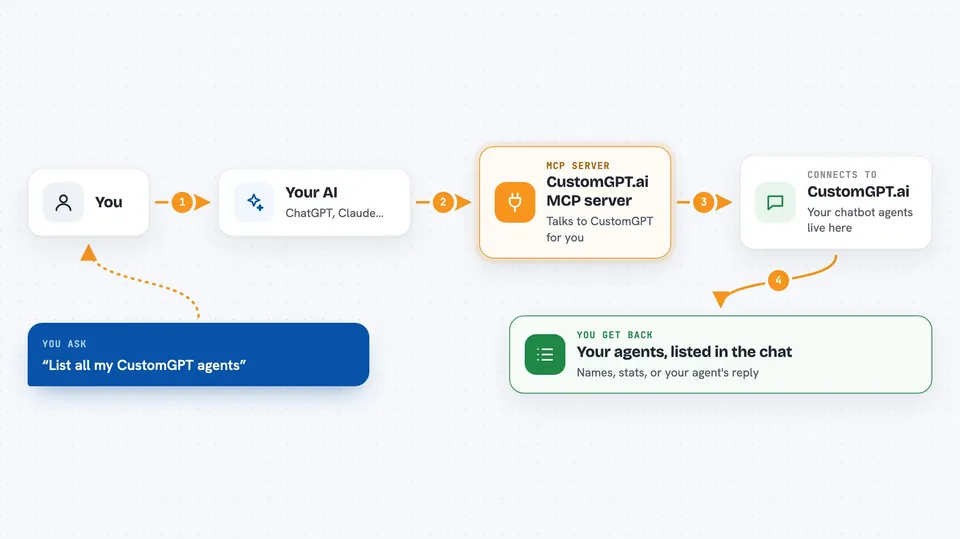
This is a small helper that connects your AI assistant to CustomGPT.ai, a service that builds chatbots from your own documents and websites. Once it is set up, you can ask your AI to talk to your CustomGPT agents, list them, or check how they are doing, all from the same chat window. It is handy if you already use CustomGPT and want to reach it without switching tabs.
What is an MCP server? The 30-second version
On its own, your AI can only chat with you. An MCP server is a small helper program that gives your AI a new skill or a connection to another app. This one connects your AI to CustomGPT.ai, so it can look up your agents and send messages to them when you ask. Think of it as a bridge between your chat window and your CustomGPT account.
What this MCP server does
You ask your AI something about your CustomGPT agents, like listing them or sending a message. Your AI passes that request to this helper. The helper talks to CustomGPT.ai using your API key, which is like a password for your account. CustomGPT sends back the answer, and the helper hands it to your AI, which shows it to you in the chat. You never have to open the CustomGPT website yourself.
 Click to zoom
What you can do with it
- List all your CustomGPT agents
- Send a message to one of your agents and read the reply
- Create a new agent from a sitemap or files
- Check an agent's stats, like page counts and conversations
- Browse the conversation history for an agent
- See which pages an agent has crawled and indexed
- Look up CustomGPT API documentation from inside the chat
Try asking your AI
- “List all my CustomGPT agents”
- “Send this question to my support agent: what are your opening hours?”
- “Show me the stats for my product help agent”
- “Which pages has my agent finished indexing?”
What it gives back to you
You get back plain answers in the chat: lists of agents with their names and IDs, stats like page counts and conversation numbers, or the reply your agent wrote to your message. If you ask for pages or conversations, you get a list you can read. Nothing is changed unless you ask it to create an agent.
Before you start
What you need
- A CustomGPT.ai account
- A CustomGPT.ai API key from your dashboard (a kind of password for apps)
- Python 3.10 or newer if you run it yourself
- An MCP-compatible client like Claude Code or Claude Web
Good to know
It can create new agents and send messages on your behalf, so check what your AI is about to do before you say yes.
Install it with your AI
Add CustomGPT.ai MCP server to your AI, no technical skills needed
You don't install anything by hand. You copy one prompt, paste it into an AI that can work on your computer, and it checks, installs and connects the server for you, asking you when it needs something.
Sign in to get the install prompt
Members get a ready-made prompt that lets the Claude desktop app check CustomGPT.ai MCP server, install it and connect it for them, step by step. You don't need any technical skills: you copy, paste and answer a few questions. Your connected AI can also find and install any of the 4,361 MCP servers here for you.
Who it's for
People who already use CustomGPT.ai for their chatbots and want to reach them from their AI assistant without switching apps.