MCP server · Research
Scholar RAG MCP server
Turn a folder of academic PDFs into a searchable knowledge base your AI can read and quote from.

This is a helper that lets your AI read a folder of research papers and answer questions about them. You point it at your PDFs, and it builds a small searchable library on your own computer. It is handy for students, researchers and anyone who has to dig through lots of papers.
What is an MCP server? The 30-second version
On its own, your AI can only chat with you using what it already knows. An MCP server is a small helper program that gives your AI a new skill or a connection to something else. This one connects your AI to a collection of academic PDFs stored on your machine. Once it is set up, your AI can look things up in those papers and read them for you when you ask.
What this MCP server does
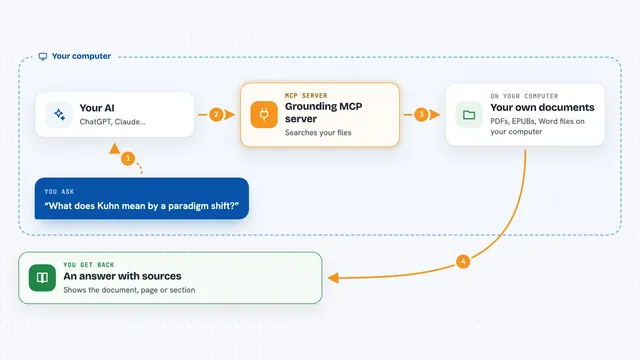
You give it a folder full of PDF papers. The helper reads each PDF, pulls out the title, authors and other details, and splits the text into small pieces. It saves all of that into a local search library. Later, when you ask your AI a question, the AI searches those pieces and hands you back the most relevant passages, with the paper and section they came from.
 Click to zoom
What you can do with it
- Build a searchable knowledge base from a folder of PDFs
- Add or remove a single paper from an existing knowledge base
- Search across all your papers for a topic or phrase
- Read a paper section by section without flooding the chat
- Browse the list of papers in a knowledge base
- Look up papers by title, author, journal or year
- Check on the progress of a long import job
Try asking your AI
- “Create a knowledge base from the papers in my Research folder”
- “Search my papers for studies about sleep and memory”
- “Show me the abstract and section outline of the paper on transformer models”
- “Read me the methods section of that paper”
- “Which papers in my library are from 2023?”
What it gives back to you
You get back answers in plain chat text. Searches return a ranked list of matching passages with the paper title, section and a short snippet. Document lookups return the metadata, abstract and a section outline. Reading a paper returns the text page by page, so it stays manageable in the chat.
Before you start
What you need
- A folder of PDF papers on your computer
- The uv tool installed (the README shows the one-line command)
- Access to three small AI model services for chat, embeddings and reranking, either running locally or through an OpenAI-compatible server
- About 3.2 GB of free space for the PDF reader models, downloaded on first use
Good to know
It can delete a whole knowledge base or a single paper, so check before confirming, and it reads the PDFs you point it at, so keep private files out of that folder.
Install it with your AI
Add Scholar RAG MCP server to your AI, no technical skills needed
You don't install anything by hand. You copy one prompt, paste it into an AI that can work on your computer, and it checks, installs and connects the server for you, asking you when it needs something.
Sign in to get the install prompt
Members get a ready-made prompt that lets the Claude desktop app check Scholar RAG MCP server, install it and connect it for them, step by step. You don't need any technical skills: you copy, paste and answer a few questions. Your connected AI can also find and install any of the 4,361 MCP servers here for you.
Who it's for
Students, researchers and analysts who work with many academic PDFs and want their AI to help them search and read them.