
MCP server · Finance and crypto
SwapTitan swap MCP server
by polsolbridge
Ask your AI for crypto swap quotes and routes, and get back transactions you sign yourself.
This is a helper that lets your AI look up crypto prices, compare swap routes, and build swap transactions on Solana and several other chains. It is handy if you already trade crypto and want to ask questions in plain words instead of clicking around websites. Nothing moves until you sign with your own wallet.
What is an MCP server? The 30-second version
On its own, your AI can only chat. An MCP server is a small helper program that gives your AI a new skill or a connection to a service. This one connects your AI to SwapTitan, a swap service for Solana and other blockchains. Once it is connected, you can ask your AI for prices or swap details and it will fetch them for you.
What this MCP server does
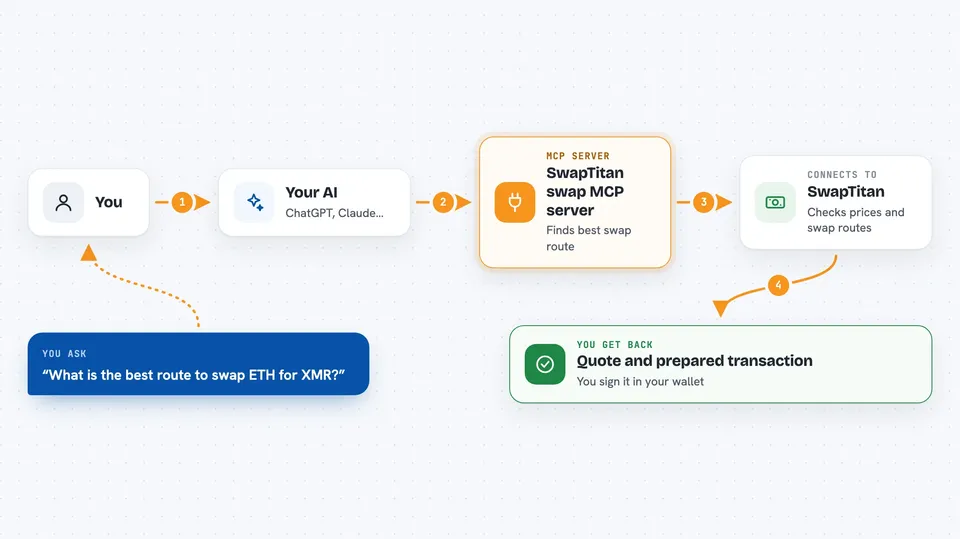
You ask your AI something like what is the best route to swap one coin for another. The AI sends that question to this helper. The helper talks to the SwapTitan service, which checks prices and swap routes across several chains. You get the answer back in the chat, and if you want to actually swap, it can prepare a transaction for your wallet to sign.
 Click to zoom
What you can do with it
- Get live prices for many coins and tokens
- Compare swap routes across Solana and several other chains
- Build an unsigned Solana swap transaction for your wallet
- Build an unsigned swap transaction for Ethereum, Base, BSC, Arbitrum, Polygon, Optimism or Avalanche
- Check current Solana priority fee levels before sending a transaction
- Run a basic rug check on a token
- Look up Hyperliquid perpetuals information
Try asking your AI
- “What is the price of Solana and USDC right now?”
- “Give me a quote to swap 0.1 SOL for USDC on Solana.”
- “What is the best route to swap ETH for XMR?”
- “What are the current Solana priority fees?”
What it gives back to you
You get answers in the chat: prices, quotes, route comparisons, fee levels, or a prepared transaction you can sign. For swaps, the transaction comes as a block of encoded data that your wallet app can read and sign. Nothing is sent or changed on the blockchain until you sign it yourself.
Before you start
What you need
- A crypto wallet you control, for signing transactions
- The Claude desktop app or another tool that supports MCP servers
- Internet access to reach the SwapTitan service
Good to know
This server prepares crypto transactions and can involve real money and fees, so always check the details in your wallet before you sign anything.
Install it with your AI
Add SwapTitan swap MCP server to your AI, no technical skills needed
You don't install anything by hand. You copy one prompt, paste it into an AI that can work on your computer, and it checks, installs and connects the server for you, asking you when it needs something.
Sign in to get the install prompt
Members get a ready-made prompt that lets the Claude desktop app check SwapTitan swap MCP server, install it and connect it for them, step by step. You don't need any technical skills: you copy, paste and answer a few questions. Your connected AI can also find and install any of the 4,609 MCP servers here for you.
Who it's for
People who already trade crypto and want a quick way to check prices, routes and fees by asking their AI.



