MCP server · Security
Feldspar Scan MCP server
Lets your AI run a security scan on a public code repository and read the findings back to you.
Feldspar Scan is a free security checker for code repositories. It looks for known-vulnerable dependencies, hard-coded secrets and a few risky configuration habits, and reports each problem as a file and line number. It is handy if you work with code and want a quick safety check before merging changes.
What is an MCP server? The 30-second version
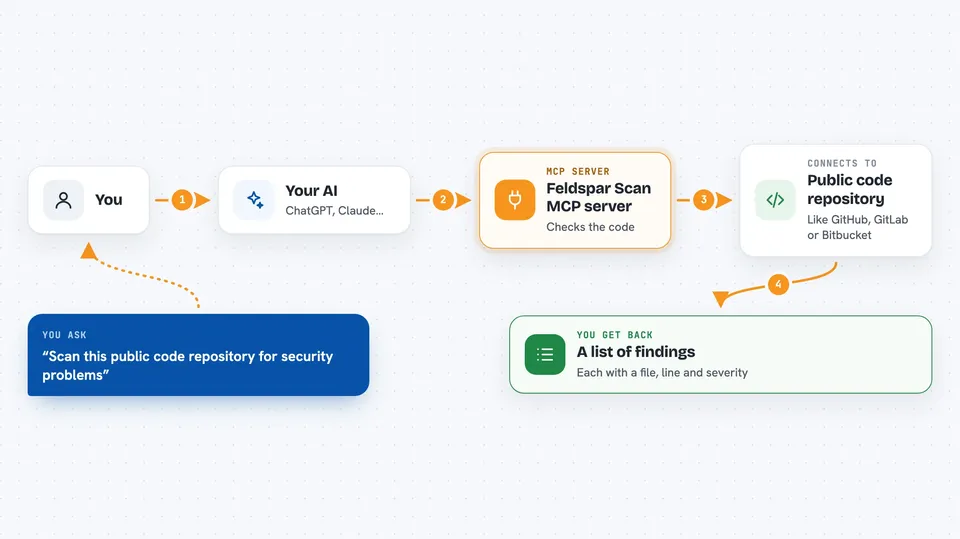
On its own, your AI can only chat with you. An MCP server is a small helper program that gives your AI a new skill or a connection to another service. This one connects your AI to the Feldspar Scan service, so when you ask about a repository, your AI can send it off to be scanned and bring the results back into the chat. You do not install anything yourself; the helper runs on the Feldspar side.
What this MCP server does
You ask your AI to check a public repository, for example on GitHub, GitLab, Codeberg or Bitbucket. Your AI passes the repository address to the Feldspar Scan helper. The helper fetches the code, checks the dependency files against the OSV vulnerability database, searches for patterns that look like secret keys, and runs a few configuration checks. It sends back a list of findings, each with a file, a line number and a severity, and your AI shows that to you in the chat.
 Click to zoom
What you can do with it
- Scan a public repository for known-vulnerable dependencies
- Find hard-coded secrets like API keys and passwords in the code
- Spot risky configuration such as a committed .env file or a Dockerfile that runs as root
- Get each problem as a file and line number so you can fix it
- See a severity label for every finding, from low to critical
- Ask about the paid, deeper audit tier and what it costs
Try asking your AI
- “Scan https://github.com/owner/repo and tell me the most serious findings”
- “Are there any hard-coded secrets in this repository?”
- “Which dependencies in this project have known vulnerabilities?”
- “What does the paid Feldspar audit include and how much is it?”
What it gives back to you
You get a list of findings in the chat, each one with a short id, a category, a severity, the file and line where it was found, and a short summary. There is also a small summary block with counts and the commit that was scanned. If something went wrong during the scan, a short errors note is included. Your AI can summarise the list for you or show it as it is.
Before you start
What you need
- Nothing to install, since the scan runs on the Feldspar hosted service
- The repository must be public and hosted on GitHub, GitLab, Codeberg or Bitbucket
- An AI tool that can connect to MCP servers, such as an MCP-capable editor or agent
Good to know
The hosted scan is limited to 5 scans per hour per IP address, and it only looks at the current files, not the git history, so secrets that were deleted in a later commit are missed.
Install it with your AI
Add Feldspar Scan MCP server to your AI, no technical skills needed
You don't install anything by hand. You copy one prompt, paste it into an AI that can work on your computer, and it checks, installs and connects the server for you, asking you when it needs something.
Sign in to get the install prompt
Members get a ready-made prompt that lets the Claude desktop app check Feldspar Scan MCP server, install it and connect it for them, step by step. You don't need any technical skills: you copy, paste and answer a few questions. Your connected AI can also find and install any of the 4,609 MCP servers here for you.
Who it's for
Developers, reviewers and anyone who wants a quick safety check on a public code repository before merging changes.