
MCP server · Finance and crypto
Pythia Oracle MCP server
Lets your AI look up crypto trading indicators like RSI, EMA and Bollinger Bands for tokens such as Bitcoin.
This is a helper that connects your AI to Pythia, a service that calculates crypto trading indicators and puts them on a blockchain. It is handy if you work with crypto data, trading tools or smart contracts and want quick answers about indicators without digging through websites. You do not need to be a programmer to ask your AI questions with it.
What is an MCP server? The 30-second version
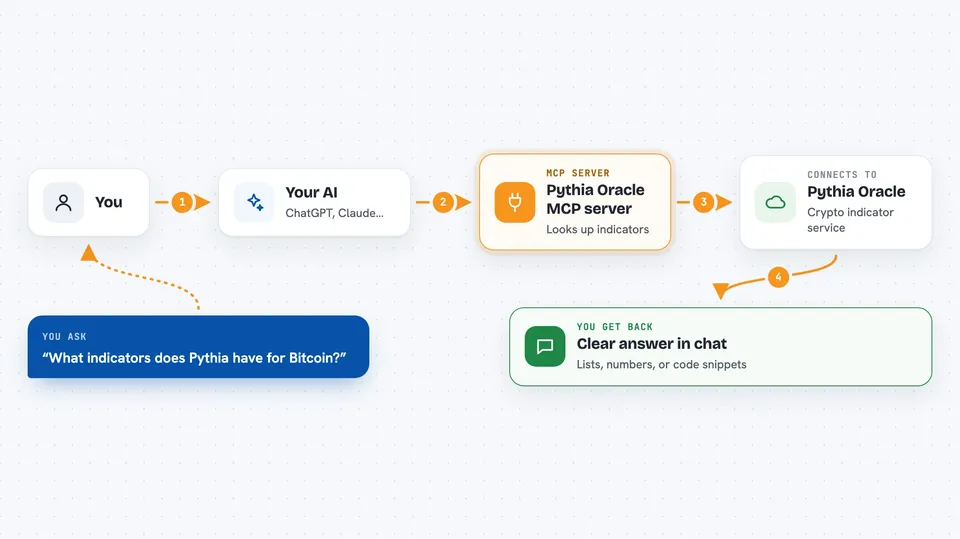
On its own, your AI can only chat with you using what it already learned. An MCP server is a small helper program that gives your AI a new skill or a connection to an outside service. This one connects your AI to Pythia, a crypto indicator service, so it can look up things like RSI or EMA values for a token when you ask. You just type a question, and the helper fetches the answer for you.
What this MCP server does
You ask your AI something like which indicators exist for Bitcoin. Your AI passes that question to this helper program. The helper talks to Pythia's live status feed and pulls back the matching information, such as indicator names, token lists, uptime numbers or pricing tiers. Your AI then shows you the answer in plain words in the chat. Some tools also give you ready-to-use code snippets for smart contracts if you need them.
 Click to zoom
What you can do with it
- List all crypto tokens Pythia tracks and whether they are working
- Show which indicators exist for a token like Bitcoin or Solana
- Check how reliable the service has been over the last 30 days
- Get the latest value of an indicator feed
- Look up pricing tiers and what each one costs in LINK
- Get example smart contract code for using Pythia
- Read past indicator history for a feed over a date range
Try asking your AI
- “What indicators does Pythia have for Bitcoin?”
- “Is Pythia reliable enough to integrate?”
- “What tokens does Pythia cover and are they all working?”
- “Show me recent BTC Visions that fired”
What it gives back to you
You get back clear text answers in the chat: lists of tokens, indicator names, uptime percentages, pricing details or code snippets. For history requests, you get per-day coverage plus a simple TRUE, FALSE or INSUFFICIENT_DATA verdict with links to the original files. Nothing is changed on your side; it is all read-only lookups.
Before you start
What you need
- Python installed on your computer
- The pythia-oracle-mcp package installed (pip install pythia-oracle-mcp)
- An MCP-compatible AI app such as Claude Desktop, Claude Code, Cursor or Windsurf
Good to know
It only reads information from Pythia, so it cannot change or delete anything, but crypto indicator data can be wrong or delayed, so do not treat it as financial advice.
Install it with your AI
Add Pythia Oracle MCP server to your AI, no technical skills needed
You don't install anything by hand. You copy one prompt, paste it into an AI that can work on your computer, and it checks, installs and connects the server for you, asking you when it needs something.
Sign in to get the install prompt
Members get a ready-made prompt that lets the Claude desktop app check Pythia Oracle MCP server, install it and connect it for them, step by step. You don't need any technical skills: you copy, paste and answer a few questions. Your connected AI can also find and install any of the 4,609 MCP servers here for you.
Who it's for
Crypto traders, DeFi developers and anyone curious about on-chain trading indicators who wants quick answers from their AI.



