
MCP server · Developer tools
GodotLens MCP server
Lets your AI ask Godot itself about your GDScript project: where things are used, what compiles, and what the game printed.
GodotLens is a helper that connects your AI assistant to the Godot game engine, so it can answer questions about your GDScript project using Godot's own knowledge instead of guessing from the text. It is handy if you write or edit scripts in Godot and want your AI to check real names, real signatures, and real errors before it changes anything.
What is an MCP server? The 30-second version
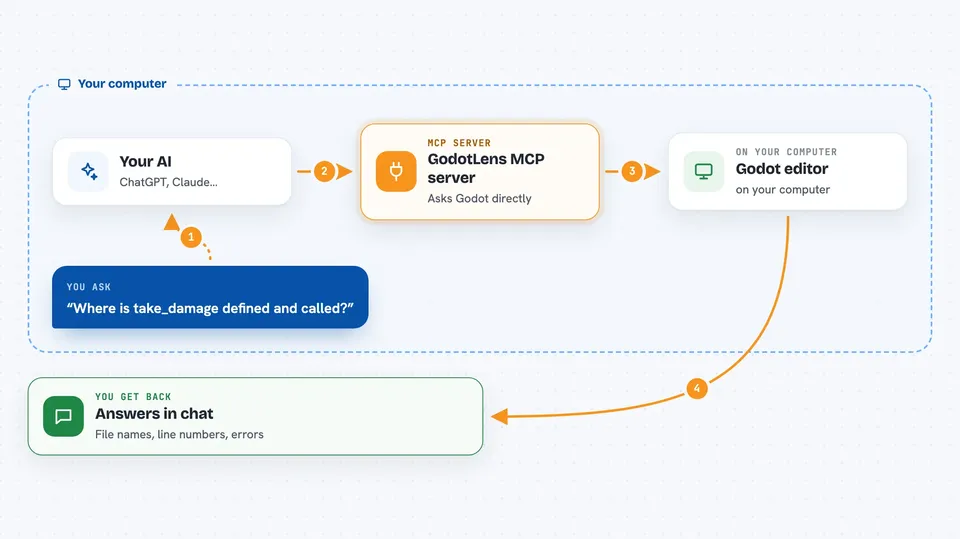
On its own, your AI can only chat. It cannot see your Godot project or run your game. An MCP server is a small helper program you connect once, and it gives your AI a new skill. Here, that skill is talking to Godot: your AI asks GodotLens a question, GodotLens asks the running Godot editor, and the answer comes back into your chat.
What this MCP server does
You ask your AI something about your project, like where a function is called or whether an edit is valid. Your AI passes the question to GodotLens. GodotLens talks to the Godot editor you have open, or runs the Godot program directly for scene and project questions. Godot's own answer comes back, and your AI explains it to you in the chat. If you ask it to run the game, GodotLens starts it and brings back what it printed.
 Click to zoom
What you can do with it
- Find where a function or variable is defined
- List every real place a symbol is used, ignoring comments
- Check whether an edit would compile before saving it
- Look up the exact signature of a Godot engine method
- Rename a symbol across your scripts
- Inspect a scene's node tree and signal connections
- Run the game and read what it printed
Try asking your AI
- “Where is take_damage defined and where is it called?”
- “Is this new function I wrote valid GDScript?”
- “What is the real signature of move_and_slide in my Godot version?”
- “Run the game and show me any errors it printed”
What it gives back to you
You get answers in the chat: file names with line numbers, lists of call sites, type information, and error or warning messages. When you run the game, you get back the console output, including print statements and runtime errors with their location. When it renames something, it tells you what it changed and warns you about places it could not update.
Before you start
What you need
- Godot 4.6 or newer, with your project open in the editor
- Python 3.10 or newer, or Node.js 16 or newer if you use npx
- The path to your Godot program, set in GODOT_BIN, for scene and project questions
Good to know
It can rename symbols and change files in your project, and it can start and stop your running game, so keep a backup or use version control.
Install it with your AI
Add GodotLens MCP server to your AI, no technical skills needed
You don't install anything by hand. You copy one prompt, paste it into an AI that can work on your computer, and it checks, installs and connects the server for you, asking you when it needs something.
Sign in to get the install prompt
Members get a ready-made prompt that lets the Claude desktop app check GodotLens MCP server, install it and connect it for them, step by step. You don't need any technical skills: you copy, paste and answer a few questions. Your connected AI can also find and install any of the 4,361 MCP servers here for you.
Who it's for
People making games in Godot who use an AI assistant to help write or fix GDScript and want it to check the real project instead of guessing.





