
MCP server · Developer tools
SharpLens MCP server
Lets your AI read, search, and safely refactor C# and .NET code with compiler-level accuracy.
SharpLens is a helper for people who work with C# and .NET code. It connects your AI assistant to the same code-understanding engine that Visual Studio uses, so the AI can answer questions about your code accurately instead of guessing. It is handy if you or your team maintain a .NET project and want help navigating, checking, or cleaning it up.
What is an MCP server? The 30-second version
On its own, your AI can only chat and read text. An MCP server is a small helper program that gives your AI a new skill or a connection to something else. This one connects your AI to your C# solution through Roslyn, the compiler engine behind .NET. Once it is running, your AI can look up symbols, find references, and make careful code changes when you ask.
What this MCP server does
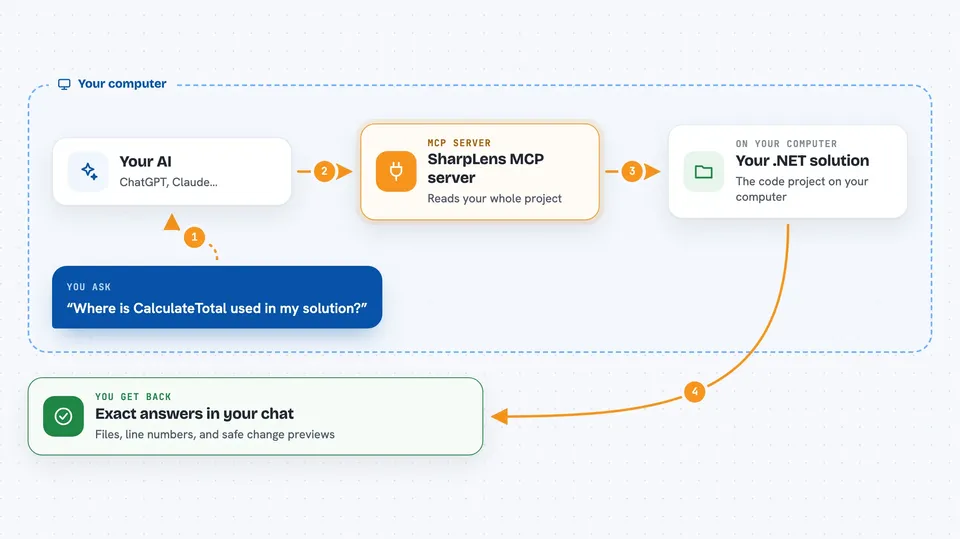
You point it at your .NET solution file, and it loads the whole project into memory. Then you ask your AI a question in plain words, like where a method is used or what breaks if you rename something. The AI calls the right SharpLens tool, the tool asks the Roslyn compiler engine, and you get a precise answer back in the chat. It can also suggest refactorings and show a preview before anything is changed. If you edit files outside of it, you ask it to sync so answers stay up to date.
 Click to zoom
What you can do with it
- Find every place a method, class, or property is used
- See who calls a method and what it calls in turn
- Rename a symbol safely across the whole solution
- Check your code for compiler errors and warnings
- Spot dead code, unused usings, and unused packages
- Measure complexity and find over-coupled classes
- Preview a refactoring before applying it
Try asking your AI
- “Load my solution and show me the project structure”
- “Where is the OrderService.CalculateTotal method used, and who calls it?”
- “Rename the class CustomerHelper to CustomerUtilities across the solution, but show me a preview first”
- “Which public methods in this project have no tests?”
What it gives back to you
You get answers in the chat: lists of files and line numbers, symbol details, call graphs, diagnostics, and complexity numbers. Refactoring tools can return a preview of the change so you can review it before applying. Some tools only compute changes and leave the actual editing to you or your AI. Everything comes back in a clear success or error format with suggestions for what to try next.
Before you start
What you need
- The .NET SDK installed on your computer
- A .NET solution file (.sln or .slnx) you want to analyze
- An MCP client such as Claude Code or another tool that supports MCP servers
Good to know
It can rename symbols and change code across your whole solution, so always review the preview before applying changes, and keep your work in version control.
Install it with your AI
Add SharpLens MCP server to your AI, no technical skills needed
You don't install anything by hand. You copy one prompt, paste it into an AI that can work on your computer, and it checks, installs and connects the server for you, asking you when it needs something.
Sign in to get the install prompt
Members get a ready-made prompt that lets the Claude desktop app check SharpLens MCP server, install it and connect it for them, step by step. You don't need any technical skills: you copy, paste and answer a few questions. Your connected AI can also find and install any of the 4,609 MCP servers here for you.
Who it's for
C# and .NET developers, and anyone who maintains a .NET codebase and wants an AI assistant that truly understands the code.




