
MCP server · Developer tools
k6 MCP server
by QAInsights
Let your AI run k6 load tests and report the results back to you in chat.
This is a small helper that connects your AI assistant to k6, a free tool for load testing websites and apps. Once it is set up, you can just ask your AI to run a test and it will start k6 for you. It is handy for people who test how well a site holds up under traffic but do not want to type k6 commands by hand.
What is an MCP server? The 30-second version
On its own, your AI can only chat. An MCP server is a small helper program that gives your AI a new skill or a connection to another tool. This one connects your AI to k6, the load testing tool, so the AI can start a test on your computer and show you what happened. You still need k6 installed, but the AI handles the running part for you.
What this MCP server does
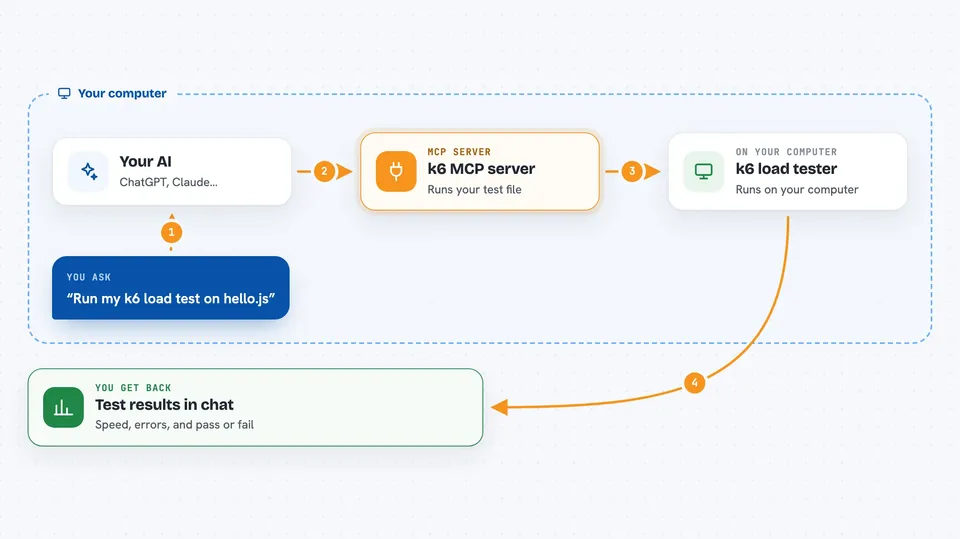
You write a k6 test script (a small file that says which page to hit and how often). You ask your AI to run that script. The AI passes your request to this MCP server, which starts k6 on your machine. k6 sends fake visitors to your site and measures how it responds. The server sends the live output back to your AI, and your AI shows it to you in the chat.
 Click to zoom
What you can do with it
- Run a k6 test with the default settings (30 seconds, 10 virtual users)
- Run a k6 test with your own duration and number of virtual users
- See the live output of a running test in the chat
- Ask your AI to explain or debug test results
- Try different load levels without typing k6 commands yourself
Try asking your AI
- “Run k6 test for hello.js”
- “Run my test.js with 50 virtual users for 2 minutes”
- “Start a k6 test on checkout.js with 20 VUs for 1 minute”
- “Run the load test in api-test.js and tell me if anything failed”
What it gives back to you
You get the output of the k6 run: numbers like requests per second, response times, and error counts, plus the pass or fail summary. Your AI can then explain those numbers in plain words or point out what looks wrong. Nothing is changed on your site; it only sends test traffic.
Before you start
What you need
- Python 3.12 or newer
- The k6 load testing tool installed on your computer
- The uv package manager
- A k6 test script file (for example test.js)
Good to know
This sends real traffic to whatever address is in your test script, so only point it at sites you own or have permission to test.
Install it with your AI
Add k6 MCP server to your AI, no technical skills needed
You don't install anything by hand. You copy one prompt, paste it into an AI that can work on your computer, and it checks, installs and connects the server for you, asking you when it needs something.
Sign in to get the install prompt
Members get a ready-made prompt that lets the Claude desktop app check k6 MCP server, install it and connect it for them, step by step. You don't need any technical skills: you copy, paste and answer a few questions. Your connected AI can also find and install any of the 4,609 MCP servers here for you.
Who it's for
QA engineers, developers, and anyone who checks how a website or app behaves under heavy traffic.




