
MCP server · Finance and crypto
OpenMM MCP server
by qbt-labs
Lets your AI check crypto prices, view balances, place trades and run grid strategies for you.
OpenMM is a helper that connects your AI assistant to crypto exchanges and Cardano trading pools. Once it is set up, you can ask your AI in normal words to look up prices, check your account, place an order or start a simple trading strategy. It is handy for people who follow crypto markets and want to do everyday tasks without clicking through exchange websites.
What is an MCP server? The 30-second version
On its own, your AI can only chat. An MCP server is a small helper program that gives your AI a new skill or a connection to an app or service. This one connects your AI to crypto exchanges like MEXC, Kraken and Coinbase, and to Cardano trading pools. So when you ask about a price or tell it to buy something, your AI can actually go and do it for you.
What this MCP server does
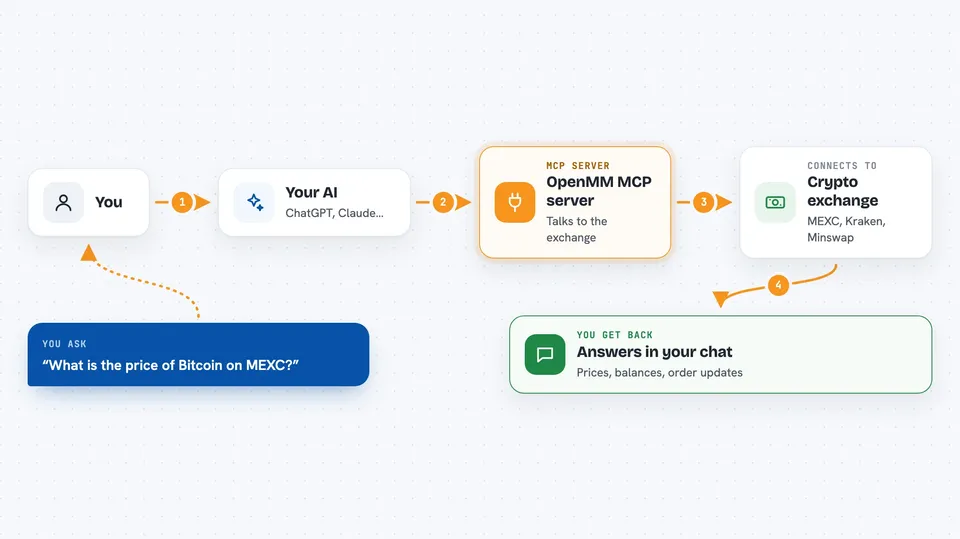
You ask your AI something in plain words, like the price of Bitcoin on MEXC. Your AI sends that request to this helper program, which talks to the exchange for you. The exchange sends back the numbers, and the helper passes them to your AI, which explains them to you in the chat. If you ask it to place an order or start a strategy, the helper sends that instruction to the exchange too, and tells you what happened. Your login details and wallet key are kept in a locked file on your computer, not inside the AI itself.
 Click to zoom
What you can do with it
- Check live prices, bid/ask and volume for a coin on an exchange
- Look at the order book and recent trades for a trading pair
- See your account balances on a connected exchange
- List your open orders
- Place a limit or market buy or sell order
- Cancel one order or all orders for a pair
- Start a grid trading strategy between two prices
- Look up Cardano token prices and pools on Minswap and SundaeSwap
Try asking your AI
- “Get me the BTC/USDT ticker on MEXC”
- “Buy 0.1 ETH at 2400 dollars on Kraken”
- “Start a grid strategy on MEXC for INDY/USDT between 0.10 and 0.15 with 10 levels and 500 dollars total”
- “What is the current price of SNEK on Cardano DEXes”
What it gives back to you
You get answers in the chat: prices, spreads, volumes, order book levels, recent trades, balances and order lists. When you place or cancel an order, it tells you what it did. For strategies, it shows the status and any orders running. Everything comes back as text you can read right away.
Before you start
What you need
- Node.js 20 or later if you run it on your own computer
- An MCP client like Claude Desktop, Claude Code, Cursor or Windsurf
- Exchange API keys if you want to trade or see your balance (these are like passwords the exchange gives you)
- A wallet key if you want to use the paid hosted service
Good to know
This helper can place real trades and move real money on your exchange account, so check every order before you confirm it and set spending limits in the policy.
Install it with your AI
Add OpenMM MCP server to your AI, no technical skills needed
You don't install anything by hand. You copy one prompt, paste it into an AI that can work on your computer, and it checks, installs and connects the server for you, asking you when it needs something.
Sign in to get the install prompt
Members get a ready-made prompt that lets the Claude desktop app check OpenMM MCP server, install it and connect it for them, step by step. You don't need any technical skills: you copy, paste and answer a few questions. Your connected AI can also find and install any of the 4,609 MCP servers here for you.
Who it's for
People who follow crypto markets and want to check prices, manage orders or run simple strategies through their AI assistant without clicking around exchange sites.



