MCP server · Security
npm Security Audit MCP server
by qianniuspace
Lets your AI check your project's npm packages for known security problems and suggest fixes.
This is a small helper that lets your AI look at the packages your project uses and tell you which ones have known security problems. It is handy if you work on a project that uses npm, pnpm or yarn and you want a plain answer about what is risky. You do not need to be a security expert to use it.
What is an MCP server? The 30-second version
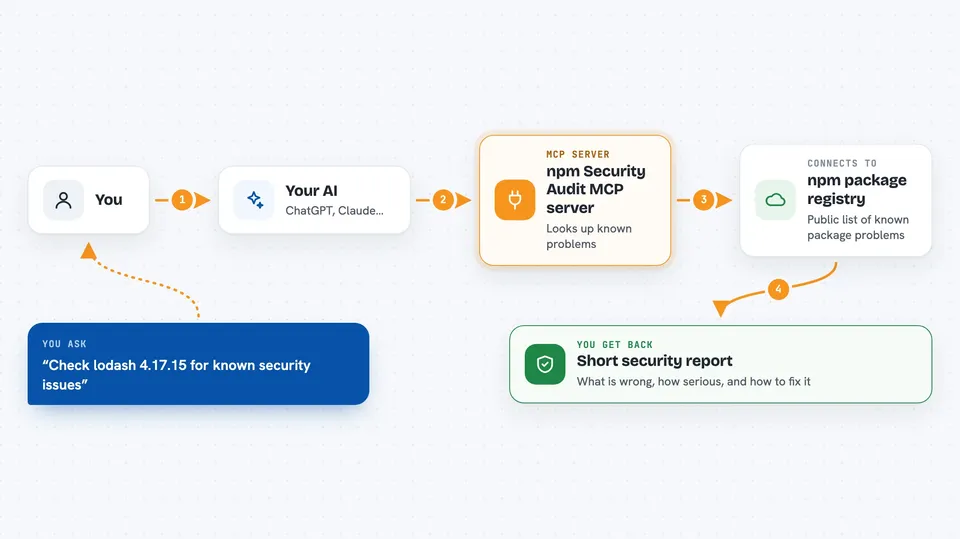
On its own, your AI can only chat with you. An MCP server is a small helper program that gives your AI one new skill or one new connection. This helper connects your AI to the npm registry, the public library where JavaScript packages live, so your AI can look up known security issues for the packages you use. When you ask about your packages, the AI uses this helper to fetch real answers instead of guessing.
What this MCP server does
You tell your AI which packages or project you want checked. The AI passes that to this helper. The helper asks the npm registry for known security reports about those packages. It then hands back a short report with the problem, how serious it is, and which version fixes it. Your AI shows you that report in the chat in plain words.
 Click to zoom
What you can do with it
- Check a package for known security problems
- See how serious each problem is (critical, high, moderate, low)
- Get the version number that fixes the problem
- See the CVE and advisory reference for each issue
- Get a CVSS score for each vulnerability
- Check packages from npm, pnpm or yarn projects
- Find out when a package has no known problems
Try asking your AI
- “Check lodash 4.17.15 for known security issues”
- “Are there any vulnerabilities in the packages in my project?”
- “What is the safest version of lodash to use?”
- “Give me a security report for my npm dependencies”
What it gives back to you
You get a short report in the chat. Each problem shows the package name, the version, how serious it is, a short description, and the version that fixes it. If there are no known problems, it simply says so.
Before you start
What you need
- The Cursor or Cline app (or another tool that supports MCP servers)
- Node.js installed on your computer
Good to know
It only reads public information about packages, so it does not change or delete anything on your computer.
Install it with your AI
Add npm Security Audit MCP server to your AI, no technical skills needed
You don't install anything by hand. You copy one prompt, paste it into an AI that can work on your computer, and it checks, installs and connects the server for you, asking you when it needs something.
Sign in to get the install prompt
Members get a ready-made prompt that lets the Claude desktop app check npm Security Audit MCP server, install it and connect it for them, step by step. You don't need any technical skills: you copy, paste and answer a few questions. Your connected AI can also find and install any of the 4,609 MCP servers here for you.
Who it's for
Developers and anyone who maintains a JavaScript project and wants a quick, plain answer about package security.