
MCP server · Finance and crypto
RAVN cross-chain swap MCP server
by ravndex
Ask your AI to find and set up cross-chain crypto swaps, including native Bitcoin.
This is a helper that lets your AI look up and prepare cryptocurrency swaps across different blockchains, including real Bitcoin. It is made for people who already use an AI chat tool and want to move or trade crypto without clicking through a website. If you have never touched crypto, this one is probably not for you.
What is an MCP server? The 30-second version
On its own, your AI can only chat. An MCP server is a small helper program that gives your AI a new skill or a connection to an app or service. This helper connects your AI to RAVN, a swap service, so the AI can ask RAVN for prices, routes, and swap instructions on your behalf. You just type what you want, and the AI uses this helper behind the scenes.
What this MCP server does
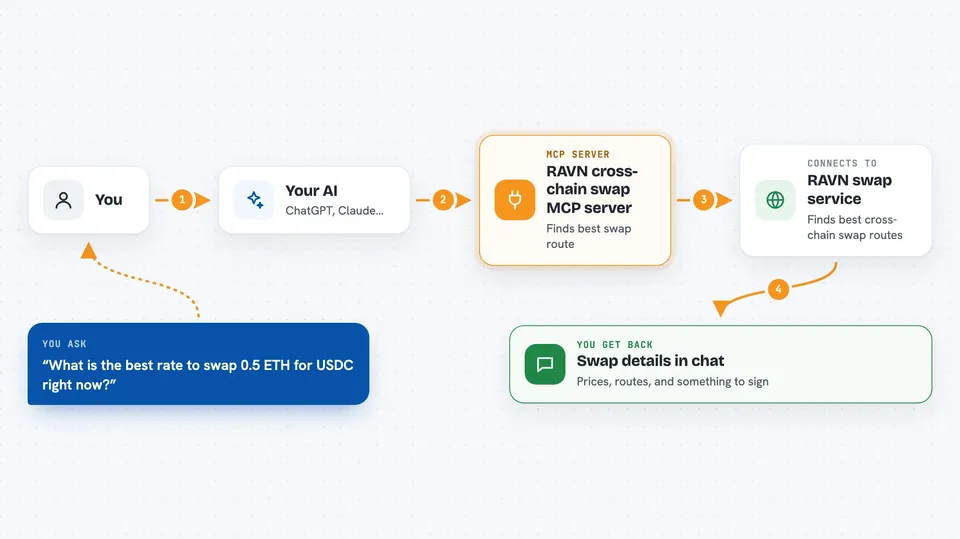
You ask your AI something like "what is the best way to swap 1 ETH for BTC?" The AI sends that question to this helper, which asks RAVN's public service for the best route and price. RAVN replies with the details, and the helper passes them back to your AI. Your AI then shows you the answer in plain language. If you decide to go ahead, the helper can prepare the transaction for you to sign yourself.
 Click to zoom
What you can do with it
- Get the best-priced route for a swap between two tokens or chains
- Prepare a swap so you can sign it in your own wallet
- Check the status of a swap you already started
- See which chains and tokens RAVN currently supports
- Find out which tokens can be swapped directly from native Bitcoin
- Build a Bitcoin payment ready for you to sign, without RAVN seeing it
Try asking your AI
- “What is the best rate to swap 0.5 ETH for USDC right now?”
- “Can I swap native Bitcoin for SOL, and what would I get?”
- “Set up a swap of 100 USDC on Base to native BTC”
- “Is my earlier swap finished yet?”
What it gives back to you
You get back clear answers in the chat: prices, routes, which chains are live, and the status of a swap. When you ask to set up a swap, it gives you something to sign in your own wallet, like a transaction or a deposit address. It never moves your money by itself. Everything shows up as normal text you can read and act on.
Before you start
What you need
- A crypto wallet you control, so you can sign transactions yourself
- Node.js 18 or newer if you install the local version
- The Claude desktop app or another AI tool that supports MCP servers
Good to know
This is real crypto with real money at stake, and swaps cannot be undone once signed, so double-check every address and amount before you approve anything.
Install it with your AI
Add RAVN cross-chain swap MCP server to your AI, no technical skills needed
You don't install anything by hand. You copy one prompt, paste it into an AI that can work on your computer, and it checks, installs and connects the server for you, asking you when it needs something.
Sign in to get the install prompt
Members get a ready-made prompt that lets the Claude desktop app check RAVN cross-chain swap MCP server, install it and connect it for them, step by step. You don't need any technical skills: you copy, paste and answer a few questions. Your connected AI can also find and install any of the 4,609 MCP servers here for you.
Who it's for
Crypto users who already swap tokens and want to do it by chatting with their AI instead of clicking through a website.



