
MCP server · Gaming
Razz.games MCP server
by razz-games
Play provably fair dice, flip, crash, plinko and other games with real SOL from your AI chat.
This is a helper that connects your AI assistant to Razz.games, a site where you can play simple chance games with small amounts of Solana (SOL) cryptocurrency. It is handy if you already use an AI chat tool and want to try these games or check your balance without clicking around a website. You just ask in plain words and the AI does the clicking for you.
What is an MCP server? The 30-second version
On its own, your AI can only chat. It cannot reach out to a website or play a game. An MCP server is a small helper program that gives your AI a new skill, in this case a connection to Razz.games. Once it is set up, the AI can place a bet, check a result, or read a room for you when you ask.
What this MCP server does
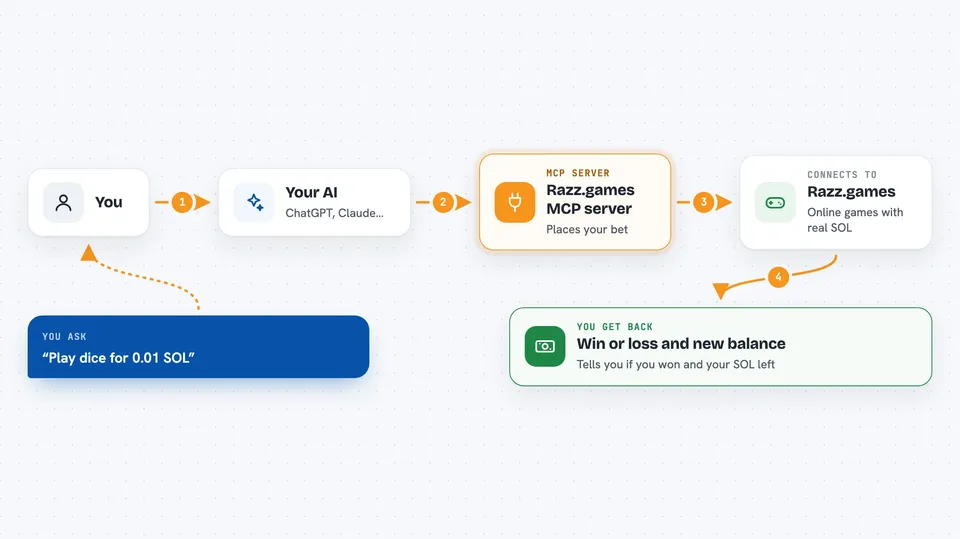
You type something like play dice for 0.01 SOL. Your AI passes that to this helper program. The helper talks to Razz.games over the internet, places the bet, and waits for the result. Then it hands the result back to your AI, which tells you in the chat whether you won or lost and what your new balance is. Some games take a few steps, like mines or tower, and the AI walks through them one at a time.
 Click to zoom
What you can do with it
- Play instant games like dice, flip, plinko and limbo with or without a small SOL bet
- Start and play through longer games like mines and tower, clicking cells or picking doors
- Join a live crash round, watch the multiplier and cash out before it crashes
- Check your SOL balance and get a deposit address to top up
- Withdraw SOL to a linked Solana wallet
- Look up the leaderboard and your recent game results
- Chat in rooms, send direct messages and tip other players
Try asking your AI
- “Play dice for 0.01 SOL”
- “Start a mines game with 3 mines and a 0.005 SOL bet”
- “What is my current SOL balance?”
- “Show me the top players on the leaderboard this week”
What it gives back to you
You get short answers in the chat: win or loss, the multiplier, and the amount won or lost. For games like mines or tower you also see the current state of the board and your running multiplier. Balance, leaderboard and profile lookups come back as small lists or numbers. When you deposit or withdraw, you get an address or a confirmation message.
Before you start
What you need
- A Razz.games account or an API key (you can create one with the register tool after connecting)
- The Claude desktop app or another AI tool that supports MCP servers
- Node.js installed on your computer (the helper runs with npx)
- A Solana wallet if you want to deposit or withdraw real SOL
Good to know
This server can move real cryptocurrency: bets, deposits, withdrawals and tips all spend SOL from your account, so only use small amounts you are comfortable losing and double-check every amount before you confirm.
Install it with your AI
Add Razz.games MCP server to your AI, no technical skills needed
You don't install anything by hand. You copy one prompt, paste it into an AI that can work on your computer, and it checks, installs and connects the server for you, asking you when it needs something.
Sign in to get the install prompt
Members get a ready-made prompt that lets the Claude desktop app check Razz.games MCP server, install it and connect it for them, step by step. You don't need any technical skills: you copy, paste and answer a few questions. Your connected AI can also find and install any of the 4,361 MCP servers here for you.
Who it's for
People who already use an AI chat tool and want to try small crypto games or check their Razz.games account without leaving the chat.





