
MCP server · Finance and crypto
Lightning Enable MCP server
Lets your AI pay small Bitcoin Lightning invoices, check balances, and buy access to paid web APIs.
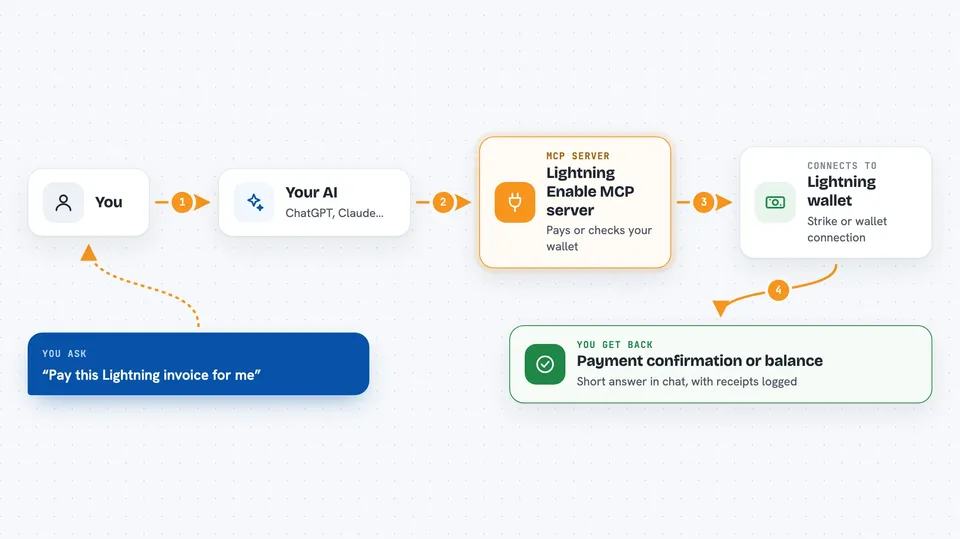
This is a helper that gives your AI assistant a Bitcoin Lightning wallet. Once it is connected, your AI can pay small invoices, create invoices to receive money, check the balance, and pay for access to websites that charge per request. It is handy if you work with Bitcoin payments, small online purchases, or paid data services.
What is an MCP server? The 30-second version
On its own, your AI can only chat. An MCP server is a small helper program that gives your AI a new skill or a connection to an outside service. This one connects your AI to a Lightning wallet, so the AI can send and receive small Bitcoin payments when you ask. You stay in the chat, and the helper does the wallet work behind the scenes.
What this MCP server does
You ask your AI something like paying an invoice or checking your balance. The AI passes that request to this helper program. The helper then talks to your chosen wallet, such as Strike or a wallet connection string, and carries out the payment or lookup. The result comes back into the chat as a short answer, a list, or a confirmation. For paid web APIs, the helper can pay the small access fee automatically and then fetch the data you wanted.
 Click to zoom
What you can do with it
- Pay a Bitcoin Lightning invoice you paste into the chat
- Create an invoice so someone can pay you
- Check your wallet balance and recent spending
- Set budget limits so the AI cannot overspend
- Search a registry of paid web APIs by keyword or category
- Pay a small fee to access an L402-protected web API
- Run a one-satoshi test payment to confirm your wallet works
Try asking your AI
- “Pay this Lightning invoice for me: lnbc...”
- “Check my Lightning wallet balance”
- “Find paid APIs about weather data”
- “Create an invoice for 500 sats with the note coffee”
What it gives back to you
You get short answers in the chat: a confirmation that a payment went through, the balance in satoshis, a list of matching paid APIs, or a new invoice code you can share. Spending and receipts are logged, so you can ask what was paid and when. If a payment is above your limit, the AI will ask you to approve it first.
Before you start
What you need
- A Lightning wallet that returns a payment preimage, such as Strike, LND, or an NWC connection string from Alby Hub or CoinOS
- An API key or connection string from that wallet (a kind of password the wallet site gives you)
- The Claude desktop app or another app that supports MCP servers
Good to know
This server can spend real Bitcoin from your wallet, so set spending limits and check any payment the AI asks you to approve.
Install it with your AI
Add Lightning Enable MCP server to your AI, no technical skills needed
You don't install anything by hand. You copy one prompt, paste it into an AI that can work on your computer, and it checks, installs and connects the server for you, asking you when it needs something.
Sign in to get the install prompt
Members get a ready-made prompt that lets the Claude desktop app check Lightning Enable MCP server, install it and connect it for them, step by step. You don't need any technical skills: you copy, paste and answer a few questions. Your connected AI can also find and install any of the 4,609 MCP servers here for you.
Who it's for
People who handle Bitcoin Lightning payments, buy paid data or APIs, or want their AI to manage small online payments without leaving the chat.



