
MCP server · Gaming
Fantasy Premier League MCP server
by rishijatia
Lets your AI look up live Fantasy Premier League player stats, fixtures and your own team.
This is a small helper that connects your AI assistant to Fantasy Premier League. Once it is set up, you can ask your AI about players, teams, fixtures and your own squad, and it will pull the real numbers for you. It is handy if you play FPL and want quick answers without clicking around the website.
What is an MCP server? The 30-second version
On its own, your AI can only chat with you using what it already knows. An MCP server is a small helper program that gives your AI a new skill or a connection to an app or service. This one connects your AI to Fantasy Premier League, so it can look up player stats, fixtures and your team when you ask. You do not need to understand how it works inside; you just ask a question and the AI uses this helper behind the scenes.
What this MCP server does
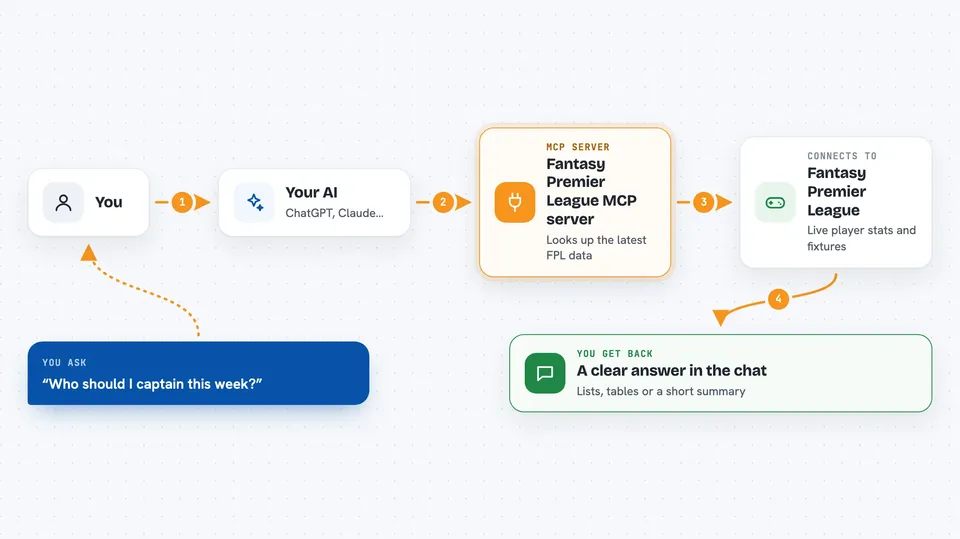
You ask your AI a question about Fantasy Premier League, like who to captain or how a player has been doing. The AI passes your question to this helper program. The helper talks to the Fantasy Premier League website and pulls back the latest data. Then the AI reads that data and gives you a clear answer in the chat, often as a list, a table or a short summary.
 Click to zoom
What you can do with it
- Compare two players across recent gameweeks
- Search for players by name, team or position
- Check the current gameweek status and deadlines
- See upcoming fixtures and how hard they look
- Get live scores while matches are being played
- View your own FPL team and your league standings
- Get captain suggestions and transfer ideas
Try asking your AI
- “Compare Mohamed Salah and Erling Haaland over the last 5 gameweeks”
- “Find all Arsenal midfielders”
- “What is the current gameweek status?”
- “Show me the top 5 forwards by points”
What it gives back to you
You get answers written in the chat, usually as lists, short tables or summaries. For example, a player comparison comes back as a side by side breakdown of their stats, and a fixture check comes back as a list of upcoming matches with difficulty notes. If you ask about your own team, it shows your squad and how it is doing. Nothing on the FPL site gets changed; it only reads data.
Before you start
What you need
- Python 3.10 or higher installed on your computer
- The Claude desktop app (or another app that supports MCP servers)
- A Fantasy Premier League account, only if you want to see your own team or private leagues
- A refresh token copied from your FPL browser session, only for the features that need login
Good to know
The features that read your own team or private leagues need your FPL login token, so only set that up on a computer you trust, and remember the FPL data comes from an unofficial source that can change without warning.
Install it with your AI
Add Fantasy Premier League MCP server to your AI, no technical skills needed
You don't install anything by hand. You copy one prompt, paste it into an AI that can work on your computer, and it checks, installs and connects the server for you, asking you when it needs something.
Sign in to get the install prompt
Members get a ready-made prompt that lets the Claude desktop app check Fantasy Premier League MCP server, install it and connect it for them, step by step. You don't need any technical skills: you copy, paste and answer a few questions. Your connected AI can also find and install any of the 4,361 MCP servers here for you.
Who it's for
Fantasy Premier League players who want quick stats, comparisons and team advice without browsing the FPL site by hand.





