MCP server · Finance and crypto · official
Roamzy eSIM MCP server
by roamzy-io · official
Buy and manage a travel eSIM for 193 countries, paying per MB in USDT or USDC.
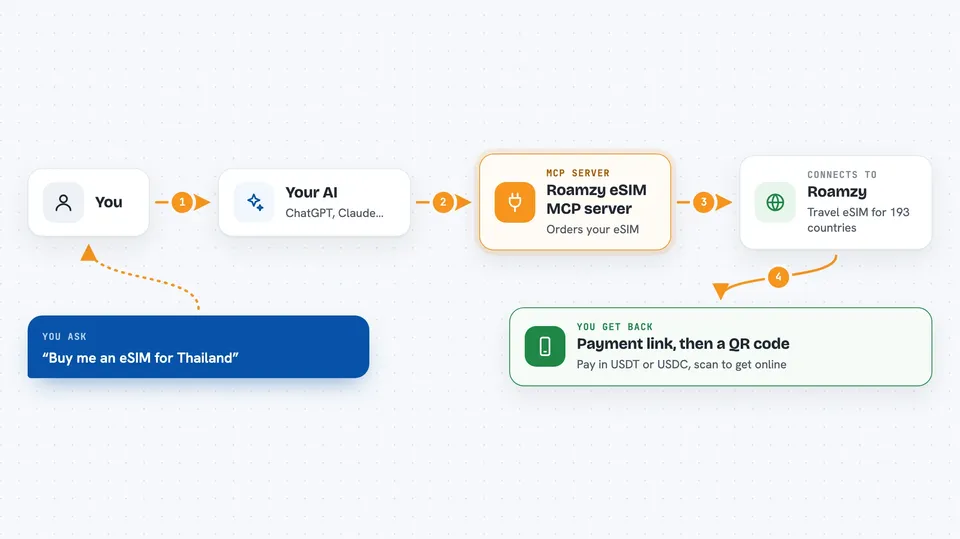
This is a helper for your AI chat that lets it buy and manage a travel eSIM from Roamzy. You tell your AI where you are going, it looks up the rate, creates the order, and hands you a QR code to scan on your phone. It is handy if you travel and want mobile data abroad without hunting for a local SIM shop.
What is an MCP server? The 30-second version
On its own, your AI can only chat with you. An MCP server is a small helper program that gives your AI a new skill or a connection to an app or service. This one connects your AI to Roamzy, the eSIM service. Once it is set up, your AI can look up country rates, create an eSIM order, and fetch your activation QR code when you ask.
What this MCP server does
You ask your AI something like buy me an eSIM for Thailand. The AI calls this helper, which talks to the Roamzy website on your behalf. Roamzy tells it the per-MB rate for that country and which coins and networks you can pay with. The AI creates an order and gives you a payment link. After you pay with USDT or USDC, the AI checks the order and hands you the QR code to scan into your phone.
 Click to zoom
What you can do with it
- Look up the per-MB rate for any of 193 countries
- Estimate what a certain amount of data will cost in USDT
- Create an eSIM order and get a payment link
- Check whether your payment has gone through
- Get your eSIM activation QR code
- List the eSIMs on your account and their balances
- See your referral link and any earnings from it
Try asking your AI
- “I'm going to Thailand for a week, buy me an eSIM”
- “How much would 5 GB cost in Japan?”
- “What coins and networks can I pay with right now?”
- “Show me my eSIMs and their balances”
What it gives back to you
You get answers in the chat: rates, a payment link, an order status, and a QR code image you can scan. It can also list your eSIMs with their phone numbers and remaining balance. If you ask about referrals, it shows your link and earnings. Everything comes back as readable text or a small image, not as files you have to open elsewhere.
Before you start
What you need
- An MCP client such as Claude Desktop, Cursor, Cline or similar
- Node.js installed on your computer (the setup uses npx)
- A crypto wallet with USDT or USDC if you want to actually buy an eSIM
Good to know
This server can spend real money from your crypto wallet, so check the amount and the coin before you pay, and keep the claim link it gives you or you may lose access to that eSIM in a new chat.
Install it with your AI
Add Roamzy eSIM MCP server to your AI, no technical skills needed
You don't install anything by hand. You copy one prompt, paste it into an AI that can work on your computer, and it checks, installs and connects the server for you, asking you when it needs something.
Sign in to get the install prompt
Members get a ready-made prompt that lets the Claude desktop app check Roamzy eSIM MCP server, install it and connect it for them, step by step. You don't need any technical skills: you copy, paste and answer a few questions. Your connected AI can also find and install any of the 4,609 MCP servers here for you.
Who it's for
Frequent travellers and remote workers who want mobile data abroad and are comfortable paying with stablecoins.