MCP server · Finance and crypto
WorldCitiSim eSIM MCP server
Let your AI find travel eSIM plans and start a purchase, then you pay and get the QR code by email.
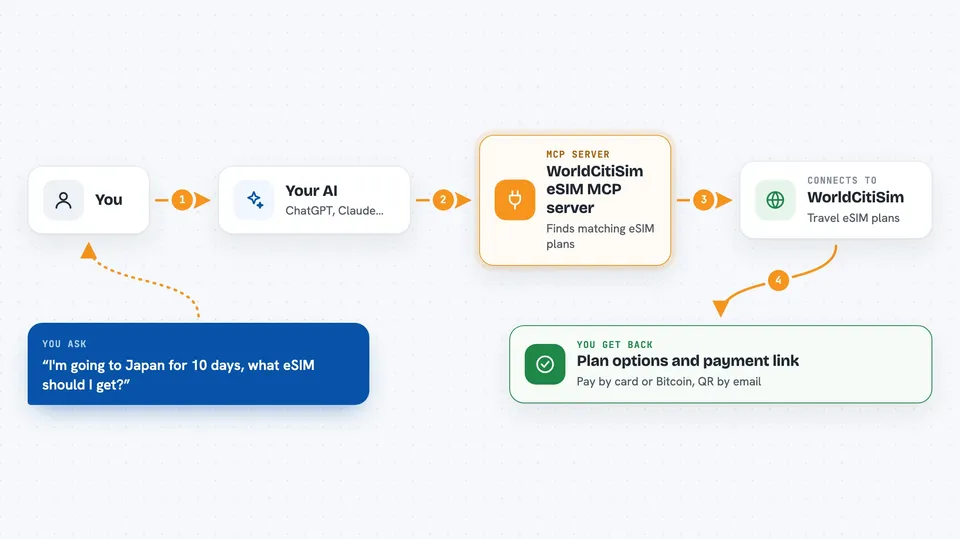
This is a small helper that lets your AI assistant look up travel eSIM plans from WorldCitiSim and start an order for you. You still pay yourself on a normal checkout page or by Bitcoin, and the eSIM QR code arrives in your email. It is handy if you travel a lot and want to sort out data for a trip without clicking through a shop website.
What is an MCP server? The 30-second version
On its own, your AI can only chat with you. An MCP server is a small helper program that gives your AI a new skill or a connection to an app or service. This one connects your AI to WorldCitiSim, a travel eSIM shop. Once it is added, your AI can search their plans and start an order for you when you ask.
What this MCP server does
You tell your AI where you are going and for how long, and it searches the WorldCitiSim catalog for matching eSIM plans. It shows you a few options with prices and how much data they include. When you pick one, the AI creates a pending order and hands you a payment link for card payment, or a Bitcoin address and QR code if you prefer that. After you pay, the AI can check the order and the eSIM QR code is sent to your email.
 Click to zoom
What you can do with it
- Search eSIM plans by country, region, number of days, or data amount
- See prices and variations for a specific plan
- Start an order with your email address
- Get a Stripe checkout link to pay by card
- Get a Bitcoin address and QR code to pay in crypto
- Check whether your order is paid and ready
Try asking your AI
- “I'm going to Japan for 10 days, what eSIM should I get?”
- “Show me eSIM plans for Italy with at least 10GB”
- “Start an order for the 5GB Europe plan, my email is ana@example.com”
- “Can you check if my eSIM order is ready yet?”
What it gives back to you
You get back a short list of matching plans with prices and data amounts, or the details of one plan. When you order, you get a payment link or a Bitcoin address with a QR code to scan. Once payment clears, the AI can tell you the order is completed, and the eSIM QR code itself is emailed to you.
Before you start
What you need
- An MCP-compatible AI app, like the Claude desktop app, Claude Code, Cursor, or ChatGPT in Developer Mode
- Node.js 20.11 or newer installed on your computer
- An email address where the eSIM QR code can be sent
- A way to pay: a card for the Stripe checkout, or a Bitcoin wallet
Good to know
Creating an order is real: if you follow through with payment, you are buying an eSIM and money leaves your account, so check the plan and price before you pay.
Install it with your AI
Add WorldCitiSim eSIM MCP server to your AI, no technical skills needed
You don't install anything by hand. You copy one prompt, paste it into an AI that can work on your computer, and it checks, installs and connects the server for you, asking you when it needs something.
Sign in to get the install prompt
Members get a ready-made prompt that lets the Claude desktop app check WorldCitiSim eSIM MCP server, install it and connect it for them, step by step. You don't need any technical skills: you copy, paste and answer a few questions. Your connected AI can also find and install any of the 4,609 MCP servers here for you.
Who it's for
Frequent travellers and anyone who wants to buy a travel data plan quickly through their AI assistant instead of a shop website.