MCP server · Security
MCP Shield security scanner
by rob925
Your AI can scan a project for leaked passwords, risky commands and unsafe tool descriptions.

MCP Shield is a security checker for projects that build AI tools and helpers. You point it at a folder, and it looks for common dangers like hard-coded passwords, shell commands and sneaky instructions hidden in text. It is handy for anyone who builds or reviews these AI helper projects and wants a quick safety check before sharing them.
What is an MCP server? The 30-second version
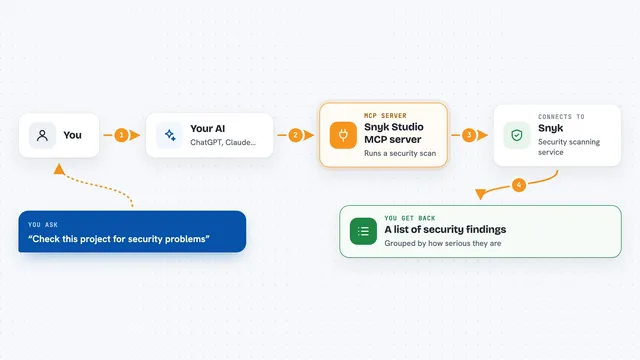
On its own, your AI can only chat with you. An MCP server is a small helper program that gives your AI a new skill or a connection to something else. This one connects your AI to MCP Shield, a security scanner, so your AI can run a safety check on a project folder and tell you what it found. You just ask in plain words, and the helper does the scanning behind the scenes.
What this MCP server does
You ask your AI to check a project folder for security problems. Your AI passes that request to MCP Shield, which reads the files and looks for patterns like API keys left in the code, shell commands, or tool descriptions that sound dangerous. It also looks for text that tries to trick an AI, like phrases telling it to ignore earlier instructions. Then it hands back a list of findings with severity levels, so you can see what needs attention.
 Click to zoom
What you can do with it
- Scan a local project folder for security risks
- Find hard-coded API keys, tokens and passwords
- Spot shell command execution in the code
- Flag risky tool names and descriptions
- Detect prompt injection phrases in text
- List all the rules the scanner uses
- Produce reports in text, JSON, Markdown or SARIF
Try asking your AI
- “Scan this folder for security problems”
- “Check my MCP server project for leaked secrets”
- “What security rules does MCP Shield check for?”
- “Run a scan on this project and show me anything high or critical”
What it gives back to you
You get a list of findings, each with a severity level like low, medium, high or critical. Each finding shows the file, the line number, and a short explanation of what looks risky. If nothing is found, it tells you the scan came back clean. You can also ask for a report file in Markdown or another format.
Before you start
What you need
- Python installed on your computer
- The MCP Shield package installed (the README shows a simple pip install command)
- An AI app that can connect to MCP servers, like the Claude desktop app
Good to know
It only catches common patterns and is not a full security audit, so do not treat a clean scan as proof that a project is safe.
Install it with your AI
Add MCP Shield security scanner to your AI, no technical skills needed
You don't install anything by hand. You copy one prompt, paste it into an AI that can work on your computer, and it checks, installs and connects the server for you, asking you when it needs something.
Sign in to get the install prompt
Members get a ready-made prompt that lets the Claude desktop app check MCP Shield security scanner, install it and connect it for them, step by step. You don't need any technical skills: you copy, paste and answer a few questions. Your connected AI can also find and install any of the 4,609 MCP servers here for you.
Who it's for
Developers and reviewers who build or check AI helper projects and want a quick safety scan.