
MCP server · Chat
Madurai CityBus MCP server
by rsiva2294
Lets your AI plan Madurai bus routes, find stops, and check TNSTC stage fares for you.
This is a small helper that connects your AI assistant to the Madurai CityBus bus network. Once it is set up, you can just ask your AI things like which bus to take or how much the fare is, and it will look it up for you. It is handy if you live in or travel around Madurai and use buses.
What is an MCP server? The 30-second version
On its own, your AI can only chat with you. An MCP server is a small helper program that gives your AI a new skill or a connection to an app or service. This one connects your AI to the Madurai CityBus route network, so it can look up buses, stops, and fares for you when you ask. You do not need to understand how it works inside; you just ask in normal words.
What this MCP server does
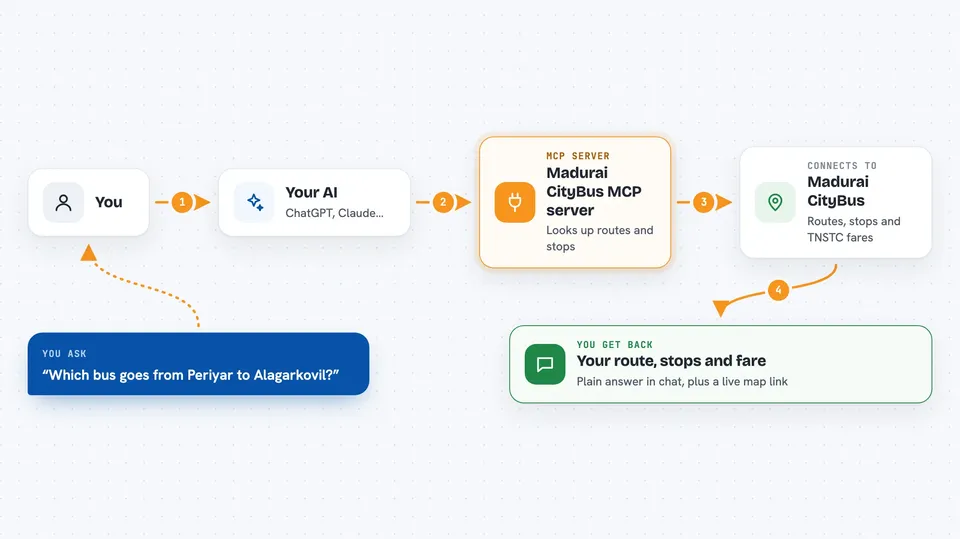
You ask your AI a question about Madurai buses, like how to get from one place to another. Your AI sends that question to this helper. The helper looks through the Madurai CityBus route and stop information and works out the answer. Then your AI tells you the route, the stops, the fare, or the departure platform in the chat. It can also give you a link to a live map of the route.
 Click to zoom
What you can do with it
- Find direct and one-transfer bus routes between two places in Madurai
- Look up full details and the stop sequence for a specific bus number
- Search bus stops by name in English or Tamil
- Calculate official TNSTC stage fares for different bus classes
- Check which platform bay a bus leaves from at Periyar Bus Stand
- Get a link to a live visual map of a route
Try asking your AI
- “Which bus goes from Periyar to Alagarkovil?”
- “Show me the stops on bus number 44”
- “How much is the fare from Periyar Bus Stand to MGR Bus Stand on bus 77?”
- “Find the bus stop called பெரியார்”
What it gives back to you
You get back plain answers in the chat: a route suggestion, a list of stops, a fare amount, or a platform number. For routes, it can also include a link you can click to see a live map. Everything shows up as normal text, so you can read it right away.
Before you start
What you need
- The Claude desktop app or another AI tool that supports MCP servers
- Node.js installed on your computer (the setup uses a tool called npx)
Good to know
Route and transfer suggestions are guidance only, so check live platform departures at the bus stand before you travel.
Install it with your AI
Add Madurai CityBus MCP server to your AI, no technical skills needed
You don't install anything by hand. You copy one prompt, paste it into an AI that can work on your computer, and it checks, installs and connects the server for you, asking you when it needs something.
Sign in to get the install prompt
Members get a ready-made prompt that lets the Claude desktop app check Madurai CityBus MCP server, install it and connect it for them, step by step. You don't need any technical skills: you copy, paste and answer a few questions. Your connected AI can also find and install any of the 4,609 MCP servers here for you.
Who it's for
People who live in or visit Madurai and use the city buses, plus anyone helping them plan trips.




