MCP server · Security
Agentic Wallet Guardian MCP server
by rudimentall1
Your AI can check a crypto transaction before it is signed and get a clear allow, warn or block answer.
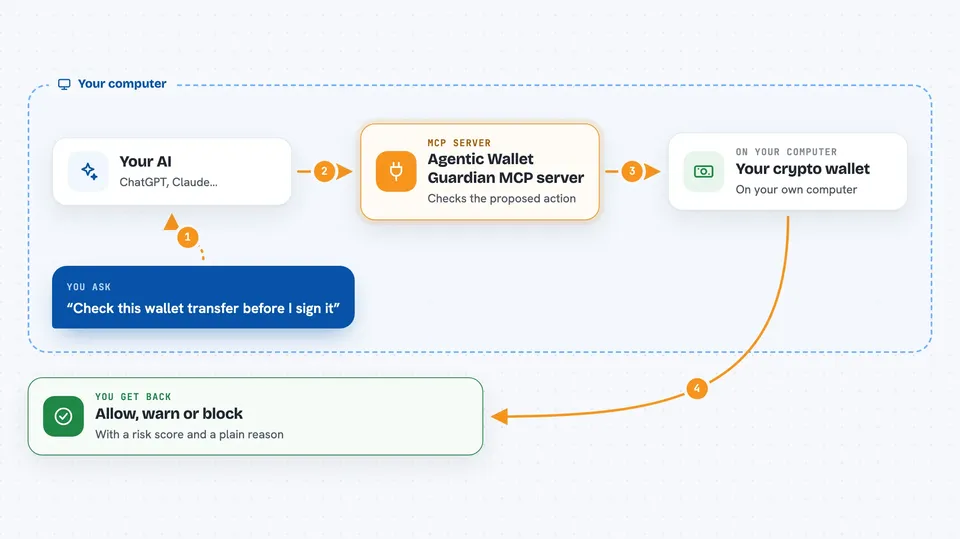
Agentic Wallet Guardian is a small security helper you run yourself. It looks at a crypto transaction an AI agent wants to make and gives back a simple answer: allow it, warn about it, or block it. It is handy for people testing AI agents that touch blockchain wallets, and for teams that want to keep their wallet details on their own machines.
What is an MCP server? The 30-second version
On its own, your AI can only chat. An MCP server is a small helper program that gives your AI a new skill or a connection to another service. This one connects your AI to a wallet safety checker that runs on your own computer. When your AI wants to send a crypto transaction, it asks this helper first, and the helper replies with allow, warn or block plus the reasons.
What this MCP server does
You ask your AI to do something with a crypto wallet, like send tokens or approve spending. Your AI turns that into a proposed action and sends it to this helper. The helper checks the wallet, the token, the contract and any known bad addresses, then runs your own policy rules. It adds up all the signals into a risk score from 0 to 100. Finally it tells your AI whether to allow, warn or block, and explains why in plain words.
 Click to zoom
What you can do with it
- Check a proposed crypto transaction before it is signed
- Get a plain-language reason for an allow, warn or block decision
- See a risk score from 0 to 100 for each proposed action
- Apply your own spending caps and reputation rules
- Check an address against a local list of sanctioned addresses
- Look up token and contract details from real data sources
- Review an agent's past decisions and history
What it gives back to you
You get back a decision word: ALLOW, WARN or BLOCK. Along with it comes a risk score, the list of signals that fed into that score, and the policy rules that fired. The chat shows this as a short explanation in everyday words, so you can see exactly why the answer came out that way.
Before you start
What you need
- Python 3.10 or newer
- The project files from the GitHub repository
- An RPC endpoint URL if you want real wallet and token data (a web address that talks to the blockchain)
- A free GoPlus API key if you want extra token and contract checks
Good to know
This tool can block or allow real crypto transactions, so test it carefully before letting an agent act on its decisions, and remember the local threat lists are empty by default until you fill them.
Install it with your AI
Add Agentic Wallet Guardian MCP server to your AI, no technical skills needed
You don't install anything by hand. You copy one prompt, paste it into an AI that can work on your computer, and it checks, installs and connects the server for you, asking you when it needs something.
Sign in to get the install prompt
Members get a ready-made prompt that lets the Claude desktop app check Agentic Wallet Guardian MCP server, install it and connect it for them, step by step. You don't need any technical skills: you copy, paste and answer a few questions. Your connected AI can also find and install any of the 4,361 MCP servers here for you.
Who it's for
People building or testing AI agents that touch crypto wallets, and teams that need to keep wallet data on their own machines.