MCP server · Security
basescope MCP server
by chasdaddy
Ask your AI to check if a crypto token, wallet, or approval on Base looks safe before you sign anything.
basescope is a helper that lets your AI look up safety information about crypto tokens and wallets on the Base network and a few other chains. It only reads information, it can never move or spend anything. It is handy if you use Base or other crypto networks and want a second opinion before you approve or buy something.
What is an MCP server? The 30-second version
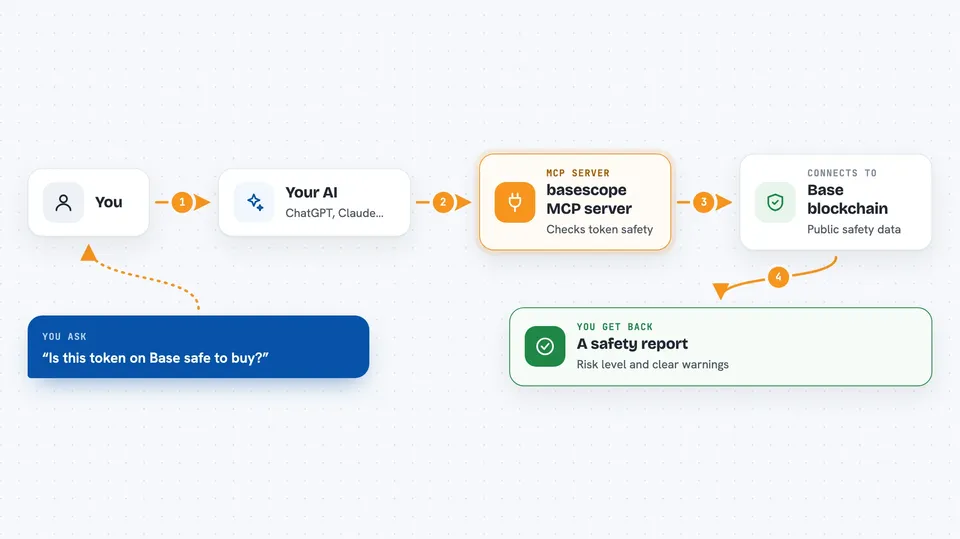
On its own, your AI can only chat with you using what it already knows. An MCP server is a small helper program you connect to your AI that gives it a new skill or a connection to an app or service. This one connects your AI to public blockchain data on Base and other networks, so it can look up tokens, wallets, and approvals for you. You ask a question in plain words, and the AI uses this helper to fetch the answer.
What this MCP server does
You ask your AI something like whether a token is safe or what approvals a wallet has. The AI passes that request to basescope, which reads public blockchain data and safety services. basescope checks things like honeypot traps, hidden taxes, risky approvals, and whether an address is known to be malicious. It then hands the results back to your AI, which explains them to you in the chat. Nothing is ever signed or sent, so your funds stay where they are.
 Click to zoom
What you can do with it
- Check if a token on Base looks like a honeypot or rug pull
- See the buy and sell tax on a token
- List a wallet's open token approvals and flag risky ones
- Check if an address is on known scam or phishing lists
- Look up a wallet's ETH or token balance
- Resolve an ENS name or a Basename to a wallet address
- Check current gas prices and a token's USD price
Try asking your AI
- “Use basescope to check if token 0x1234... on Base is safe”
- “What approvals does wallet 0xabcd... have on Base, and are any of them risky?”
- “Resolve the Basename alice.base.eth to an address”
- “What is the current gas price on Base and the price of this token?”
What it gives back to you
You get back a short answer in the chat, often with a risk level like low, medium, high, or critical. For a token check you may see flags such as high sell tax or owner can mint more supply. For approvals you get a list of spenders, with the risky ones listed first. For balances and prices you get plain numbers, and for names you get the matching address.
Before you start
What you need
- An MCP client such as Claude Desktop or Cursor
- Node.js installed on your computer (npx is part of it)
Good to know
It only reads information and cannot move funds, but its results are signals, not guarantees, so always do your own research before you buy or approve anything.
Install it with your AI
Add basescope MCP server to your AI, no technical skills needed
You don't install anything by hand. You copy one prompt, paste it into an AI that can work on your computer, and it checks, installs and connects the server for you, asking you when it needs something.
Sign in to get the install prompt
Members get a ready-made prompt that lets the Claude desktop app check basescope MCP server, install it and connect it for them, step by step. You don't need any technical skills: you copy, paste and answer a few questions. Your connected AI can also find and install any of the 4,361 MCP servers here for you.
Who it's for
Anyone who uses Base or other crypto networks and wants a quick safety read on tokens, wallets, and approvals before they act.