MCP server · Security
SicariusGuard MCP server
Lets your AI check whether a Solana token or NFT looks like a scam before you buy or sell.
SicariusGuard is a safety checker for Solana tokens and NFTs. You give it a token's address, and it looks at many warning signs and gives you a risk score. It is handy if you trade Solana coins and want a second opinion before you swap.
What is an MCP server? The 30-second version
On its own, your AI can only chat with you. An MCP server is a small helper program that gives your AI a new skill or a connection to a service. This one connects your AI to SicariusGuard, a Solana token safety service. Once it is connected, you can ask your AI about a token and it will fetch the safety report for you.
What this MCP server does
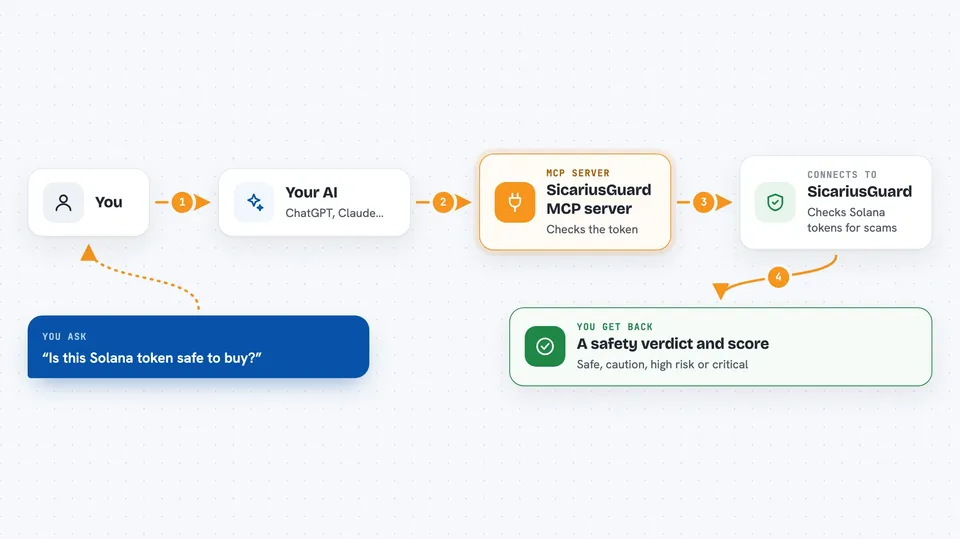
You paste a Solana token address into your chat and ask if it is safe. Your AI sends that address to SicariusGuard through this helper. SicariusGuard then looks at the token on the Solana blockchain, checks if the owner can still print more coins or freeze wallets, tests whether the token can actually be sold, checks the liquidity pool, and pulls market data. It adds everything up into one risk score and sends it back. Your AI then explains the result to you in plain words.
 Click to zoom
What you can do with it
- Check if a Solana token has a risky mint or freeze authority
- Test whether a token can actually be sold (honeypot check)
- See how concentrated the token supply is among top holders
- Check if the liquidity pool is locked or burned
- Look up how old a token is
- Check the reputation of the wallet that deployed the token
- Scan an NFT for collection verification and pricing issues
- Scan up to 10 tokens at once
Try asking your AI
- “Is this Solana token safe to buy? DezXAZ8z7PnrnRJjz3wXBoRgixCa6xjnB7YaB1pPB263”
- “Run a full safety scan on this token and explain the risk score”
- “Can I actually sell this token or is it a honeypot?”
- “Check the deployer wallet of this token, is it a known scammer?”
- “Is this NFT from a real collection or a fake?”
What it gives back to you
You get back a clear verdict like SAFE, CAUTION, HIGH_RISK, or CRITICAL, plus a score from 0 to 100. The report breaks down each check: mint authority, freeze authority, honeypot test, holder concentration, liquidity lock, token age, market data, and deployer reputation. Your AI will usually summarise the important parts in the chat and mention anything that looks dangerous.
Before you start
What you need
- A Helius RPC URL (a Solana connection address; you can get one free from helius.dev)
- A Birdeye API key (optional, makes market data richer; free tier available at birdeye.so)
- Node.js installed on your computer if you run it yourself (the npx option handles this for you)
Good to know
This gives you a risk score, not a guarantee, so a SAFE verdict does not mean a token is truly safe and you can still lose money.
Install it with your AI
Add SicariusGuard MCP server to your AI, no technical skills needed
You don't install anything by hand. You copy one prompt, paste it into an AI that can work on your computer, and it checks, installs and connects the server for you, asking you when it needs something.
Sign in to get the install prompt
Members get a ready-made prompt that lets the Claude desktop app check SicariusGuard MCP server, install it and connect it for them, step by step. You don't need any technical skills: you copy, paste and answer a few questions. Your connected AI can also find and install any of the 4,361 MCP servers here for you.
Who it's for
Solana traders, crypto hobbyists, and anyone who wants a quick safety check before buying a token or NFT.