MCP server · Finance and crypto
ApexVol MCP server
by ryansilk
Lets your AI pull live options data like IV rank, Greeks, and gamma exposure for any ticker.
This is a helper that connects your AI assistant to ApexVol, a service that tracks options market data. Once it is connected, you can just ask questions in plain English about volatility, options chains, or strategy ideas, and your AI will go fetch the numbers for you. It is handy for anyone who trades options or wants to understand what the market is pricing in.
What is an MCP server? The 30-second version
On its own, your AI can only chat with you using what it already knows. An MCP server is a small helper program that gives your AI a new skill or a connection to an outside service. This one connects your AI to ApexVol, so when you ask about a ticker, the AI can look up real options data there and bring the answer back into your conversation. You do not need to know how it works under the hood, you just ask and it answers.
What this MCP server does
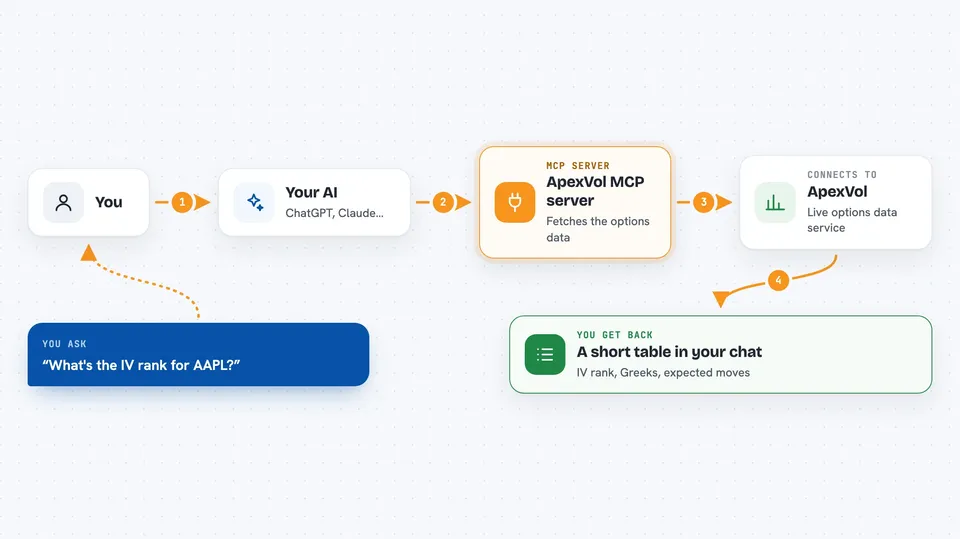
You ask your AI something like what is the IV rank for SPY. The AI passes that request to this helper, which talks to the ApexVol platform over the internet. ApexVol sends back the numbers, like current implied volatility, IV rank, and the 52 week range. The AI then shows you a short table or summary right in the chat. You can keep asking follow up questions and the AI will pull more data to compare.
 Click to zoom
What you can do with it
- Check IV rank and percentile for a ticker
- Pull the full options chain for any expiration
- Look up gamma exposure and GEX flip levels
- Build and analyze an options strategy like an iron condor
- See upcoming earnings and expected moves
- Run a stress test on your positions
- Screen the market for high IV or unusual activity
Try asking your AI
- “What's the IV rank for AAPL?”
- “Show me the options chain for QQQ expiring next week”
- “Build an iron condor on SPY and show me the Greeks”
- “What earnings are coming up this week?”
What it gives back to you
You get back short tables, summaries, and numbers right in your chat, like IV rank, Greeks, expected moves, or strategy profit and loss. For strategy questions, it can show you the legs, the cost, and the Greeks. For screening, it gives you a list of tickers that match what you asked for. Everything is formatted so you can read it at a glance.
Before you start
What you need
- A paid ApexVol plan (starts at $55 per month)
- An ApexVol API token from your account page (a kind of password for apps)
- Python 3.10 or newer if you install it locally
- The Claude desktop app or Claude Code if you use the local install
Good to know
This is market data, not financial advice, and it needs a paid ApexVol plan, so check the cost and treat the numbers as information to think about, not a signal to trade on.
Install it with your AI
Add ApexVol MCP server to your AI, no technical skills needed
You don't install anything by hand. You copy one prompt, paste it into an AI that can work on your computer, and it checks, installs and connects the server for you, asking you when it needs something.
Sign in to get the install prompt
Members get a ready-made prompt that lets the Claude desktop app check ApexVol MCP server, install it and connect it for them, step by step. You don't need any technical skills: you copy, paste and answer a few questions. Your connected AI can also find and install any of the 4,066 MCP servers here for you.
Who it's for
Options traders, finance students, and anyone who wants quick options data without clicking through a website.