
MCP server · Finance and crypto
Crypto Trader MCP server
by SaintDoresh
Lets your AI look up live crypto prices, market data, trends and history from CoinGecko.
This is a small helper that connects your AI assistant to CoinGecko, a popular website that tracks cryptocurrency prices. Once it is set up, you can just ask your AI things like the price of Bitcoin or which coins are trending, and it will go and fetch the numbers for you. It is handy for anyone who follows crypto casually and wants quick answers without opening a bunch of tabs.
What is an MCP server? The 30-second version
On its own, your AI can only chat with you using what it already knows. An MCP server is a small helper program that gives your AI a new skill or a connection to an outside service. This one connects your AI to CoinGecko, so it can look up live crypto prices and market information for you. You ask in normal words, and the helper goes and gets the data.
What this MCP server does
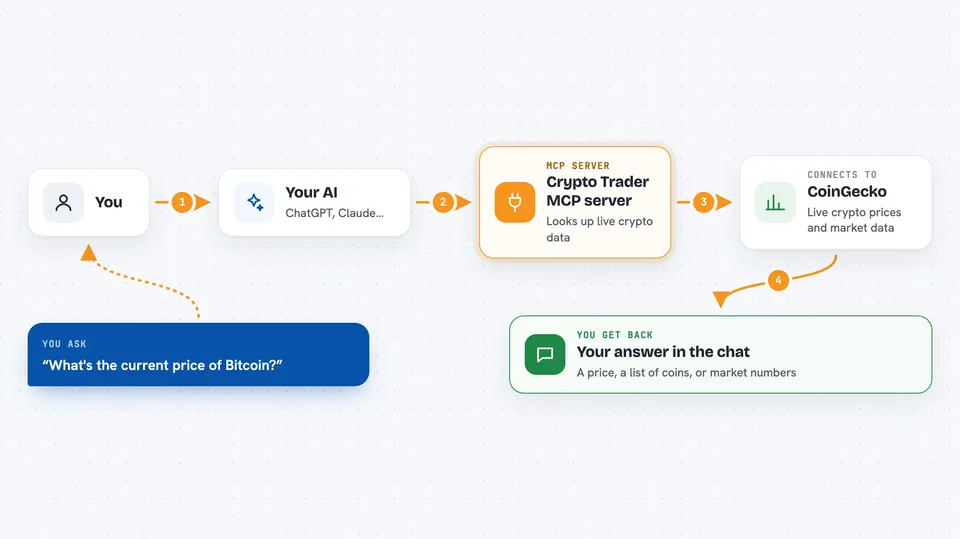
You ask your AI a question about crypto, like the price of Bitcoin or how Ethereum is doing today. The AI passes that request to this helper program running on your computer. The helper talks to the CoinGecko website and pulls back the latest numbers. Then the AI shows you the answer in the chat, in plain words. If something goes wrong, you get a short error message instead of a made-up number.
 Click to zoom
What you can do with it
- Check the current price of a coin like Bitcoin or Ethereum
- See detailed market data such as market cap, daily high and low
- Look at price history over the last few days or weeks
- Search for a coin by name or symbol
- See which cryptocurrencies are trending right now
- Get overall market statistics like total market value
Try asking your AI
- “What's the current price of Bitcoin?”
- “Show me detailed market data for Ethereum”
- “What's the price history of Dogecoin for the last 30 days?”
- “Which cryptocurrencies are trending today?”
What it gives back to you
You get answers written out in the chat, based on live data from CoinGecko. Depending on what you ask, that can be a single price, a short list of coins, a set of market numbers, or a list of dates and prices for a chart. If a coin name is wrong or the service is busy, you get a short error message instead.
Before you start
What you need
- Python 3.10 or newer installed on your computer
- The Claude desktop app
- The project files downloaded from GitHub
- An internet connection (the data comes from CoinGecko)
Good to know
The data comes from the free CoinGecko service, which limits how often it can be asked, so very frequent questions may fail or be slowed down, and this tool only reads data, it does not buy or sell anything.
Install it with your AI
Add Crypto Trader MCP server to your AI, no technical skills needed
You don't install anything by hand. You copy one prompt, paste it into an AI that can work on your computer, and it checks, installs and connects the server for you, asking you when it needs something.
Sign in to get the install prompt
Members get a ready-made prompt that lets the Claude desktop app check Crypto Trader MCP server, install it and connect it for them, step by step. You don't need any technical skills: you copy, paste and answer a few questions. Your connected AI can also find and install any of the 4,609 MCP servers here for you.
Who it's for
Anyone who follows cryptocurrency casually and wants quick price and market answers without leaving their chat.



