MCP server · API
OpenAPI MCP server
by saurav61091
Turn any OpenAPI spec into tools your AI can call, with login support built in.
This is a small helper that reads a web service's instruction sheet (called an OpenAPI spec) and turns it into actions your AI can use. It is handy for people who work with a company's internal or public web services and want their AI to talk to them without writing code.
What is an MCP server? The 30-second version
On its own, your AI can only chat. An MCP server is a small helper program that gives your AI a new skill or a connection to an app or service. This one connects your AI to a web service described by an OpenAPI spec, so the AI can look things up or do things there for you when you ask. You do not need to understand the technical parts; you just ask in plain words.
What this MCP server does
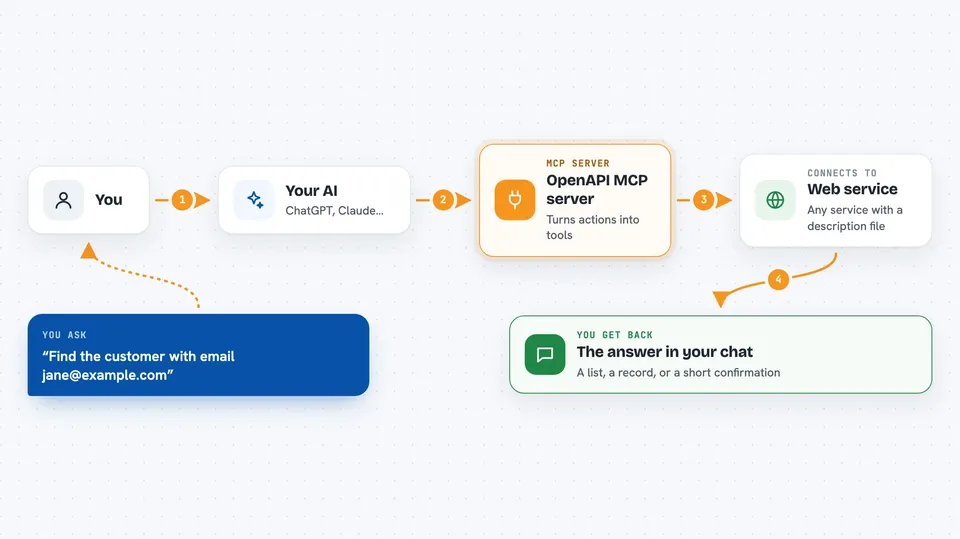
You give this helper an OpenAPI spec, which is a file that describes what a web service can do. The helper reads that file and turns each action in it into something your AI can call. When you ask your AI to do something, the AI picks the right action, sends the request to the web service, and brings the answer back to you. It also handles the login details (Bearer, API key, or Basic auth) so the service accepts the request.
 Click to zoom
What you can do with it
- Connect your AI to any web service that has an OpenAPI spec
- Ask your AI to look up information from that service
- Ask your AI to send data or make changes through that service
- Use services that need a Bearer token, API key, or username and password
- Turn a long list of service actions into simple tools your AI can pick from
Try asking your AI
- “Using the OpenAPI tools, find the customer with email jane@example.com”
- “Create a new support ticket titled Printer not working”
- “List the last five orders for account 4821”
- “Update the shipping address for order 99012”
What it gives back to you
You get back whatever the web service sends: lists, single records, numbers, or a short confirmation that something was created or changed. Your AI shows this in the chat in plain words, often as a small table or a few bullet points. If the service refuses the request, you see an error message explaining why.
Before you start
What you need
- An OpenAPI 3.x spec file or link for the service you want to use
- Login details for that service (a Bearer token, an API key, or a username and password)
- A way to run the helper, such as Node.js or Docker if you run it yourself
Good to know
It can make changes or send data to the connected service, so check what you ask it to do before you run it.
Install it with your AI
Add OpenAPI MCP server to your AI, no technical skills needed
You don't install anything by hand. You copy one prompt, paste it into an AI that can work on your computer, and it checks, installs and connects the server for you, asking you when it needs something.
Sign in to get the install prompt
Members get a ready-made prompt that lets the Claude desktop app check OpenAPI MCP server, install it and connect it for them, step by step. You don't need any technical skills: you copy, paste and answer a few questions. Your connected AI can also find and install any of the 4,609 MCP servers here for you.
Who it's for
People who work with company web services or public APIs and want their AI to use them without writing code.