
MCP server · Gaming
RPG Maker XP MCP server
Let your AI read and edit your RPG Maker XP project data and render map previews as images.
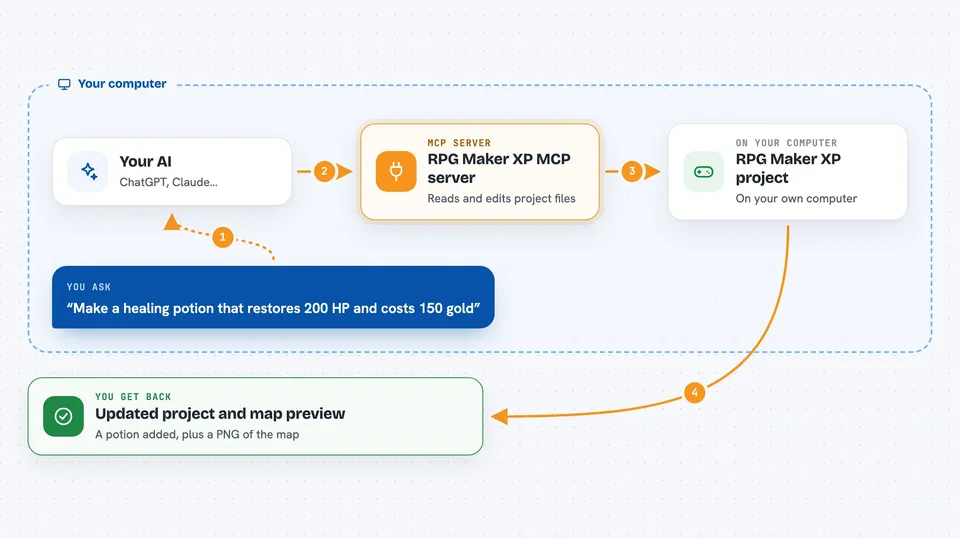
This is a helper that connects your AI assistant to an RPG Maker XP project on your computer. You describe what you want in plain words, like a new healing potion or a forest map, and the AI makes the change in your real project files. It is handy for hobbyist game makers who would rather type a request than click through the editor for every small thing.
What is an MCP server? The 30-second version
On its own, your AI can only chat with you. An MCP server is a small helper program that gives your AI a new skill or a connection to something else. This one connects your AI to an RPG Maker XP project folder on your machine, so it can look up actors, items, maps and scripts, and change them when you ask. You still use your normal AI app; the helper just runs quietly in the background.
What this MCP server does
You ask your AI something like "make a healing potion that restores 200 HP and costs 150 gold". The AI passes that request to this helper program. The helper opens the relevant data files in your RPG Maker XP project, reads them, and writes the change back in the same format the editor uses. Then it tells the AI what it did, and the AI explains the result to you. For maps, it can also draw a flat picture of the map so you can see the layout without opening the editor.
 Click to zoom
What you can do with it
- Create and edit actors, items, weapons, armors and skills
- Build new maps and paint tiles, autotiles and regions
- Add and change map events, including show-text dialogue and transfers
- Search across your project for things like NPC dialogue mentioning a word
- Render a map preview to a PNG image so you can see the layout
- Check your project for missing graphics and audio files
- Read and edit RGSS scripts stored in your project
Try asking your AI
- “Make a healing potion that restores 200 HP and costs 150 gold.”
- “Create a 40 by 30 forest map with a pond in the north-east, then show it to me.”
- “Find every NPC on map 3 whose dialogue mentions the king.”
- “List the actors in my project and their starting equipment.”
What it gives back to you
You get back plain answers in the chat: lists of actors, items or maps, the details of one entry, or a short confirmation of what was changed. When you ask for a map preview, it saves a PNG picture in your project and tells you the file path so you can open it. Validation tools return lists of problems, like missing image files or maps you cannot reach. Script and database lookups come back as readable text, not raw file contents.
Before you start
What you need
- Node.js 18 or newer installed on your computer
- An MCP client such as Claude Desktop or Claude Code
- An RPG Maker XP project folder with Game.rxproj and a Data folder
- RPG Maker XP installed, if your project uses the default RTP assets
Good to know
It writes directly into your real project files, so close the RPG Maker XP editor first and back up your Data folder, because the automatic backup only keeps one copy per file per session.
Install it with your AI
Add RPG Maker XP MCP server to your AI, no technical skills needed
You don't install anything by hand. You copy one prompt, paste it into an AI that can work on your computer, and it checks, installs and connects the server for you, asking you when it needs something.
Sign in to get the install prompt
Members get a ready-made prompt that lets the Claude desktop app check RPG Maker XP MCP server, install it and connect it for them, step by step. You don't need any technical skills: you copy, paste and answer a few questions. Your connected AI can also find and install any of the 4,361 MCP servers here for you.
Who it's for
Hobbyist and indie RPG Maker XP creators who want to build or tweak their game by describing changes instead of clicking through the editor.





