
MCP server · Developer tools
Symfony Agent MCP server
by shakaran
Lets your AI read and explain your Symfony app: routes, entities, services, logs and more.
This is a helper that connects your AI assistant to a Symfony project on your computer so it can read and explain what is inside. It only looks, it never changes anything. It is handy if you work on a Symfony app and want quick answers about routes, database tables, services or logs without digging through files yourself.
What is an MCP server? The 30-second version
On its own, your AI can only chat with you. An MCP server is a small helper program that gives your AI a new skill or a connection to something, here to your Symfony codebase. Once it is set up, your AI can ask this helper questions about your project, and the helper reads the local files and reports back. You just type a normal question and the AI does the looking for you.
What this MCP server does
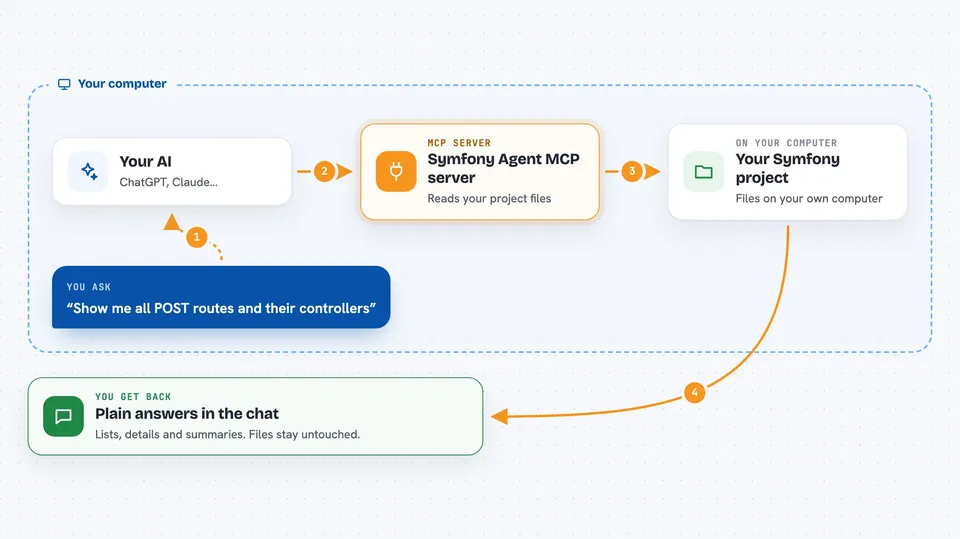
You ask your AI something about your Symfony app, like which routes exist or what a database table looks like. The AI passes that question to this helper program. The helper reads the files in your project folder, such as route configs, entities, services and logs. It sends a short, cleaned-up answer back, with passwords and secret keys blanked out. The AI then explains the result to you in plain words in the chat.
 Click to zoom
What you can do with it
- List all routes in your app and which controller handles each one
- Show the properties and relationships of a database entity
- Find services tagged in a certain way in the service container
- Summarise recent errors and warnings from your logs
- Show migration history and flag any destructive migrations
- Point out controllers that have no security rules
- Give a code quality report with dead code and risky spots
Try asking your AI
- “Show me all POST routes and the controllers behind them”
- “What entities have a relationship with User?”
- “List the last 50 lines of the production log”
- “Are there any circular dependencies in the service container?”
What it gives back to you
You get answers in the chat: lists of routes, entity details, service names, log summaries, migration history, or a short quality report. It can also show numbers, like how many errors happened in the last day. Everything comes back as text you can read and copy. It never changes your files, so nothing in your project is modified.
Before you start
What you need
- Node.js version 22 or newer installed on your computer
- A Symfony project folder on the same machine
- An MCP client like Claude Desktop, Claude Code, Cursor or VS Code Copilot
Good to know
It only reads your project, never changes it, and it blanks out passwords and secret keys before sending anything to the AI, but it can still read your logs and config files, so point it only at folders you are comfortable sharing.
Install it with your AI
Add Symfony Agent MCP server to your AI, no technical skills needed
You don't install anything by hand. You copy one prompt, paste it into an AI that can work on your computer, and it checks, installs and connects the server for you, asking you when it needs something.
Sign in to get the install prompt
Members get a ready-made prompt that lets the Claude desktop app check Symfony Agent MCP server, install it and connect it for them, step by step. You don't need any technical skills: you copy, paste and answer a few questions. Your connected AI can also find and install any of the 4,609 MCP servers here for you.
Who it's for
Symfony developers and anyone who maintains a Symfony app and wants quick, plain-language answers about the codebase.




