MCP server · Analytics
Agentic Ledger MCP server
Ask your AI about your agent runs, costs, and stuck loops recorded by the local Agentic Ledger.

Agentic Ledger is a free tool that watches what your AI agents do and records every call, its cost, and whether a loop got stuck. This MCP server lets your AI read that local record for you. It is handy if you run agents and want quick answers about spending, sessions, or odd behavior without clicking through a dashboard.
What is an MCP server? The 30-second version
On its own, your AI can only chat with you. An MCP server is a small helper program that gives your AI a new skill or a connection to an app or service. This one connects your AI to your local Agentic Ledger, the flight recorder that sits between your agents and the model provider. Once connected, your AI can look up sessions, costs, and loop flags in that ledger and tell you what it finds.
What this MCP server does
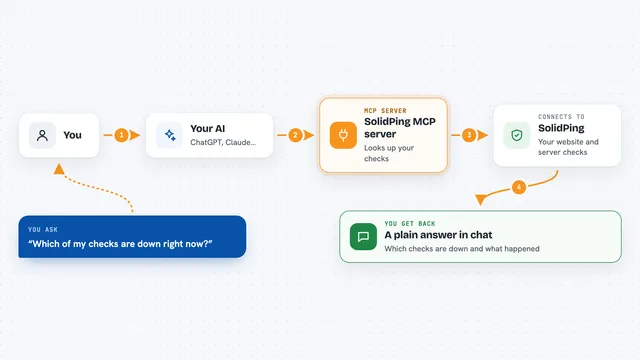
You ask your AI a question about your agent activity. The AI sends that question to this helper, which reads your local Agentic Ledger database. The helper finds the matching sessions, loop runs, costs, or flags and sends them back. Your AI then explains the result in plain words in the chat. Nothing leaves your machine, because the ledger runs locally.
 Click to zoom
What you can do with it
- List recent agent sessions and what they cost
- Show the total spend for a given day or run
- Find loop runs that were flagged as stuck
- Explain why a particular loop was flagged
- Compare the cost of two runs side by side
- Check whether any calls were blocked by a budget or ceiling
- Look up a single call by its action ID
Try asking your AI
- “How much did my agents spend yesterday?”
- “Which loop runs got flagged as stuck this week?”
- “Show me the sessions from run-1 and what they cost”
- “Were any calls blocked by a budget or ceiling today?”
What it gives back to you
You get back plain answers, lists, and numbers in the chat. For example, a list of sessions with their times and costs, or a count of flagged loops with a short reason for each. If you ask about a specific run, you get its spend, call count, and status. The AI presents all of this as normal text you can read.
Before you start
What you need
- Agentic Ledger installed and running on your machine
- Some agent activity already recorded in the ledger
- An AI app that can use MCP servers, like the Claude desktop app
Good to know
This server reads your local ledger data, which can include your prompts, responses, and costs, so treat that record as private.
Install it with your AI
Add Agentic Ledger MCP server to your AI, no technical skills needed
You don't install anything by hand. You copy one prompt, paste it into an AI that can work on your computer, and it checks, installs and connects the server for you, asking you when it needs something.
Sign in to get the install prompt
Members get a ready-made prompt that lets the Claude desktop app check Agentic Ledger MCP server, install it and connect it for them, step by step. You don't need any technical skills: you copy, paste and answer a few questions. Your connected AI can also find and install any of the 4,361 MCP servers here for you.
Who it's for
People who run AI agents and want quick, plain answers about their costs, sessions, and stuck loops without opening a dashboard.