
MCP server · Finance and crypto
l402-kit MCP server
by ShinyDapps
Let your AI pay small Bitcoin Lightning fees to use paid web services on its own.
This is a helper that lets your AI pay tiny amounts of Bitcoin to use web services that charge per use. It is handy if you want your AI to reach paid tools or data without you stepping in to pay each time. You set a spending limit, and the AI stays inside it.
What is an MCP server? The 30-second version
On its own, your AI can only chat with you. An MCP server is a small helper program that gives your AI a new skill or a connection to an outside service. This one connects your AI to the L402 payment system, which is a way to pay for web services with Bitcoin's Lightning network. So when your AI runs into a service that asks for payment, this helper can pay the small fee for you, up to the limit you set.
What this MCP server does
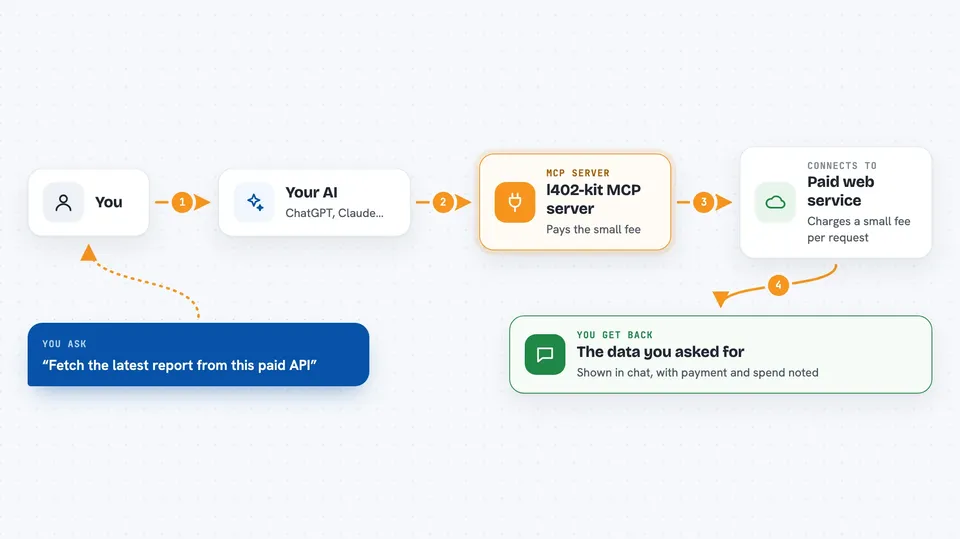
You ask your AI to fetch something from a paid web service. The service replies that payment is required. Your AI uses this helper, which pays the small Lightning fee from your wallet. The service then sends back the data, and your AI shows it to you. All of this happens in seconds, and the helper stops if it would go over your budget.
 Click to zoom
What you can do with it
- Pay small Lightning fees for paid web services automatically
- Set a spending limit in sats so the AI never overspends
- Fetch data from services that charge per call
- Use your own Lightning wallet through a provider like Blink or Alby
- Work with Claude Desktop, Cursor, and other MCP-compatible apps
Try asking your AI
- “Fetch the latest report from this paid API and summarize it for me”
- “Get the data from this endpoint that charges per call, stay under 500 sats”
- “Check how much of my session budget is left”
- “Pull the paid dataset and show me the top 10 rows”
What it gives back to you
You get back whatever the paid service sent, usually as text or structured data in the chat. It also tells you when a payment was made and how much was spent. If the budget is reached, it says so instead of paying. Everything appears right in your conversation.
Before you start
What you need
- A Lightning wallet with a small balance in sats
- An API key from a Lightning provider such as Blink or Alby (a kind of password the site gives you)
- An MCP-compatible app like Claude Desktop or Cursor
- Node.js installed so the npx command can run
Good to know
This helper can spend real Bitcoin from your wallet, so set a low budget and use a wallet with only a small balance.
Install it with your AI
Add l402-kit MCP server to your AI, no technical skills needed
You don't install anything by hand. You copy one prompt, paste it into an AI that can work on your computer, and it checks, installs and connects the server for you, asking you when it needs something.
Sign in to get the install prompt
Members get a ready-made prompt that lets the Claude desktop app check l402-kit MCP server, install it and connect it for them, step by step. You don't need any technical skills: you copy, paste and answer a few questions. Your connected AI can also find and install any of the 4,609 MCP servers here for you.
Who it's for
People who want their AI to use paid web services on its own without paying each time by hand.



