
MCP server · Finance and crypto
Crypto Market Data MCP server
Lets your AI look up live crypto prices, charts, order books and market mood for you.
This is a small helper that gives your AI assistant a live view of the cryptocurrency market. You ask a question in plain words, and it fetches real prices, charts and signals for you. It is handy if you follow crypto at all, or if you just want quick numbers without opening five different websites.
What is an MCP server? The 30-second version
On its own, your AI can only chat with you using what it already learned. An MCP server is a little helper program that gives your AI a new skill or a connection to a service. This one connects your AI to live crypto market data, so when you ask about Bitcoin or Ethereum, it can actually go check instead of guessing. You install it once, and from then on your AI just uses it whenever a question needs real market numbers.
What this MCP server does
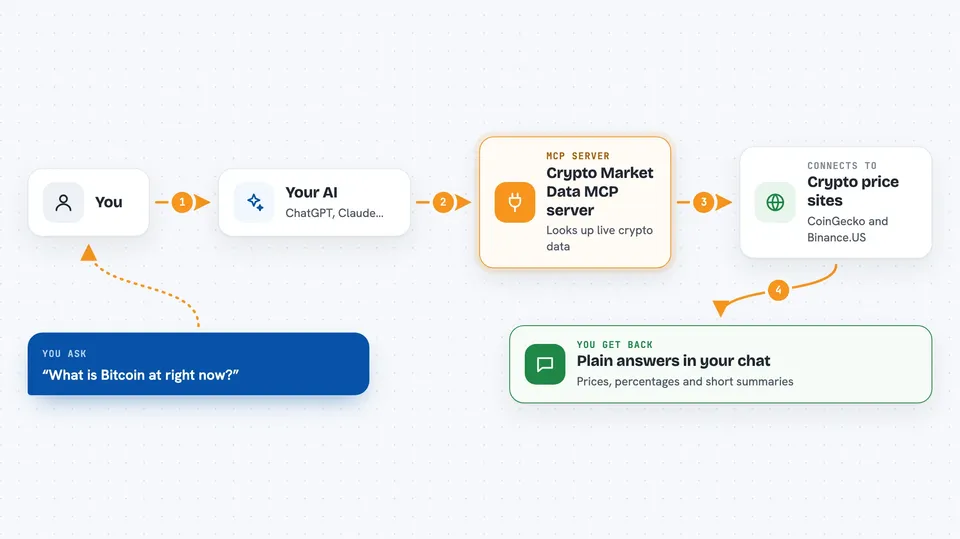
You ask your AI something like what is Bitcoin at right now. Your AI passes that question to this helper program. The helper then talks to free public crypto data sources, like CoinGecko and Binance.US, and pulls back the current numbers. Your AI reads the answer and explains it to you in the chat, in normal words.
 Click to zoom
What you can do with it
- Check the current price, 24 hour change, volume and market cap of any crypto
- Pull candlestick history from one day up to a year
- Look at the live order book for a coin, with top bids and asks
- See the top 100 coins ranked by market cap
- Find out what coins are trending right now
- Get simple technical signals like RSI, moving averages and trend
- Compare up to ten coins side by side
- Check the crypto Fear and Greed Index for the last week
Try asking your AI
- “What is BTC trading at right now?”
- “Is ETH overbought or oversold?”
- “Show me the order book for SOL.”
- “Compare BTC, ETH and SOL for me.”
- “What is the market mood today?”
What it gives back to you
You get back plain answers in the chat: prices, percentages, small tables of coins, and short summaries of signals like overbought or sideways. For charts and order books, you get the numbers listed out, for example the best bid and best ask and the spread. It does not draw pictures, it gives you the figures and your AI explains them.
Before you start
What you need
- An AI app that supports MCP servers, like Claude Code or the Claude desktop app
- Node.js installed on your computer (the free program that runs npx)
Good to know
The numbers come from free public sources and can be delayed or briefly wrong, so do not treat them as trading advice or as the final word before you buy or sell anything.
Install it with your AI
Add Crypto Market Data MCP server to your AI, no technical skills needed
You don't install anything by hand. You copy one prompt, paste it into an AI that can work on your computer, and it checks, installs and connects the server for you, asking you when it needs something.
Sign in to get the install prompt
Members get a ready-made prompt that lets the Claude desktop app check Crypto Market Data MCP server, install it and connect it for them, step by step. You don't need any technical skills: you copy, paste and answer a few questions. Your connected AI can also find and install any of the 4,609 MCP servers here for you.
Who it's for
Anyone who follows crypto casually or professionally and wants quick live numbers without hopping between websites.



