
MCP server · Finance and crypto
FIX Protocol MCP server
Read, check, and build FIX trading messages with your AI, offline and with a built-in field dictionary.
This is a small helper that lets your AI work with FIX messages, the tag=value format used to send orders and trade confirmations between trading systems. It runs on your own computer and does not need the internet. It is handy if you deal with trading messages and want a quick way to read them, check them, or put one together.
What is an MCP server? The 30-second version
On its own, your AI can only chat. An MCP server is a small helper program that gives your AI a new skill, in this case the ability to work with FIX protocol messages. Once it is connected, you can paste a FIX message and ask your AI what it means, or ask it to build one for you. The helper does the careful tag-by-tag work behind the scenes, and your AI shows you the result in plain words.
What this MCP server does
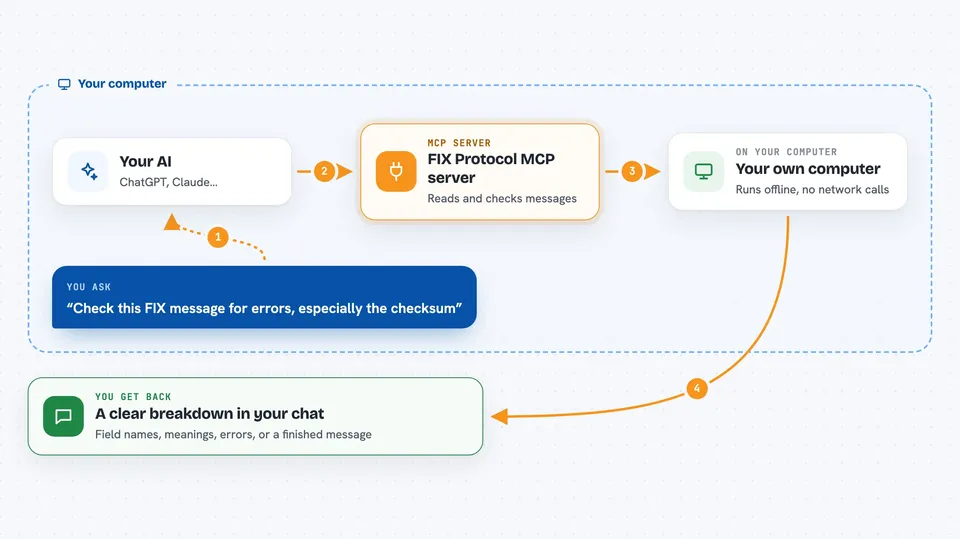
You paste a FIX message into your chat and ask your AI to read it. Your AI passes it to this helper, which breaks it into tags, field names, values, and what the coded values mean. If you ask it to check a message, the helper compares the BodyLength and CheckSum against what they should be and flags missing or out-of-order fields. If you ask it to build a message, you give the fields and the helper fills in the header, length, and checksum for you. Everything happens on your machine, with no network calls.
 Click to zoom
What you can do with it
- Decode a raw FIX message into readable field names and meanings
- Check a FIX message for a wrong checksum, bad length, or missing fields
- Build a valid FIX message from field names or tag numbers
- Look up what a tag number means and what values it accepts
- Spot unrecognised tags or enum values as warnings
- Work with messages delimited by SOH, pipe, or caret characters
Try asking your AI
- “Parse this FIX message and tell me what each field means: 8=FIX.4.2|9=65|35=A|98=0|108=30|10=062|”
- “Check this FIX message for errors, especially the checksum”
- “Build a NewOrderSingle for 100 shares of AAPL, Buy, Limit at 150.25, with ClOrdID A1”
- “What does tag 40 mean and what values can it take?”
What it gives back to you
You get back a clear breakdown in the chat: for parsing, a list of tags with their field names, values, and what the coded values mean. For validation, a simple valid or not valid answer, plus any errors and warnings. For building, the finished FIX message as a string, ready to copy. For tag lookups, the field name, data type, and the list of possible values.
Before you start
What you need
- Python installed on your computer
- The fix-protocol-mcp package installed (pip install .)
- An MCP client like the Claude desktop app
Good to know
It only covers a curated subset of FIX 4.4, so unusual tags or values may show up as warnings rather than being fully explained.
Install it with your AI
Add FIX Protocol MCP server to your AI, no technical skills needed
You don't install anything by hand. You copy one prompt, paste it into an AI that can work on your computer, and it checks, installs and connects the server for you, asking you when it needs something.
Sign in to get the install prompt
Members get a ready-made prompt that lets the Claude desktop app check FIX Protocol MCP server, install it and connect it for them, step by step. You don't need any technical skills: you copy, paste and answer a few questions. Your connected AI can also find and install any of the 4,609 MCP servers here for you.
Who it's for
People who work with trading systems, such as trade support, QA, and developers who handle FIX messages day to day.



