
MCP server · Security
SafeNode MCP Gateway
by sp3ak
Checks every tool call your AI makes and blocks, warns or holds it before it reaches your apps.
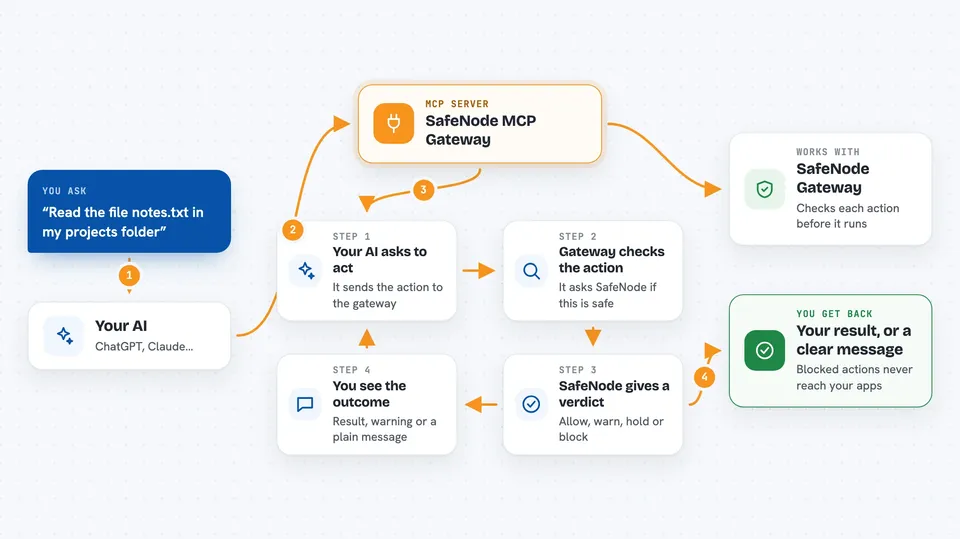
SafeNode MCP Gateway is a small helper that sits between your AI assistant and the other tools it can use. Before your AI is allowed to do anything, the gateway checks that action against a set of rules you control. It is handy if you let your AI read files, change things or run commands and you want a say in what actually happens.
What is an MCP server? The 30-second version
On its own, your AI can only chat with you. An MCP server is a small helper program that gives your AI a new skill or a connection to an app, like reading your files or looking things up in a database. This gateway is a special kind of helper: it stands in front of the other helpers you already use and checks each request first. So when your AI asks to write a file, the gateway asks SafeNode whether that is allowed, and only then passes the request along.
What this MCP server does
You ask your AI to do something, like read a file or update a record. Your AI turns that into a tool call and sends it to the gateway instead of straight to the app. The gateway sends a short description of the action to the SafeNode service and waits for an answer. If the answer is allow, the request goes through and you get the normal result. If the answer is warn, deny or review, you get a message back explaining what happened, and the request never reaches the app.
 Click to zoom
What you can do with it
- Block risky actions before they touch your files or accounts
- See a warning line in the chat when an action is allowed but flagged
- Hold an action and ask for your approval before it runs
- Hide emails, card numbers and passwords before anything leaves your computer
- Keep a local log of every decision so you have a record
- Set different rules for different tools, like stricter rules for writing than for reading
Try asking your AI
- “Read the file notes.txt in my projects folder”
- “Delete all rows from the customers table”
- “Send this summary to the team channel”
- “Write a new config file with these settings”
What it gives back to you
You get the normal result of the action when it is allowed, plus a short warning line if SafeNode flagged it. When an action is blocked, you get a plain message explaining why and a reference number you can look up. The gateway also writes a local log file of every decision if you turn that on, so you can see what your AI tried to do even when the network was down.
Before you start
What you need
- Node.js 18 or newer on your computer
- A free SafeNode API key from safenode.tech (a kind of password for apps; the site gives you one for free)
- A config file listing the MCP servers you already use
- Your MCP client, such as Claude Desktop, Claude Code or Cursor
Good to know
It only decides whether a request is forwarded, so it does not sandbox the apps behind it, and every check counts against your monthly SafeNode quota.
Install it with your AI
Add SafeNode MCP Gateway to your AI, no technical skills needed
You don't install anything by hand. You copy one prompt, paste it into an AI that can work on your computer, and it checks, installs and connects the server for you, asking you when it needs something.
Sign in to get the install prompt
Members get a ready-made prompt that lets the Claude desktop app check SafeNode MCP Gateway, install it and connect it for them, step by step. You don't need any technical skills: you copy, paste and answer a few questions. Your connected AI can also find and install any of the 4,361 MCP servers here for you.
Who it's for
People who let their AI assistant touch real files, databases or accounts and want a safety check before anything happens.





