
MCP server · Developer tools
Orihime MCP server
Lets your AI map how your code calls itself, spot security risks, and check licenses across repos.
Orihime is a helper that reads your source code and builds a map of how everything connects, across Java, Kotlin, JavaScript and TypeScript projects. Once it is connected to your AI assistant, you can ask plain questions about your code instead of searching through files yourself. It is handy for developers, tech leads, and security reviewers who work with more than one codebase.
What is an MCP server? The 30-second version
On its own, your AI can only chat with you. An MCP server is a small helper program that gives your AI a new skill or a connection to another tool. This one connects your AI to Orihime, which has already read and mapped your code. So when you ask a question about your code, the AI can look it up in that map and give you a real answer.
What this MCP server does
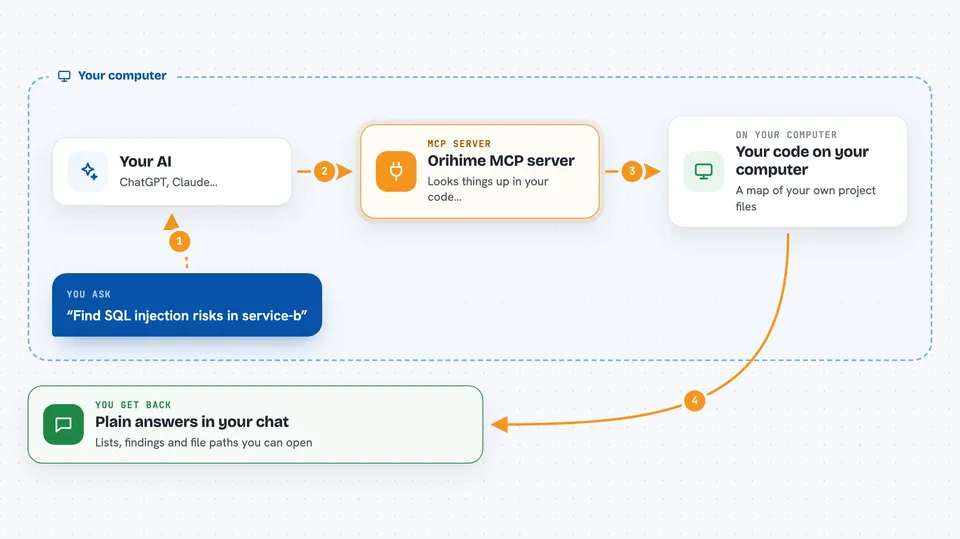
You first run a command that reads your code and builds a map of it, stored on your own computer. Then you ask your AI a question, like who calls a certain method or where a security risk lives. The AI passes that question to this helper, which looks it up in the map. The helper sends back the answer, and your AI explains it to you in the chat. You never have to open the source files or run searches yourself.
 Click to zoom
What you can do with it
- Trace who calls a method and what it calls in turn
- Find security risks like SQL injection across your services
- See what breaks if you change a method
- Check which dependencies use licenses like GPL or AGPL
- Find slow spots and endpoints nearing their limits
- List all HTTP endpoints in a repository
- Search for any class or method by name
Try asking your AI
- “Trace the call flow for GET /api/orders in service-a”
- “Find SQL injection risks in service-b”
- “What breaks if I change OrderService.processPayment?”
- “Which endpoints are approaching saturation?”
What it gives back to you
You get answers in plain language in your chat, like a list of methods, a summary of a security finding, or a warning about a slow endpoint. Some answers come as tables or reports in formats like OWASP or CWE. You can also ask for file paths and line numbers so you can jump straight to the code. Everything is explained by your AI, so you do not read raw data.
Before you start
What you need
- Python installed on your computer
- A copy of the Orihime project (you download it from GitHub)
- Your code repositories on the same computer
- An AI assistant that supports MCP, like Claude Code
Good to know
It reads your source code and stores a map on your computer, so keep that map private if your code is private, and double-check any security finding before acting on it.
Install it with your AI
Add Orihime MCP server to your AI, no technical skills needed
You don't install anything by hand. You copy one prompt, paste it into an AI that can work on your computer, and it checks, installs and connects the server for you, asking you when it needs something.
Sign in to get the install prompt
Members get a ready-made prompt that lets the Claude desktop app check Orihime MCP server, install it and connect it for them, step by step. You don't need any technical skills: you copy, paste and answer a few questions. Your connected AI can also find and install any of the 4,609 MCP servers here for you.
Who it's for
Developers, tech leads, and security reviewers who work with Java, Kotlin, JavaScript or TypeScript codebases, especially across more than one service.




