
MCP server · Security
CodeSafer MCP server
by goldmembrane
Your AI can scan code and config files for hidden tricks like invisible characters and sneaky dependencies.
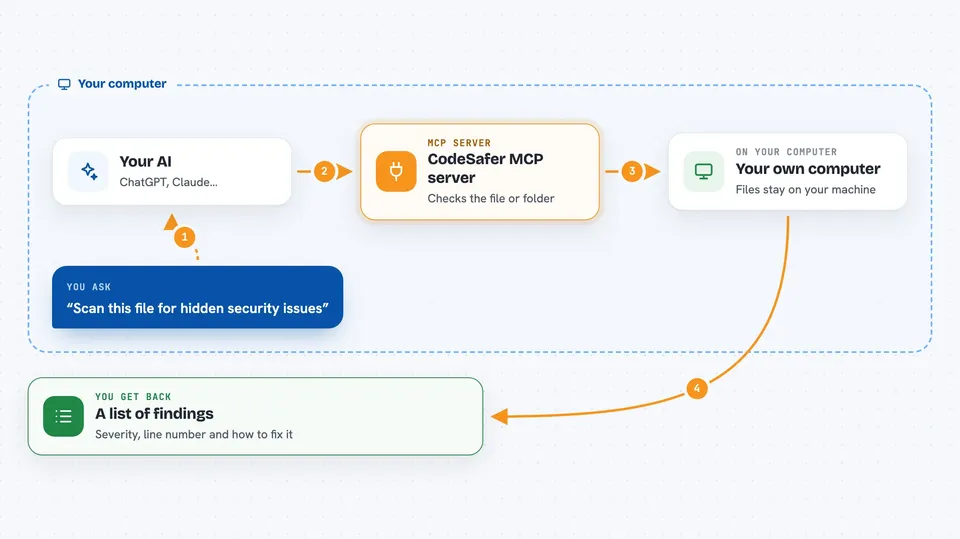
CodeSafer is a small helper that checks code for hidden problems, the kind that look fine on screen but do something else when they run. It is handy if you use AI to write or review code and want a second pair of eyes before you trust it. You add it to your AI app once, then just ask your AI to scan things.
What is an MCP server? The 30-second version
On its own, your AI can only chat with you. An MCP server is a small helper program that gives your AI a new skill or a connection to something. CodeSafer is that helper: once connected, your AI can run its scanners on your files. So when you ask your AI to check a file, it quietly asks CodeSafer to do the checking and then tells you what it found.
What this MCP server does
You ask your AI something like scan this file for hidden security issues. Your AI passes that request to CodeSafer, which runs on your own computer. CodeSafer looks through the file, or a whole folder, using a set of built-in rules and a trained model. It then hands back a list of findings with severity, line numbers, and advice on how to fix them. Nothing is uploaded anywhere; the checking happens locally.
 Click to zoom
What you can do with it
- Scan a single file for hidden or malicious code patterns
- Scan a whole folder of source files at once
- Check AI rules files like .cursorrules or CLAUDE.md for planted instructions
- Check package.json for typosquatted or suspicious dependencies
- Run a deeper AI analysis on a piece of code with a confidence score
- Ask for a plain explanation of a threat category and how to fix it
Try asking your AI
- “Scan this file for hidden security issues.”
- “Check the dependencies in package.json for typosquatting.”
- “Scan .cursorrules for a rules-file backdoor.”
- “Run a deep AI analysis of src/auth.ts.”
What it gives back to you
You get a list of findings in the chat, each with a severity level, the line number where it was found, and a short note on what is wrong. For deeper checks, you also get a confidence score from the AI analysis. If nothing suspicious turns up, it simply tells you the file looks clean. You can then ask follow-up questions like what a Trojan Source attack is and how to fix it.
Before you start
What you need
- Node.js 18 or newer installed on your computer
- An MCP-compatible AI app such as Claude Code, Cursor, VS Code with Copilot, or Cline
- The CodeSafer project downloaded and built once (the README shows the commands)
Good to know
It only reads and reports, it does not change your files, but the deeper AI analysis is limited to 10 free runs per session and paid plans exist for more.
Install it with your AI
Add CodeSafer MCP server to your AI, no technical skills needed
You don't install anything by hand. You copy one prompt, paste it into an AI that can work on your computer, and it checks, installs and connects the server for you, asking you when it needs something.
Sign in to get the install prompt
Members get a ready-made prompt that lets the Claude desktop app check CodeSafer MCP server, install it and connect it for them, step by step. You don't need any technical skills: you copy, paste and answer a few questions. Your connected AI can also find and install any of the 4,361 MCP servers here for you.
Who it's for
Developers and anyone who uses AI to write or review code and wants a quick safety check before running it.




