MCP server · Finance and crypto
MicroTap MCP server
Lets your AI pay small amounts of crypto to fetch prediction markets, crypto prices, weather and web search results on its own.
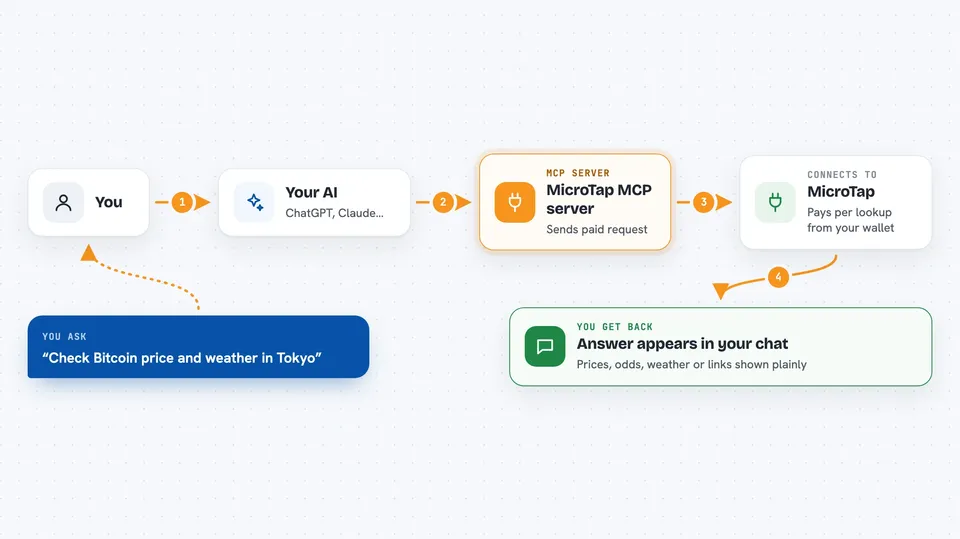
MicroTap is a helper that gives your AI assistant access to 20 small paid data services, like prediction market odds, crypto prices, weather and web search. You pay a tiny amount of crypto per request, usually a fraction of a cent. It is handy for people who want live market and crypto information inside their chat without signing up for lots of accounts.
What is an MCP server? The 30-second version
On its own, your AI can only chat with you using what it already learned. An MCP server is a small helper program that gives your AI a new skill or a connection to an outside service. This one connects your AI to MicroTap, a set of paid data services. When you ask a question, the AI quietly asks MicroTap for the answer and pays a tiny amount of crypto for it, then tells you what it found.
What this MCP server does
You ask your AI something, like the odds on a prediction market or the current price of a coin. The AI uses this helper to send a request to MicroTap. MicroTap replies asking for a small payment, and the helper signs that payment locally using a small wallet it made for you. It then retries the request with the payment attached and gets the real answer. You see the answer in your chat, and a few cents of USDC are spent from your wallet.
 Click to zoom
What you can do with it
- Look up Polymarket and Kalshi prediction market odds
- Compare prediction markets across platforms to spot price gaps
- Check crypto prices, market data and trending coins
- See DeFi totals locked across protocols and chains
- Get live weather for a place
- Run a real-time web search
- Read on-chain data like wallet balances, gas prices and ENS names
Try asking your AI
- “What are the current odds on Polymarket for the next US election?”
- “Find any prediction markets where Polymarket and Kalshi disagree by more than 5 percent”
- “What is the price of Ethereum right now and how has it moved today?”
- “What is the weather in Tokyo this afternoon?”
What it gives back to you
You get the answer in your chat, just like a normal reply from your AI. That could be a list of markets with their odds, a price number, a weather summary, a set of search results, or a wallet balance. Some answers come back as short tables or bullet lists. You do not have to do anything extra to see them.
Before you start
What you need
- The Claude desktop app or another MCP client like Cursor or Windsurf
- Node.js installed on your computer (the helper runs through npx)
- A small amount of USDC on the Base network sent to the wallet address the helper shows you
Good to know
Each request spends a small amount of real USDC from the wallet the helper made for you, so keep an eye on the balance and the spending limit.
Install it with your AI
Add MicroTap MCP server to your AI, no technical skills needed
You don't install anything by hand. You copy one prompt, paste it into an AI that can work on your computer, and it checks, installs and connects the server for you, asking you when it needs something.
Sign in to get the install prompt
Members get a ready-made prompt that lets the Claude desktop app check MicroTap MCP server, install it and connect it for them, step by step. You don't need any technical skills: you copy, paste and answer a few questions. Your connected AI can also find and install any of the 4,361 MCP servers here for you.
Who it's for
People who follow prediction markets, crypto or DeFi and want quick live answers inside their AI chat without setting up many accounts.