
MCP server · Finance and crypto
VaultPilot Crypto MCP server
by szhygulin
Check your crypto balances and DeFi positions, and prepare transactions you approve on your Ledger.
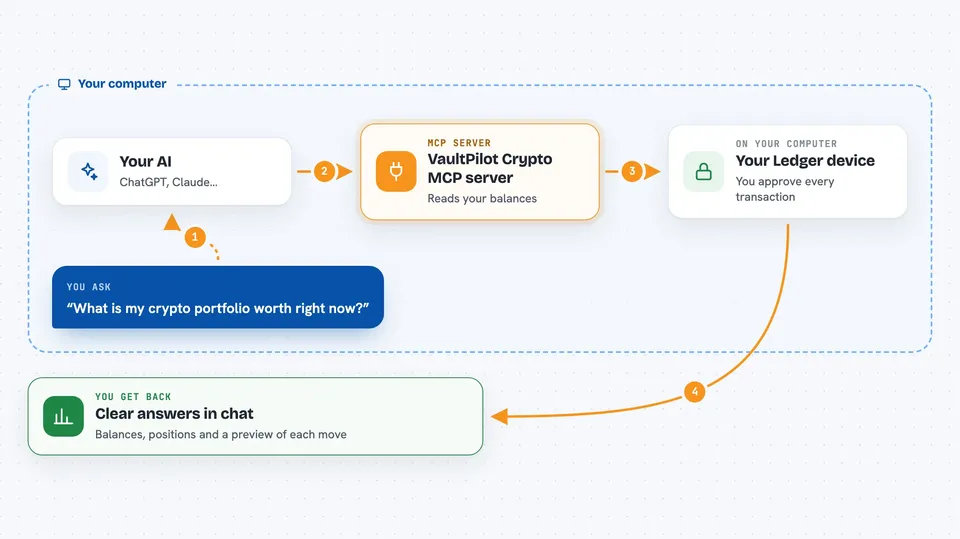
VaultPilot is a helper that connects your AI assistant to your crypto wallets and DeFi positions. It can look up balances, staking, loans and swaps across many chains, and it can prepare transactions for you. You always approve each transaction yourself on your Ledger device, so your private keys stay on the device. It is handy for people who hold crypto and use DeFi but want to keep control of their keys.
What is an MCP server? The 30-second version
On its own, your AI can only chat. An MCP server is a small helper program that gives your AI a new skill or a connection to an app or service. This one connects your AI to your crypto wallets and DeFi accounts, so it can look things up and prepare actions for you. When you ask a question, the AI uses this helper to fetch the real numbers and build the transaction, then you approve it on your Ledger.
What this MCP server does
You ask your AI something like what your portfolio is worth or what your loan health looks like. The AI uses this helper to read your balances and positions across Ethereum, Arbitrum, Polygon, Base, Optimism, TRON, Solana, Bitcoin and Litecoin. If you want to do something, like swap tokens or supply to a lending pool, the helper prepares the transaction. The transaction is then sent to your Ledger device for you to review and sign. Nothing moves until you approve it on the device.
 Click to zoom
What you can do with it
- Check your total portfolio value across chains in US dollars
- See your lending positions and health factors on Aave, Compound, Morpho, MarginFi and Kamino
- Review your staking positions on Lido, EigenLayer, Rocket Pool, Marinade and Jito
- Get swap and bridge quotes across EVM chains, Solana, TRON and Bitcoin
- Prepare token sends, approvals and revokes for you to sign on your Ledger
- Run a liquidation risk simulation on your positions
- Get a daily briefing of your crypto holdings
Try asking your AI
- “What is my total portfolio worth right now?”
- “Show me my lending positions and any health alerts”
- “Prepare a swap of 1 ETH to USDC on Arbitrum”
- “What are my staking rewards on Lido and Marinade?”
What it gives back to you
You get back clear answers in the chat, like a list of your balances with dollar totals, or a summary of your positions and health factors. For transactions, it gives you a preview of what will happen, including the recipient, amount and fees. After you sign on your Ledger, it can confirm the transaction status. Some tools also give you risk scores or decoded transaction details.
Before you start
What you need
- A Ledger hardware wallet
- Ledger Live installed and your device connected
- An MCP-compatible client like Claude Code or Cursor (Claude.ai chat needs a hosted endpoint that is not ready yet)
- Some tools need free API keys from services like Helius or a Bitcoin node, but many work without them
Good to know
This tool can prepare transactions that move your crypto, so always check the details on your Ledger screen before you approve, and be careful with any transaction you did not expect.
Install it with your AI
Add VaultPilot Crypto MCP server to your AI, no technical skills needed
You don't install anything by hand. You copy one prompt, paste it into an AI that can work on your computer, and it checks, installs and connects the server for you, asking you when it needs something.
Sign in to get the install prompt
Members get a ready-made prompt that lets the Claude desktop app check VaultPilot Crypto MCP server, install it and connect it for them, step by step. You don't need any technical skills: you copy, paste and answer a few questions. Your connected AI can also find and install any of the 4,609 MCP servers here for you.
Who it's for
Crypto holders who use DeFi and want to keep their keys on a Ledger while getting AI help with balances, positions and transaction preparation.



