
MCP server · Finance and crypto
HeadlessTracker MCP server
by tamasPetki
Lets your AI see your whole crypto portfolio across exchanges, wallets and prediction markets, read-only.
HeadlessTracker is a helper for your AI that pulls your crypto numbers together in one place. It can look at exchanges like Bybit and Binance, on-chain wallets on Ethereum and Solana, and prediction markets like Polymarket. It is handy if you hold crypto in more than one spot and want to ask plain questions instead of opening five different apps.
What is an MCP server? The 30-second version
On its own, your AI can only chat with you. An MCP server is a small helper program that gives your AI a new skill or a connection to an app or service. This one connects your AI to your crypto accounts and wallets, so it can look up your balances and positions for you. You ask a question in normal words, and the AI uses this helper to fetch the numbers.
What this MCP server does
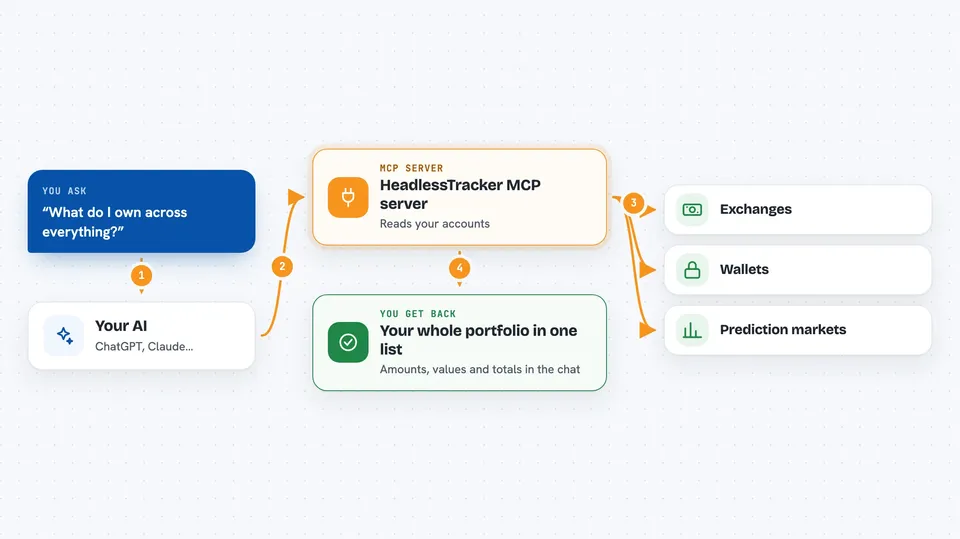
You ask your AI something like what do I own. The AI passes that question to HeadlessTracker. HeadlessTracker reads your accounts and wallets using read-only access, then tidies everything into one simple list. It sends the numbers back to your AI, and your AI shows them to you as a table, a chart or a short answer. It never places trades or moves money.
 Click to zoom
What you can do with it
- See all your crypto holdings in one list
- Check how your portfolio is split between coins, cash and prediction markets
- Look at your Polymarket positions grouped by event
- Refresh an exchange and ask for your Bitcoin profit and loss
- View a dashboard with charts inside the chat
- Check your Solana or Ethereum wallet balances by address
- Review your recent trades and weekly changes
Try asking your AI
- “What do I own across everything?”
- “How is my portfolio split between crypto and prediction markets?”
- “Show my Polymarket positions grouped by event.”
- “Refresh Bybit and tell me my BTC P&L.”
What it gives back to you
You get back a clear list of your positions with amounts and values, plus totals and a breakdown by type. Your AI can turn that into a table, a chart or a short written answer right in the chat. If you ask for a dashboard, it can show an interactive panel with tabs for portfolio, weekly review and risk. You can also ask for values in USD, EUR, GBP or HUF.
Before you start
What you need
- Node.js version 22.5 or newer
- Public wallet addresses for Solana, Hyperliquid or Polymarket (no password needed)
- Read-only API keys from Bybit or Binance if you want those included
- An Etherscan key if you want to track Ethereum wallets
Good to know
It can only read your accounts, never trade or move funds, but it does see your balances and positions, so keep your keys read-only and treat the numbers as information, not financial advice.
Install it with your AI
Add HeadlessTracker MCP server to your AI, no technical skills needed
You don't install anything by hand. You copy one prompt, paste it into an AI that can work on your computer, and it checks, installs and connects the server for you, asking you when it needs something.
Sign in to get the install prompt
Members get a ready-made prompt that lets the Claude desktop app check HeadlessTracker MCP server, install it and connect it for them, step by step. You don't need any technical skills: you copy, paste and answer a few questions. Your connected AI can also find and install any of the 4,609 MCP servers here for you.
Who it's for
People who hold crypto in several places and want to ask their AI simple questions about it without opening many apps.



