MCP server · Health and learning
Wellness CGM MCP server
by davidmosiah
Let your AI read your continuous glucose monitor and explain your blood sugar patterns.
This is a helper that connects your AI assistant to a continuous glucose monitor, the small sensor some people wear on their arm to track blood sugar all day. It works with Dexcom and with the over-the-counter FreeStyle Libre sensor. It is handy if you wear a CGM and want to ask plain questions about your readings without juggling apps.
What is an MCP server? The 30-second version
On its own, your AI can only chat. It cannot see your glucose sensor or anything else outside the conversation. An MCP server is a small helper program that gives your AI a new skill, and this one gives it a connection to your CGM. Once it is set up, you ask a question in normal words and the AI quietly asks this helper for your readings, then explains them back to you.
What this MCP server does
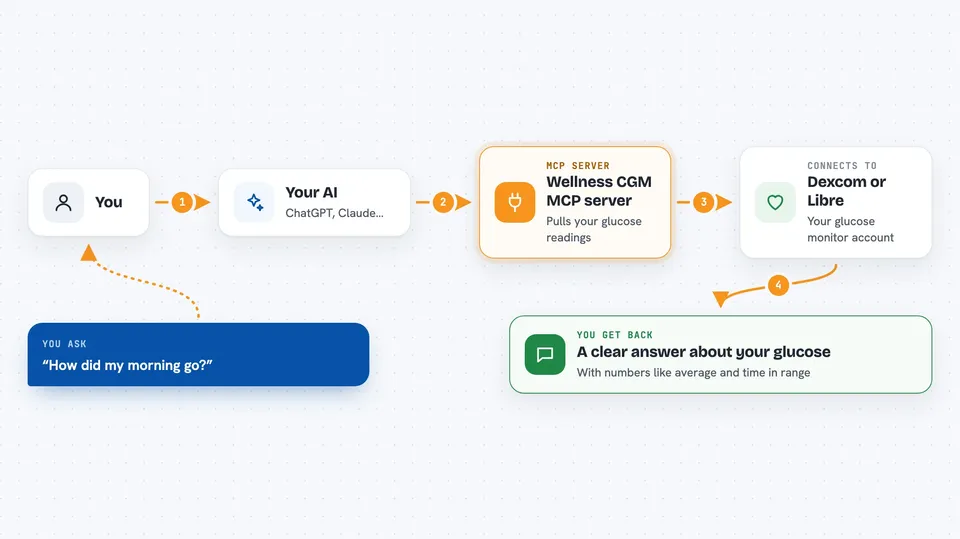
You ask your AI something like how your morning went. The AI passes that question to this helper program running on your own computer. The helper logs in to your CGM provider (Dexcom or Libre) and pulls the recent glucose readings. It then works out the numbers, like your average, your time in range, or how a meal affected you. The AI turns those numbers into a short, readable answer in the chat.
 Click to zoom
What you can do with it
- Check your most recent glucose reading and which way it is trending
- See all your readings over the last few hours
- Get a daily summary with your average, estimated A1C and time in range
- See how a specific meal affected your glucose, from baseline to peak and back
- Find low blood sugar events in a time window
- Check whether the connection is live or just showing fake test data
- Log in to LibreLink Up and list the sensors you follow
Try asking your AI
- “What is my glucose right now and which way is it going?”
- “Give me a summary of my last 12 hours, including time in range.”
- “I ate rice and chicken at 1:15pm. How did that meal affect my glucose?”
- “Were there any low blood sugar events overnight?”
What it gives back to you
You get answers written in normal language, plus the numbers behind them: your latest reading, averages, time in range, estimated A1C, and meal peaks. It also tells you which provider the data came from and how many hours the numbers actually cover. If nothing is set up yet, it returns made-up test readings clearly marked as mock so you can try it safely.
Before you start
What you need
- Node.js installed on your computer (the free program that runs this helper)
- A Dexcom developer account (free sandbox available) or your LibreLink Up email and password
- The Claude desktop app or another AI app that supports MCP servers
Good to know
This is not medical advice and must not be used for insulin or medication decisions; always talk to your doctor. Also, on the Libre sensor the data only covers about the last 12 hours per read, so check the hours covered before trusting any multi-day summary.
Install it with your AI
Add Wellness CGM MCP server to your AI, no technical skills needed
You don't install anything by hand. You copy one prompt, paste it into an AI that can work on your computer, and it checks, installs and connects the server for you, asking you when it needs something.
Sign in to get the install prompt
Members get a ready-made prompt that lets the Claude desktop app check Wellness CGM MCP server, install it and connect it for them, step by step. You don't need any technical skills: you copy, paste and answer a few questions. Your connected AI can also find and install any of the 4,361 MCP servers here for you.
Who it's for
People who wear a continuous glucose monitor and want to ask their AI plain questions about their readings, especially those tracking metabolic health or managing diabetes.