MCP server · Analytics
ChatSpatial MCP server
Ask your AI to analyze spatial transcriptomics data and get plots, cell types, and statistics back.
ChatSpatial is a helper that connects your AI assistant to tools for spatial transcriptomics, a lab technique that maps gene activity inside a tissue slice. Instead of writing analysis code yourself, you describe what you want in plain words and the AI runs the right analysis for you. It is handy for biologists, lab scientists, and students who have spatial data and want answers without becoming programmers.
What is an MCP server? The 30-second version
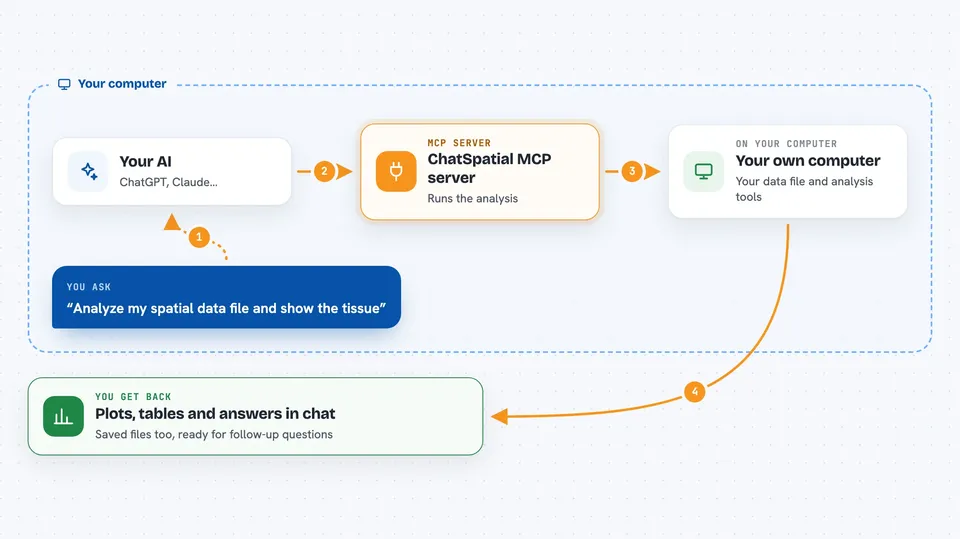
On its own, your AI can only chat. An MCP server is a small helper program that gives your AI a new skill or a connection to another tool. This one connects your AI to a set of spatial transcriptomics analysis methods. So when you ask a question about your tissue data, the AI can actually run the analysis and show you the result, not just talk about it.
What this MCP server does
You point the AI at a data file from a spatial experiment, like one from 10x Visium or Xenium. The AI picks the right analysis tool from ChatSpatial's list, sets the options, and runs it. ChatSpatial does the heavy lifting, such as finding cell types, mapping tissue regions, or running spatial statistics. Then it sends the results back to your chat as plots, tables, or numbers. You can keep asking follow-up questions in the same conversation.
 Click to zoom
What you can do with it
- Load and clean up a spatial dataset
- Show the tissue structure as a picture
- Find spatial regions or domains in the tissue
- Estimate which cell types are present in each spot
- Run spatial statistics like Moran's I or neighborhood enrichment
- Annotate cell types automatically
- Compare gene activity between groups
Try asking your AI
- “Load /data/spatial_data.h5ad and show me the tissue structure”
- “Find the spatial domains in this tissue and color them on the map”
- “Which cell types are in each spot? Run a deconvolution”
- “Are there genes that vary across space? Run a spatial variable gene test”
What it gives back to you
You get back answers in the chat: plots of the tissue, lists of cell types or genes, tables of statistics, and short summaries of what was found. Files like images or result tables can also be saved for you. Everything stays in the conversation so you can ask follow-up questions.
Before you start
What you need
- A spatial transcriptomics data file, for example an .h5ad file
- The uv tool installed once on your computer
- An MCP-compatible AI client like Claude Code, Claude Desktop, or Codex
Good to know
It runs real analyses on your data files, so make sure you point it at the right file and keep a backup of your original data.
Install it with your AI
Add ChatSpatial MCP server to your AI, no technical skills needed
You don't install anything by hand. You copy one prompt, paste it into an AI that can work on your computer, and it checks, installs and connects the server for you, asking you when it needs something.
Sign in to get the install prompt
Members get a ready-made prompt that lets the Claude desktop app check ChatSpatial MCP server, install it and connect it for them, step by step. You don't need any technical skills: you copy, paste and answer a few questions. Your connected AI can also find and install any of the 4,361 MCP servers here for you.
Who it's for
Biologists, lab scientists, and bioinformatics students who work with spatial transcriptomics data but do not want to write analysis code by hand.