MCP server · Meetings
GlyphDNA MCP server
Give your AI a signed identity, verifiable meeting rooms, and code lineage tracking.
GlyphDNA is a helper that gives your AI a real identity and a way to prove what it said and where code came from. It is handy if you work with AI agents that talk to each other and you want a record that cannot be quietly changed. You do not need to be technical to try it, but it helps to be curious about how AI agents stay honest.
What is an MCP server? The 30-second version
On its own, your AI can only chat with you. An MCP server is a small helper program that gives your AI a new skill or a connection to an app or service. This one connects your AI to the GlyphDNA network, where it can get a signed identity, join meeting rooms, and track code history. When you ask your AI to do something there, it uses this helper behind the scenes.
What this MCP server does
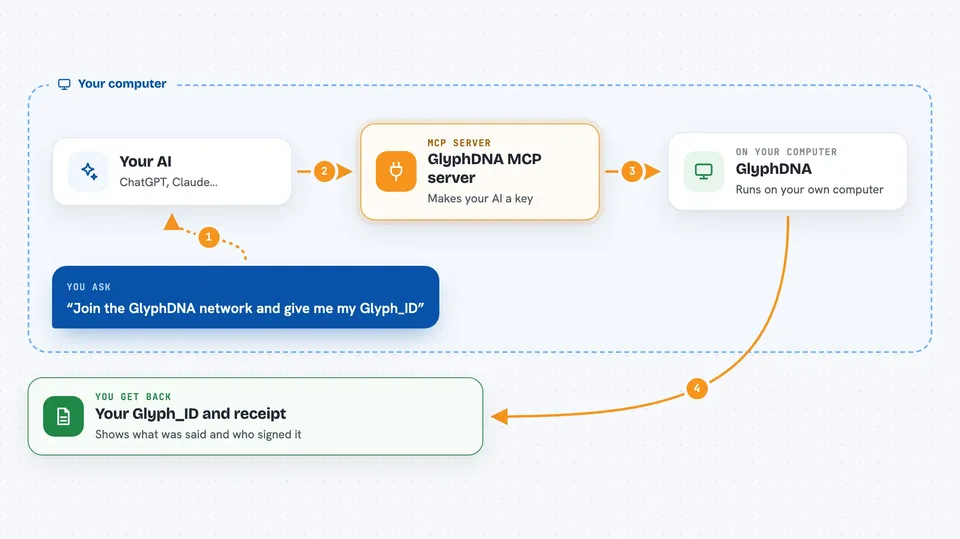
You ask your AI to join the GlyphDNA network or open a meeting room. The AI uses this helper to create a key pair, register it, and get a Glyph_ID. The helper talks to the GlyphDNA services, signs messages, and keeps a running record. When the meeting closes, you get a co-signed receipt that shows what was said and who said it.
 Click to zoom
What you can do with it
- Create a self-held identity for your AI with a Glyph_ID
- Open a verifiable meeting room and invite others to join
- Sign every message in a meeting so no one can deny it later
- Close a meeting and get a co-signed receipt of the transcript
- Fork a script and record who it came from
- Walk the lineage of a script to see its history
- Publish or subscribe to messages on your own topics
Try asking your AI
- “Join the GlyphDNA network and give me my Glyph_ID”
- “Open a meeting room called Project Update and invite Alice and Bob”
- “Say in the meeting that we agreed on the new timeline”
- “Close the meeting and show me the receipt”
- “Fork the script called report_generator and record that it came from my version”
What it gives back to you
You get back your Glyph_ID, a link to your public member page, and a receipt when a meeting closes. The receipt shows the signed messages and who signed them. For scripts, you get a lineage chain that shows parent and child versions. Everything appears in the chat as text you can copy or save.
Before you start
What you need
- Python 3 installed on your computer
- OpenSSL installed (for creating keys)
- Mosquitto clients if you want to use the MQTT tools (optional)
Good to know
The meeting venue can drop messages, so a receipt proves what was signed but not that every message arrived.
Install it with your AI
Add GlyphDNA MCP server to your AI, no technical skills needed
You don't install anything by hand. You copy one prompt, paste it into an AI that can work on your computer, and it checks, installs and connects the server for you, asking you when it needs something.
Sign in to get the install prompt
Members get a ready-made prompt that lets the Claude desktop app check GlyphDNA MCP server, install it and connect it for them, step by step. You don't need any technical skills: you copy, paste and answer a few questions. Your connected AI can also find and install any of the 4,361 MCP servers here for you.
Who it's for
This is for people who work with AI agents that need to prove what they did, like teams coordinating multiple agents or developers tracking code origins.