
MCP server · Coding
MaxMSP MCP server
by tiianhk
Let your AI read, explain, and build Max patches for music and multimedia projects.
This is a small helper that connects your AI assistant to Max, the visual programming tool used for music and multimedia. It lets the AI look at a Max patch and explain what it does, or help you build new parts inside it. It is handy if you already use Max and want a coding buddy that understands patches.
What is an MCP server? The 30-second version
On its own, your AI can only chat. An MCP server is a small helper program that gives your AI a new skill or a connection to an app. This one connects your AI to Max, so it can read the objects in your patch and add or change things when you ask. Think of it as a bridge between the chat window and your Max project.
What this MCP server does
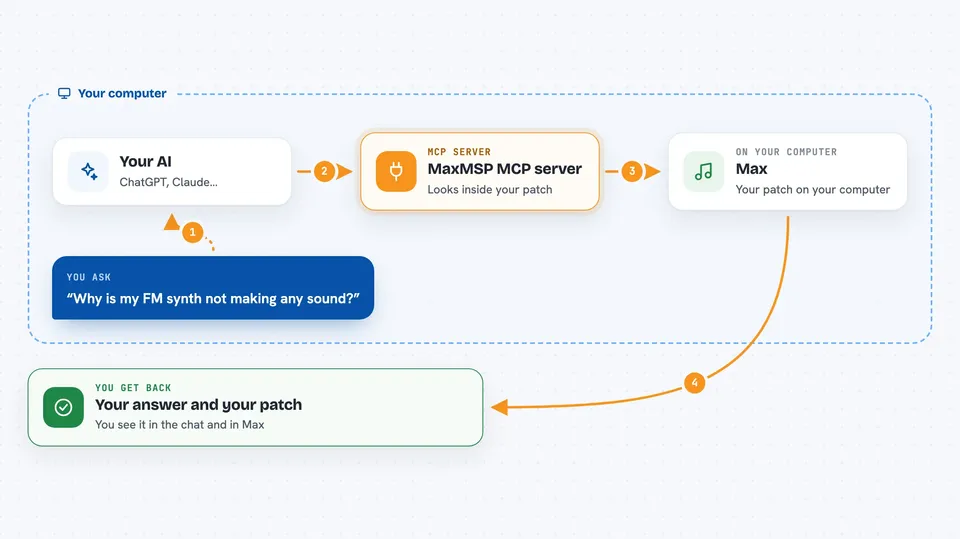
You ask your AI something about your Max patch, like what an object does or how to fix a connection. The AI uses this helper to look inside your open patch and read the official documentation for each object. Then it answers you in the chat, or it makes the change directly in the patch. You see the result right away in Max and in the conversation.
 Click to zoom
What you can do with it
- Explain what a Max patch or a single object does
- Find and describe objects in your current patch and subpatches
- Help debug why a patch is not working as expected
- Create new objects inside your patch when you ask
- Modify existing objects or connections in the patch
- Verify its own changes by checking the patch afterwards
Try asking your AI
- “Explain what this patch does in plain words”
- “Why is my FM synth not making any sound?”
- “Add an oscillator and a gain object to this patch”
- “What does the cycle~ object do and what are its inputs?”
What it gives back to you
You get answers in the chat, like a plain explanation of a patch or a list of objects it found. When it makes changes, those changes appear in your Max patch, and the AI can confirm what it did. It can also point out problems it noticed while reading the patch.
Before you start
What you need
- Python 3.8 or newer
- The uv package manager
- Max 9 or newer (Max 8 and earlier are not tested)
- A supported AI client like Claude or Cursor
Good to know
It can change objects in your open Max patch, so save a copy before letting it edit anything important.
Install it with your AI
Add MaxMSP MCP server to your AI, no technical skills needed
You don't install anything by hand. You copy one prompt, paste it into an AI that can work on your computer, and it checks, installs and connects the server for you, asking you when it needs something.
Sign in to get the install prompt
Members get a ready-made prompt that lets the Claude desktop app check MaxMSP MCP server, install it and connect it for them, step by step. You don't need any technical skills: you copy, paste and answer a few questions. Your connected AI can also find and install any of the 4,609 MCP servers here for you.
Who it's for
Max users, music technologists, and multimedia artists who want an AI helper that understands their patches.



