MCP server · Developer tools
mcp-drill MCP server
Test how your MCP servers and AI agents behave when things go wrong, and get a reliability score.
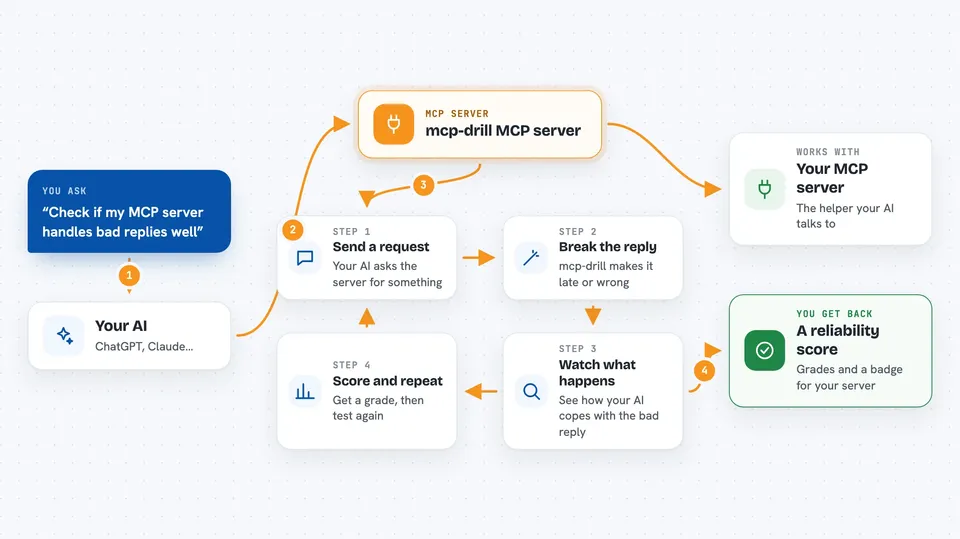
mcp-drill is a small helper you run on your own computer. It sits between your AI and another MCP server, and on purpose makes that server misbehave: it makes it slow, cuts off its answers, or sends back junk. Then it tells you whether the server and your AI handled that mess calmly or quietly acted on bad data. It is handy for people who build or test AI tools, even if you are not a hardcore programmer.
What is an MCP server? The 30-second version
On its own, your AI can only chat. An MCP server is a small helper program that gives your AI a new skill or a connection to an app or service. mcp-drill is itself an MCP server, but a special one: instead of connecting your AI to a new app, it connects your AI to another MCP server and messes with the traffic in between. That way you can see what happens when the connection to that other server goes wrong, without waiting for a real failure to happen by chance.
What this MCP server does
You tell mcp-drill which MCP server to watch and which problems to fake, like a timeout or a cut-off answer. mcp-drill then stands in the middle: your AI talks to mcp-drill, mcp-drill talks to the real server, and on the way back it changes some replies to be late, broken, or wrong. You watch what your AI does with those bad replies. Separately, the scan command looks at a server on its own and grades how well it handles bad requests and whether its tools describe their output in a way a machine can check. No live AI model is needed for the scan, so the numbers come from the server itself, not from whichever AI happens to be calling it.
 Click to zoom
What you can do with it
- Fake timeouts, slow replies, and cut-off answers from an MCP server
- Send back corrupted but well-formed tool results to see if your AI notices
- Drop tools or whole responses to test how your AI copes
- Score a local or remote MCP server on how it handles bad requests
- Grade how many of a server's tools declare a checkable output format
- Emit a small badge showing a server's output-contract grade
- Run these checks in CI without needing a live AI model or API keys
Try asking your AI
- “Wrap the filesystem MCP server and inject timeouts and truncated responses, then show me what my agent did”
- “Scan this local MCP server and tell me its error-conformance grade”
- “Score the DeepWiki remote server and give me a badge for its output-contract grade”
- “Run a scan on my server and list which tools have no output schema”
What it gives back to you
For the wrap command, you get a stream of what happened: which replies were altered, how the server reacted, and how your AI responded to the bad data. For the scan command, you get a short report with grades and numbers, such as the error-conformance result and the share of tools with a checkable output format. With the badge option, you also get a small image snippet you can paste into a README. Everything shows up as text in your terminal or chat.
Before you start
What you need
- Python installed on your computer (the tool is a Python package)
- The MCP server you want to test, plus the command that normally starts it
- For remote servers, the server's web address and an auth header if it needs one
Good to know
mcp-drill deliberately breaks and corrupts the replies from the server you point it at, so only use it on servers and agents you are testing, not on anything you rely on for real work.
Install it with your AI
Add mcp-drill MCP server to your AI, no technical skills needed
You don't install anything by hand. You copy one prompt, paste it into an AI that can work on your computer, and it checks, installs and connects the server for you, asking you when it needs something.
Sign in to get the install prompt
Members get a ready-made prompt that lets the Claude desktop app check mcp-drill MCP server, install it and connect it for them, step by step. You don't need any technical skills: you copy, paste and answer a few questions. Your connected AI can also find and install any of the 4,361 MCP servers here for you.
Who it's for
Developers, QA engineers, and anyone building or testing AI agents and MCP servers who wants to know how they behave when things go wrong.