MCP server · Security
osv-ui MCP server
by toan203
Your AI can scan your project for known security problems and show you a visual report before changing anything.
osv-ui is a free tool that checks the software libraries your project uses and tells you which ones have known security problems. It shows the results in a friendly dashboard you open in your browser. It is handy for anyone who has to keep a project's dependencies safe but does not enjoy reading long terminal warnings.
What is an MCP server? The 30-second version
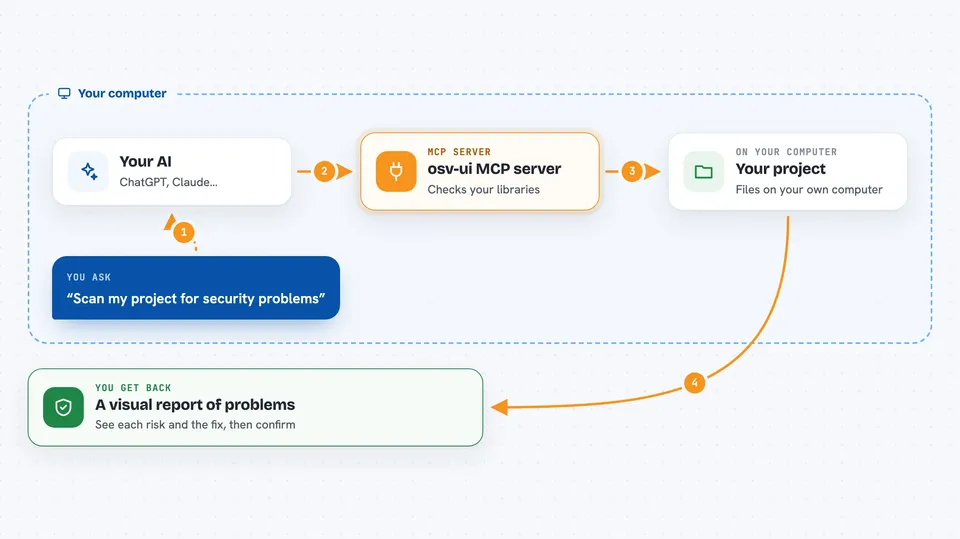
On its own, your AI can only chat with you. An MCP server is a small helper program that gives your AI a new skill or a connection to another tool. This one connects your AI to osv-ui, a security scanner that lives on your own computer. Once connected, your AI can run a scan, open the dashboard for you, and apply fixes only after you say yes.
What this MCP server does
You ask your AI to check your project for security problems. The AI uses this helper, which reads the lock files in your project to build a list of the libraries you use. The helper sends that list to OSV.dev, a free public database of known vulnerabilities, and gets back any matches. It then opens a dashboard in your browser where you can review each finding, see the risk score, and read the suggested upgrade. If you confirm, the AI can apply the fix for you.
 Click to zoom
What you can do with it
- Scan your project for known security problems in your dependencies
- Open a visual dashboard in your browser so you can review findings
- Show a risk score for each service so you know what to fix first
- Suggest safe upgrade versions with a copy-ready command
- Apply fixes only after you explicitly confirm
- Compare a scan against a previous report to see what is new
- Export reports as JSON, Markdown, or SBOM files
Try asking your AI
- “Scan my project for security vulnerabilities and show me the dashboard”
- “Which of my dependencies have critical CVEs right now?”
- “Open the osv-ui dashboard so I can review the findings”
- “Fix the high severity issues in my project, but ask me first”
What it gives back to you
You get a list of vulnerabilities grouped by service, each with a severity level, a short description, and a suggested safe version. The dashboard shows charts and a risk score so you can see at a glance where the problems are. In the chat, your AI will summarize the findings and ask whether you want to apply the fixes. If you say yes, it reports back what it changed.
Before you start
What you need
- Node.js version 22 or newer installed on your computer
- A project folder with a supported lock file (like package-lock.json or requirements.txt)
- Internet access for OSV.dev lookups, unless you use offline mode
Good to know
It can change your project files when applying fixes, so always review the suggested changes before confirming.
Install it with your AI
Add osv-ui MCP server to your AI, no technical skills needed
You don't install anything by hand. You copy one prompt, paste it into an AI that can work on your computer, and it checks, installs and connects the server for you, asking you when it needs something.
Sign in to get the install prompt
Members get a ready-made prompt that lets the Claude desktop app check osv-ui MCP server, install it and connect it for them, step by step. You don't need any technical skills: you copy, paste and answer a few questions. Your connected AI can also find and install any of the 4,609 MCP servers here for you.
Who it's for
Developers and anyone who maintains a software project and wants a simple, visual way to check for known security issues without signing up for anything.