
MCP server · Gaming
Tic Tac Toe MCP server
by tomholford
Play tic tac toe with your AI, which keeps the board, makes moves, and checks who won.
This is a small helper program that lets your AI assistant play tic tac toe with you. You ask for a new game, say where you want to put your mark, and the AI keeps track of the board and replies. It is handy if you want a quick game during a break or if you are curious how an AI handles a simple board game.
What is an MCP server? The 30-second version
On its own, your AI can only chat. An MCP server is a small helper program that gives your AI a new skill or a connection to something outside the chat. This one gives your AI a tic tac toe board it can set up, read, and change. So when you say you want to play, the AI can actually run the game instead of just talking about it.
What this MCP server does
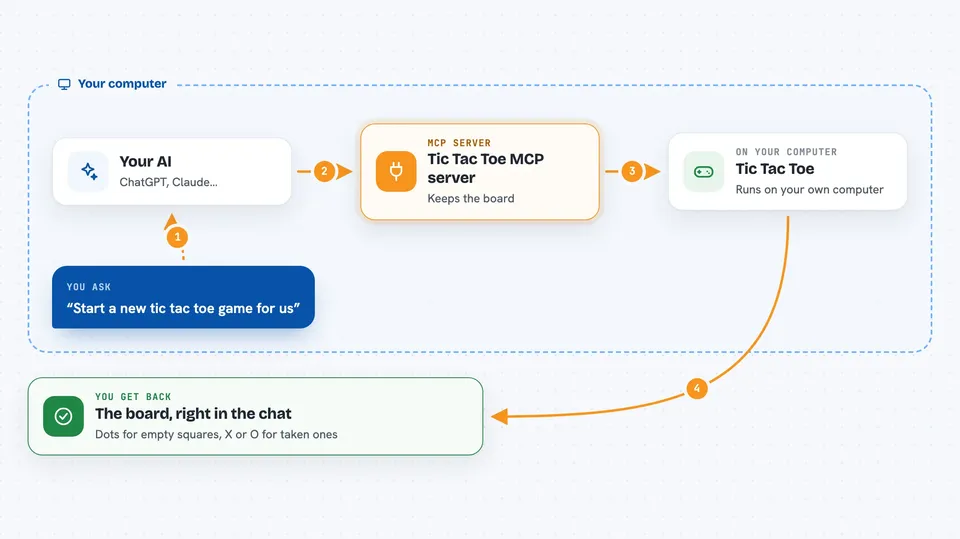
You ask your AI to start a new tic tac toe game. The AI uses this helper to create a game and show you the empty board. When you say where you want to put your X, the AI passes that move to the helper, which checks it is allowed and updates the board. The helper also tells the AI whose turn is next and whether someone has won or the game is a draw. The AI then shows you the updated board in the chat.
 Click to zoom
What you can do with it
- Start a new tic tac toe game and get a game ID
- Place your X or O on any free square
- See the current board at any time
- Ask which squares are still free
- Check if the game is still going, won, or a draw
- Reset a game back to an empty board
- List all the games you have going at once
Try asking your AI
- “Start a new tic tac toe game for us”
- “I'll put my X in the center, square B2”
- “Show me the board and tell me whose turn it is”
- “Which squares are still open?”
- “Has anyone won yet?”
What it gives back to you
You get the board drawn with dots for empty squares and X or O for taken ones, right in the chat. The AI also tells you whose turn is next and how many moves have been made. When the game ends, it says who won or that it was a draw. If you ask for analysis, it gives a short read on the position.
Before you start
What you need
- Go version 1.19 or newer installed on your computer
- An MCP-compatible app such as Claude Code or Claude Desktop
- A few minutes to build the server from its source code
Good to know
This server only plays tic tac toe and does not touch your files or accounts, so there is nothing risky about it.
Install it with your AI
Add Tic Tac Toe MCP server to your AI, no technical skills needed
You don't install anything by hand. You copy one prompt, paste it into an AI that can work on your computer, and it checks, installs and connects the server for you, asking you when it needs something.
Sign in to get the install prompt
Members get a ready-made prompt that lets the Claude desktop app check Tic Tac Toe MCP server, install it and connect it for them, step by step. You don't need any technical skills: you copy, paste and answer a few questions. Your connected AI can also find and install any of the 4,361 MCP servers here for you.
Who it's for
People who want a light, playful way to try out an AI assistant, or anyone curious about how AI and humans can share a simple game.





