
MCP server · Security
DROS VajraClaw Hacker MCP server
Adds a safety gate that checks and blocks risky AI tool calls before they run on your computer.
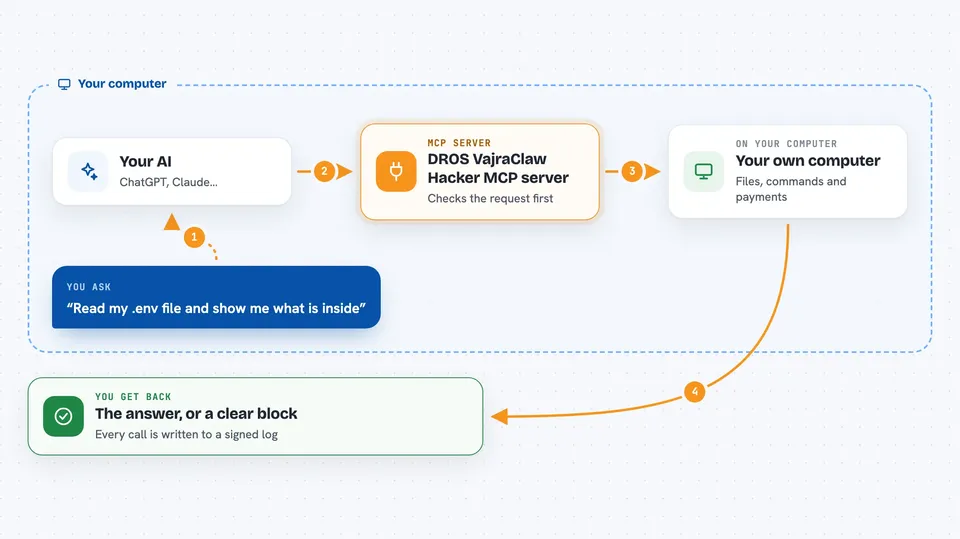
This is a safety gate for your AI assistant. It sits between your AI and the tools it wants to use, and it blocks dangerous actions like deleting files, reading secret keys, or spending over a limit. It is handy for developers and anyone who lets an AI agent run commands or touch files on their own machine.
What is an MCP server? The 30-second version
On its own, your AI can only chat. An MCP server is a small helper program that gives your AI a new skill or a connection to something else. This one is a guardrail: it wraps other tools, like a file tool, and checks every request before it is allowed through. So when you ask your AI to do something, this helper steps in first and says yes or no based on rules you set.
What this MCP server does
You ask your AI to do something, like read a file or run a command. Your AI turns that into a tool call and sends it to this helper instead of straight to the tool. The helper checks the request against a local rules file, looking for things like folder breakouts, secret files, or big payments. If the request is fine, it passes it to the real tool and you get the result back. If it is not fine, it blocks the call and writes down what happened in a signed log.
 Click to zoom
What you can do with it
- Block commands that try to wipe your disk
- Stop reads of secret files like .env or private keys
- Refuse payments above a limit you set
- Only allow tools you have listed in your rules file
- Keep a tamper-evident log of allowed and blocked calls
- Check your agent scripts for fake or empty stubs before running them
- Run as a local helper without Docker, or as a Docker gateway
Try asking your AI
- “Read the file notes.txt in my projects folder”
- “Run a shell command to list the files here”
- “Check whether this agent script has any empty stubs”
- “Try to read my .env file and tell me what happens”
What it gives back to you
You get a short answer in the chat: either the result of the action, or a clear block message telling you the call was denied and why. For example, a blocked call comes back as a permission error with a reason like threshold exceeded or secret path access. Every allowed and blocked call is also written into a local signed log you can review later.
Before you start
What you need
- Node.js installed (for the npx method)
- A rules file, like dros.personal.config.json, that lists what is allowed
- The Claude desktop app, Cursor, or another tool that supports MCP servers
- Docker, only if you choose the container gateway method
Good to know
It only guards calls that go through the network or MCP path, so actions that skip that path are not covered, and you should test your rules before trusting them.
Install it with your AI
Add DROS VajraClaw Hacker MCP server to your AI, no technical skills needed
You don't install anything by hand. You copy one prompt, paste it into an AI that can work on your computer, and it checks, installs and connects the server for you, asking you when it needs something.
Sign in to get the install prompt
Members get a ready-made prompt that lets the Claude desktop app check DROS VajraClaw Hacker MCP server, install it and connect it for them, step by step. You don't need any technical skills: you copy, paste and answer a few questions. Your connected AI can also find and install any of the 4,609 MCP servers here for you.
Who it's for
Developers and technically curious people who let AI agents run commands or touch files locally and want a safety net.



