
MCP server · Finance and crypto · official
Trade It MCP server
by Trade-Agent · official
Let your AI look up stocks and crypto and place trades on your linked brokerage accounts.
This is a helper that connects your AI assistant to your online brokerage or crypto exchange. Once it is set up, you can just type what you want in plain English, like buying some Tesla or checking your account balance. It is handy for people who already trade and want to do it faster from the chat window.
What is an MCP server? The 30-second version
On its own, your AI can only chat. It cannot see your brokerage account or place an order. An MCP server is a small helper program that gives your AI a new skill, and this one gives it a connection to Trade It, which links to brokerages like Robinhood, E*Trade, Coinbase and Kraken. So when you ask your AI to buy something, it can pass that request along to Trade It, which talks to your broker for you.
What this MCP server does
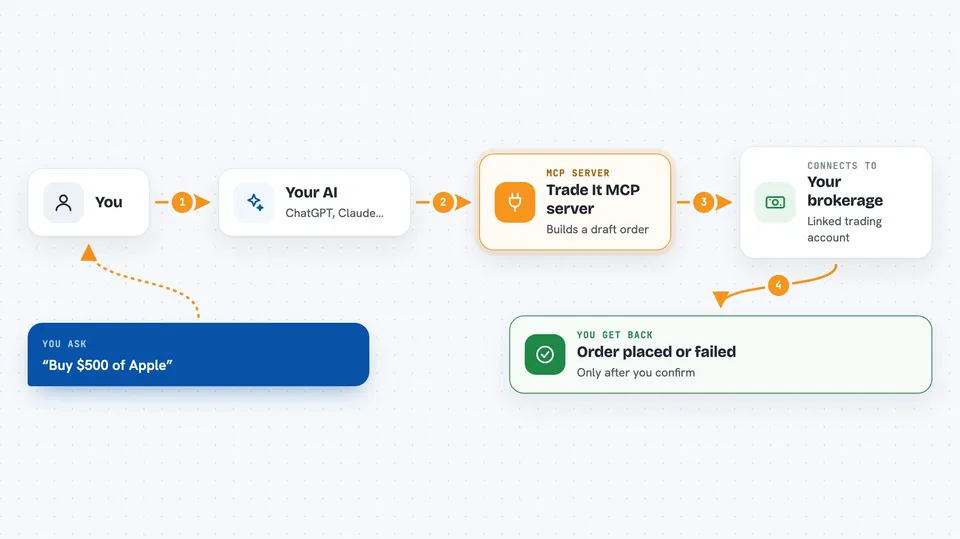
You type a request in plain English, like buy $500 of Apple. Your AI sends that to the Trade It helper, which looks up the ticker and checks your linked accounts. Trade It then builds a draft order and shows it back to you for review. Nothing goes to your broker until you clearly say to place it. Once you confirm, Trade It sends the order and tells you whether it was placed or failed.
 Click to zoom
What you can do with it
- Look up a stock or crypto price by ticker or name
- List your linked brokerage accounts and balances
- Create a draft buy or sell order for stocks or crypto
- Create draft options orders, including spreads and straddles
- Place a draft order after you confirm it
- Check the status of an order you already placed
Try asking your AI
- “How is Apple doing today?”
- “Buy $500 of Tesla”
- “Sell 10 shares of Apple if the price falls to $140”
- “Show me my accounts”
What it gives back to you
You get answers in the chat, like the current price of a ticker, a list of your accounts with balances, or the details of a draft order waiting for your confirmation. After you confirm, it tells you whether the order was placed or failed, with any error details. For options, it shows the legs and the net price.
Before you start
What you need
- An account at tradeit.app
- The Pro plan free trial
- At least one brokerage or crypto exchange linked to Trade It
Good to know
This can place real trades with real money in your brokerage accounts, so always read the draft order carefully before you confirm it.
Install it with your AI
Add Trade It MCP server to your AI, no technical skills needed
You don't install anything by hand. You copy one prompt, paste it into an AI that can work on your computer, and it checks, installs and connects the server for you, asking you when it needs something.
Sign in to get the install prompt
Members get a ready-made prompt that lets the Claude desktop app check Trade It MCP server, install it and connect it for them, step by step. You don't need any technical skills: you copy, paste and answer a few questions. Your connected AI can also find and install any of the 4,361 MCP servers here for you.
Who it's for
People who already trade stocks, crypto or options and want to place orders and check prices from their AI chat instead of opening a brokerage app.




