
MCP server · Finance and crypto
TradeRouter MCP server
by TradeRouter
Lets your AI buy, sell and set up automatic orders on Solana tokens through TradeRouter.
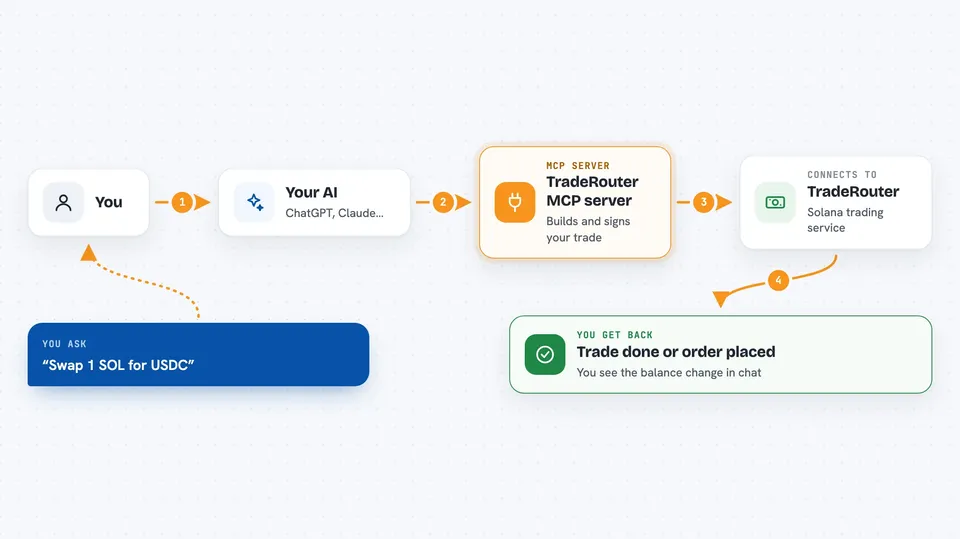
TradeRouter is a helper that connects your AI assistant to a Solana trading service called TradeRouter.ai. Once it is set up, you can ask your AI in plain words to swap tokens, check what a wallet holds, or set up an order that runs on its own. It is handy for people who trade Solana tokens and would rather type a sentence than click through a trading site.
What is an MCP server? The 30-second version
On its own, your AI can only chat. It cannot reach out to a trading service or move anything for you. An MCP server is a small helper program that gives your AI one new skill, and here that skill is talking to TradeRouter on Solana. You install the helper, your AI uses it when you ask, and the helper handles the back and forth with TradeRouter so you get an answer or an action back in the chat.
What this MCP server does
You ask your AI something like swapping one token for another, or checking the price of a token. Your AI passes that request to this helper program running on your computer. The helper talks to TradeRouter's service, which builds the trade, and the helper signs it locally with your wallet key. The signed trade goes out through Jito, a service that helps protect trades from being copied by bots. Then the helper tells your AI what happened, and your AI tells you.
 Click to zoom
What you can do with it
- Swap one Solana token for another
- Check the tokens a wallet is holding
- Look up the price and market cap of a token
- Place a limit order that buys or sells at a set price
- Set up a trailing stop order that follows the price
- Spread a big trade over time with a TWAP order
- List, check, cancel or extend your active orders
Try asking your AI
- “What tokens are in my wallet right now?”
- “Swap 1 SOL for USDC”
- “What is the market cap of this token?”
- “Place a limit buy order for this token at a market cap of 5 million”
What it gives back to you
You get answers in the chat: a list of tokens with amounts, a price or market cap number, or a short note that an order was placed, cancelled or extended. For swaps, it also shows the balance change after the trade goes through. For orders, you can ask for the current status and it will tell you whether it is still waiting, filled or cancelled.
Before you start
What you need
- Node.js version 18 or newer
- A Solana wallet private key in base58 format (use a small dedicated trading wallet, not your main one)
- An MCP client like Claude Desktop, Cursor or Cline
Good to know
This helper can move real money from your Solana wallet, so use a small dedicated trading wallet and double-check every trade before you confirm it.
Install it with your AI
Add TradeRouter MCP server to your AI, no technical skills needed
You don't install anything by hand. You copy one prompt, paste it into an AI that can work on your computer, and it checks, installs and connects the server for you, asking you when it needs something.
Sign in to get the install prompt
Members get a ready-made prompt that lets the Claude desktop app check TradeRouter MCP server, install it and connect it for them, step by step. You don't need any technical skills: you copy, paste and answer a few questions. Your connected AI can also find and install any of the 4,609 MCP servers here for you.
Who it's for
People who trade Solana tokens and want to give simple spoken or typed instructions to their AI instead of clicking around a trading site.



